Most App Store keyword research starts with search volume, competition scores, and keyword lists. But competitor rankings reveal something more valuable: which keywords already drive visibility and where opportunities exist.
Competitor keyword analysis shows the terms competitors rank for, the searches your app has missed, and the keywords you can realistically compete for. The goal is not to copy competitor metadata, but to understand how users search and where your app can grow.
Your real competitors are not always apps with similar features — they are the apps competing for the same search results. That is why competitor keyword analysis should start with search behavior, not category labels.
Key Takeaways
- Competitor rankings reveal search opportunities, not guaranteed wins.
- Keyword gaps fall into shared, missing, and irrelevant groups.
- A four-step process turns competitor data into actionable insights.
- Context-driven discovery makes metadata quality more important.
- Brand keywords work only when user intent aligns.
- Score opportunities before updating metadata.
What Are App Store Competitor Keywords in ASO?
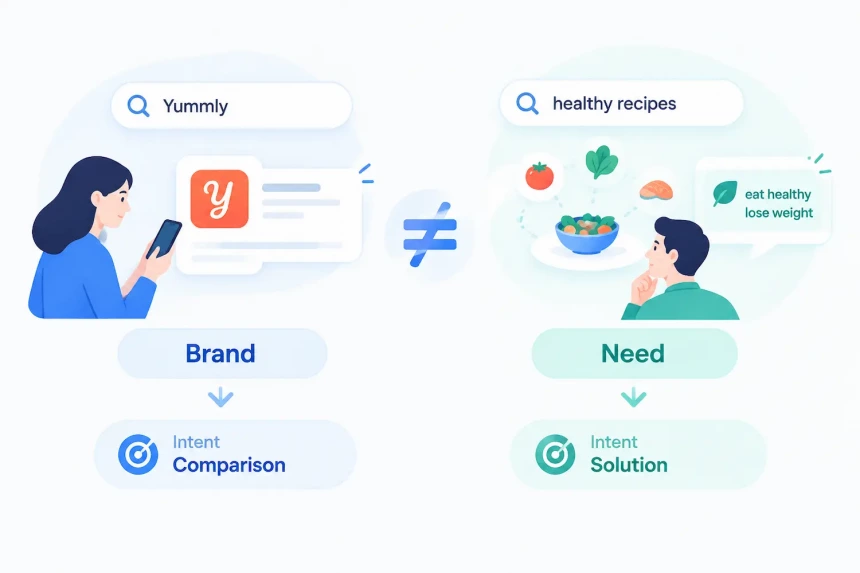
The term app store competitor keywords is often used broadly in ASO, but it actually covers two different categories: branded competitor keywords and non-branded competitor keywords.
Branded Competitor Keywords
These are searches for a specific competitor by name, such as Yummly, SideChef, or Tasty. When users type a competitor’s name into the App Store search bar, they usually have one of three intents: finding a direct alternative, comparing similar apps, or recalling an app they have seen before but cannot remember clearly.
Do not build your keyword strategy on branded terms. Three reasons explain why:
Intent is narrow. The user already has a specific app in mind, so there is limited room to redirect them.
Conversion is usually more difficult. Users searching for a specific competitor are often closer to that brand, which makes it harder for another app to capture their intent.
Policy risk is real. Apple’s App Review Guideline 2.3.7 requires metadata to accurately represent the app and prohibits attempts to manipulate discovery through misleading use of trademarks or other app names. Relying on competitor brand names for visibility can create unnecessary risk.
Non-Branded Competitor Keywords
These are functional, need-based terms that your competitors rank for, such as “recipe app,” “healthy recipes,” or “meal planner app.” These keywords usually provide stronger opportunities because they represent user needs rather than specific brands.
Non-branded competitor keywords are often stronger opportunities because they reflect the user’s underlying need rather than a specific app preference. These searches usually provide a clearer connection between user intent and your app’s value proposition, making them easier to evaluate and optimize.
Why Competitor Keywords Beat a Blank Keyword List
A strong competitor keyword analysis starts with market evidence, not assumptions. Building a keyword list from scratch often relies on guesses, while competitor data shows which terms already perform in a competitive environment. This advantage appears in three areas.
A Competitor’s Rankings Provide Validated Signals
When a competitor ranks for a keyword, it suggests the term is relevant to its category and has earned visibility.
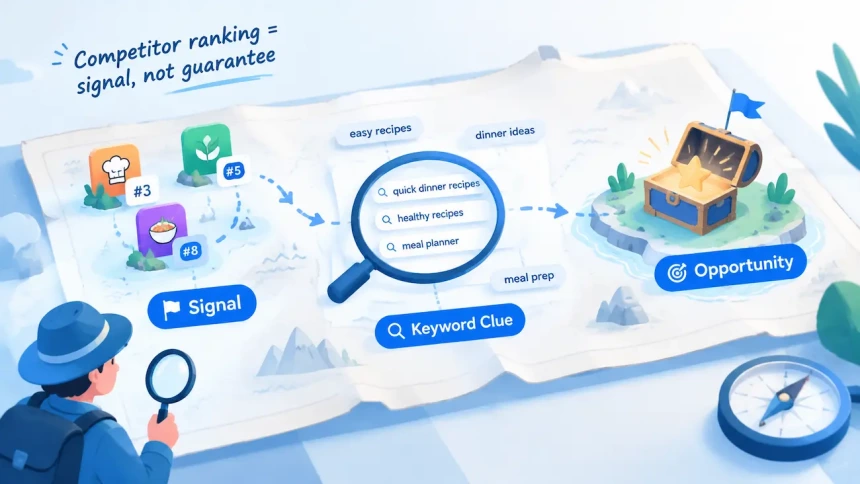
However, rankings are signals, not guarantees. A competitor ranking for “quick dinner recipes” does not mean every recipe app should target it. Its performance may come from stronger metadata alignment, higher conversion rates, better reviews, or a product experience built around that user need.
For example, a beginner cooking app may rank for “quick dinner recipes” because its listing matches users seeking simple guidance. A vegan recipe app targeting the same keyword may struggle if its positioning does not match that intent.
Competitor rankings should therefore create a validated shortlist, not a shortcut. They identify keywords worth testing, while your own relevance and conversion determine the outcome.
Keyword Gaps Reduce Guesswork
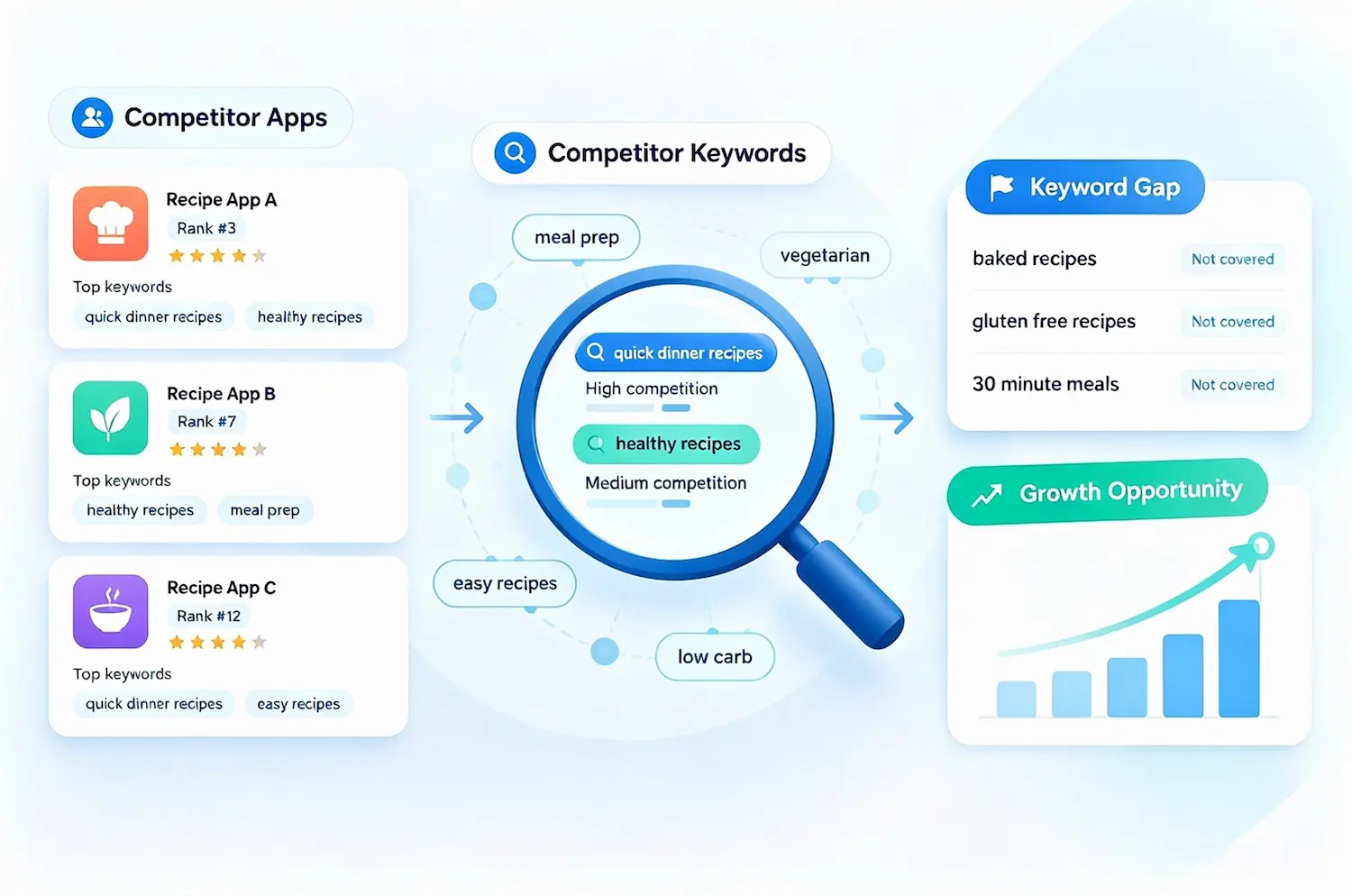
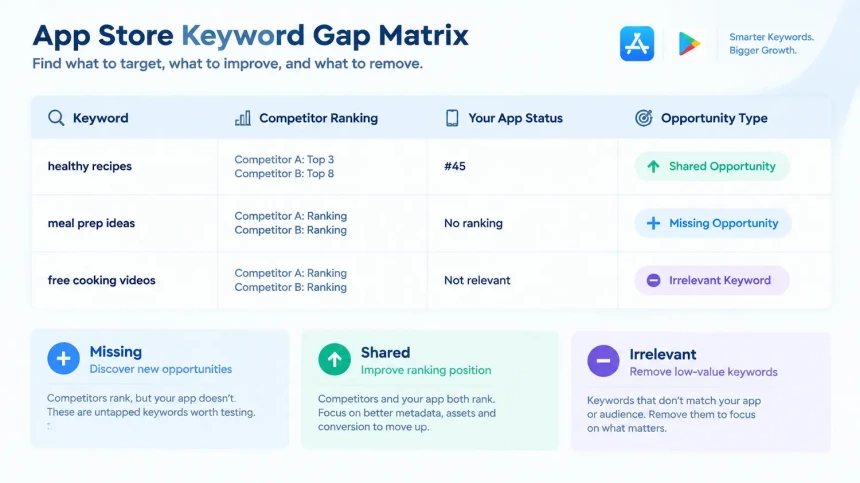
Keyword gaps usually appear in two forms: keywords where competitors rank but your app does not, and keywords where competitors rank significantly higher.
These gaps are valuable because demand has already been validated. The remaining question is whether your app can compete effectively.
For example, a competitor might rank #3 for ‘quick dinner recipes’ while your app has no visibility at all — a Missing gap. Or a competitor might rank #8 for meal planner while your app sits at #70 — a Shared gap that needs stronger optimization rather than a new listing. (Step 4 shows how to organize these gaps into a matrix; the framework for scoring and ranking them appears later, under “How to Prioritize Keyword Opportunities.”)
Missing keywords represent opportunities where competitors capture visibility but your app has no presence.
Shared keywords show terms where your app already appears but needs stronger optimization to close the ranking gap.
Unlike blind keyword research, competitor gaps start with evidence that users search for these terms and that they matter within your market. To put these findings into a broader ASO strategy, explore our comprehensive guide to app store keywords, covering keyword research, selection, and optimization.
Competitor Metadata Reveals Positioning Gaps
Keywords show what competitors rank for. Metadata explains how they win those searches. Reviewing competitor app names, subtitles, descriptions, and screenshots reveals the positioning strategies behind their keyword choices.
One competitor may focus on quick recipes, another on ingredient substitutions, and another on meal planning. These themes show the user needs they target and the keyword groups they build around. Competitor analysis is not only about finding individual keywords. It helps identify market angles and positioning opportunities.
A positioning gap can be more valuable than a single keyword gap because it can support an entire keyword cluster. This approach helps uncover broader opportunities around user problems, features, and search intent rather than isolated keywords.
How to Find App Store Keywords Competitors Rank For
Finding app store keywords competitors rank for requires more than collecting keyword lists — it requires identifying real competitors, analyzing rankings, and evaluating keyword gaps. The process starts with identifying the right competitors, analyzing their listings, tracking ranking keywords, and building a keyword gap matrix.
Each step has limitations, so ranking data should always guide decisions.
Step 1: Build Your Real Competitor Set
Your App Store competitors are not always the same as your business competitors.
Two groups matter:
Direct competitors: apps with similar features and audiences.
Search competitors: apps ranking for the same searches, even if their products differ.
A balanced competitor set includes 3–4 similar apps, 2–3 category leaders, and 1–2 adjacent apps sharing keyword visibility.
Broader research prevents blind spots. Search performance, not assumptions, should determine who belongs in your analysis.
Step 2: Analyze Their Visible Metadata
Review competitor app names, subtitles, descriptions, and screenshots to understand their positioning and keyword themes.
However, visible metadata only shows part of the picture. App Store search relevance considers elements such as the app name, subtitle, keyword field, and other app information. The keyword field (up to 100 characters) is hidden from users, so a term appearing in visible copy doesn’t guarantee ranking — and plenty of keywords that do rank never appear in the listing at all.
Caveat: rankings reveal competitor keyword strategies more accurately than visible copy alone.
Step 3: Collect Their Ranking Keywords
Use ASO tools to identify the keywords competitors are ranking for, along with estimated popularity and competition levels. The data from an app ranking service shows which terms already generate visibility and where potential opportunities exist.
Caveat: ASO metrics are third-party estimates, not official data. Use them for prioritization, then validate important opportunities before acting.
Step 4: Build a Keyword Gap Matrix
After collecting competitor data, organize findings into a keyword gap matrix:
| Keyword | Competitor A | Competitor B | Your App | Action |
| recipe app | Top 5 | Top 10 | Not ranking | Target |
| meal prep ideas | Top 20 | — | Not ranking | Test |
| healthy recipes | Top 3 | Top 8 | #45 | Prioritize |
Classify keywords into three groups — Shared and Missing were defined earlier; here’s the third category:
Irrelevant keywords — Terms that bring visibility but do not match your user intent. These often create traffic without installs. A keyword gap should always be evaluated based on relevance, not ranking potential alone.
For example, using the “healthy recipes” row above — where Competitor A ranks Top 3 and Competitor B ranks Top 8 while your app sits at #45 — you could test the keyword through metadata updates and listing improvements. The result will depend on relevance, competition, and user response.
This is one observed case, not a benchmark. Results vary by category and competition, but it demonstrates the principle: competitor-validated keywords often provide a stronger starting point than untested ideas.
Caveat: a gap matrix identifies opportunities, not guaranteed rankings. Relevance and conversion determine whether a keyword drives installs.
How AI and Semantic Understanding Are Changing App Discovery in 2026
Traditional competitor keyword analysis assumes that app stores match searches directly with metadata. However, Apple is moving beyond simple keyword matching, changing how ASO teams interpret ranking data.
As app stores become better at understanding context, competitor keyword analysis should focus less on exact keyword copying and more on identifying the user problems, features, and intents behind ranking keywords.
Apple Uses AI-Generated App Tags to Improve Discoverability
Apple introduced App Store Tags to help users discover apps by features and use cases. According to Apple’s search documentation, these tags are generated by large language models based on metadata submitted through App Store Connect and reviewed by Apple before appearing. Developers can also remove unwanted tags.
App Tags are one visible layer of this shift — but Apple’s search ranking also applies a separate, invisible semantic-matching layer that can surface an app for related searches even without a matching Tag or keyword. This reflects a broader shift beyond traditional keyword placement. App visibility is increasingly influenced by broader signals, including app positioning, features, and metadata quality.
The impact goes beyond traditional keyword matching. Early observations suggest that AI-driven categorization may help apps appear for related searches beyond the exact terms included in metadata. For ASO teams, this means visibility may increasingly depend on how clearly an app’s features, positioning, and user value are communicated — not only on the keywords explicitly added to the listing.
A strong listing should explain the app’s purpose naturally, helping Apple understand its relevance — and that relevance can now extend to terms you never explicitly targeted in your metadata.
Google Play Follows the Same Direction
Google Play has followed a similar approach through its metadata policies. Titles, icons, and descriptions must accurately represent an app and avoid misleading claims or keyword stuffing.
Unlike Apple, Google Play has no dedicated keyword field. Keyword relevance depends on how naturally the entire listing communicates an app’s features, value, and user benefits.
The key change in 2026 is not a new policy, but the increasing importance of contextual understanding. Both platforms are rewarding listings that clearly describe an app rather than pages designed only to contain keywords.
How to Analyze Competitor Brand Names in App Store Keywords
App store keywords competitor brand names require a different type of analysis than non-branded terms because users searching these terms usually have stronger brand intent. Competitor brand keywords reveal demand only when your app matches the reason behind the search. The goal is not to copy a rival’s metadata, but to understand the need users are trying to solve and whether your app is a relevant alternative.
When a Brand Term Makes Sense
A competitor brand keyword can be worth analyzing when your positioning is meaningfully different. Your app solves the same problem with differences in pricing, workflow, audience, or features.
Users are exploring alternatives. Some searches reflect comparison intent, where users are looking for better value, usability, or a closer fit. Avoid targeting brand terms when your app has no meaningful connection to the competitor or when the goal is only to gain visibility. Ranking for an irrelevant brand search rarely leads to conversions and may create metadata compliance risks.
The key question is not whether you can rank for a competitor brand term — it is whether your app matches the intent behind that search.
What the Platform Rules Actually Say
Apple’s policy risk was covered earlier — the same logic applies across the whole listing, not just brand terms. Google Play applies a parallel standard: metadata must stay accurate, relevant, and free from deceptive keyword use. Neither platform bans every competitor mention outright. The line is intent — a genuine comparison is different from inserting a competitor’s name only to capture traffic.
Target the Need Behind the Brand
The stronger strategy is to analyze what users want from a competitor search, then optimize around that underlying need.
| Competitor search | Underlying need |
| Yummly alternative | Healthy recipe app |
| SideChef alternative | Step-by-step cooking guidance |
| Tasty alternative | Quick recipe videos |
Users searching for competitors are usually looking for a solution, feature, or outcome — not just a brand name. Use competitor brand analysis to understand positioning gaps and user needs, not to copy competitor keywords.
How to Prioritize Keyword Opportunities
A competitor keyword analysis can generate more opportunities than you can optimize in a single release cycle. The challenge is deciding which keywords deserve priority.
A useful framework is:
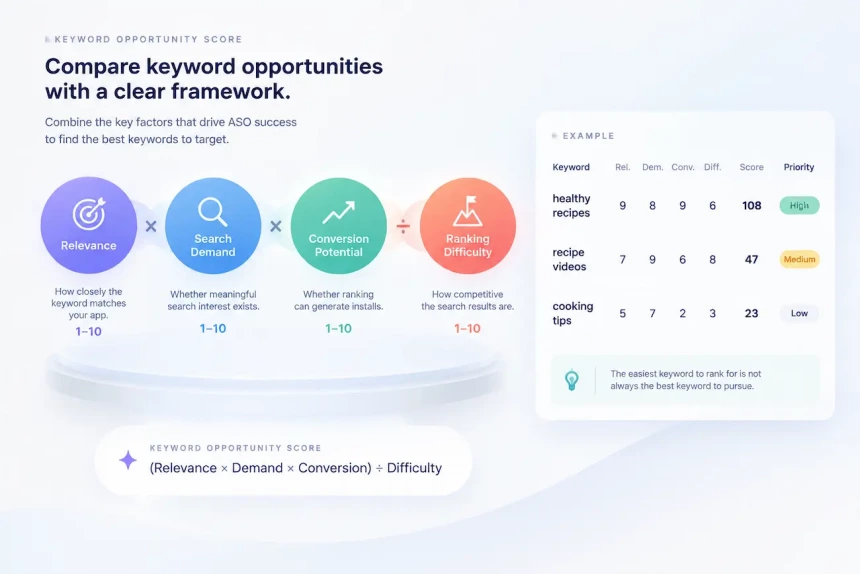
Keyword Opportunity Score: Opportunity = (Relevance × Search Demand × Conversion Potential) ÷ Ranking Difficulty
This is not an Apple or Google metric. It is a practical framework for comparing keyword opportunities by combining the factors that usually determine ASO potential.
Score each factor from 1–10:
Relevance — how closely the keyword matches your app. High-demand keywords with weak relevance may generate visibility but rarely create sustainable growth. As App Store discovery becomes more context-driven, semantic fit matters more than exact keyword matching.
Search Demand — whether meaningful search interest exists, based on third-party tool estimates or available Apple Search Ads popularity indicators. Use these figures for comparison, not as exact search volume.
Conversion Potential — whether ranking can generate installs, not just impressions. A competitor brand term may have strong demand but low value if users are searching for another app and your product does not match their intent.
Ranking Difficulty — how competitive the search results are. A difficult keyword should only become a priority when its relevance, demand, and conversion potential justify the effort.
Example: Scores are relative, not absolute. Within a single analysis, a practical split is: above 80 = High, 30–80 = Medium, below 30 = Low. Recalibrate these bands to your own keyword set rather than treating them as fixed benchmarks.
| Keyword | Relevance | Demand | Conversion | Difficulty | Score | Priority |
| healthy recipes | 9 | 8 | 9 | 6 | 108 | High |
| recipe videos | 7 | 9 | 6 | 8 | 47 | Medium |
| cooking tips | 5 | 7 | 2 | 3 | 23 | Low |
The table shows why difficulty alone should not determine priority. “Cooking tips” is the easiest of the three to rank for, yet it scores lowest — weak relevance and poor conversion potential cancel out the low difficulty. “Recipe videos” is the hardest, but stronger demand keeps it ahead of “cooking tips.”
Where the score comes from:
The “healthy recipes” row is the same keyword from the Step 4 gap matrix. Its Demand score of 8 reflects validated interest — two competitors already rank Top 3 and Top 8. Its Difficulty of 6 reflects those same established competitors: winnable, but not quick. Relevance and Conversion both score 9 because a recipe-focused cooking app matches the search intent directly, which is what pushes the total to 108 despite the moderate difficulty.
The key principle is simple: the easiest keyword to rank for is not always the best keyword to pursue.
Turn the Analysis Into Metadata Changes
A scored keyword list only creates value when it changes your actual store listing. After identifying competitor keyword gaps and prioritizing opportunities, the next step is deciding where those keywords should appear in your metadata. However, iOS and Google Play handle keyword discovery differently, so the approach to iOS App Store keywords and Android keyword optimization must be adapted for each platform.
iOS Fields
iOS keyword optimization primarily relies on three metadata fields: the App Name, Subtitle, and Keyword field. Each field should support a different level of your prioritized keyword list based on relevance, competition, and available space.
App Name — reserve this space for your strongest keyword opportunity. With only 30 characters available, the App Name should clearly communicate your app category while supporting search relevance.
Subtitle — use this field for a secondary keyword theme that naturally explains your app’s value. Like the App Name, it is limited to 30 characters and contributes to search matching.
Keyword field — use the remaining 100 characters for additional opportunities from your competitor keyword analysis, especially long-tail terms and lower-competition keywords that do not fit naturally into the visible metadata.
The most important rule across all three fields: don’t repeat keywords. Apple reads these fields together, so if ‘recipe’ already appears in the App Name, repeating it in the Subtitle or Keyword field adds little value — that space is better spent on a competitor-validated term you haven’t targeted yet.
For a deeper breakdown of keyword allocation across iOS metadata fields, see our keyword selection guide.
Android Fields
Google Play follows a different structure: there is no dedicated keyword field. Instead, keyword signals mainly come from visible listing fields, including the Title, Short Description, and Long Description.
Title — limited to 30 characters and one of the strongest relevance signals available in your listing. Use it for your primary keyword while keeping the app name clear and natural.
Short description — up to 80 characters, this field is visible before users expand the listing. It is a valuable place to include a secondary keyword theme while communicating your app’s core benefit.
Long description — up to 4,000 characters and fully indexed, this provides the largest space for expanding keyword coverage. However, more space does not mean more keywords are better. The goal is to build topical relevance with natural content rather than create a list of search terms.
A practical approach is to place your primary keywords naturally near the beginning of the long description, where users and Google’s systems can quickly understand your app’s purpose. The remaining content should expand on features, use cases, and benefits while maintaining a clear connection to the keywords you want to rank for.
Where the Two Stores Differ
| Field | iOS App Store | Google Play |
| Name / Title | 30 characters, indexed | 30 characters, indexed |
| Subtitle / Short Description | 30 characters, indexed | 80 characters, indexed |
| Keyword Field | 100 characters, indexed, hidden from users | No equivalent field exists |
| Long Description | Not indexed | Up to 4,000 characters, indexed |
The practical takeaway is that iOS keyword strategy is a compression problem. With limited indexed space across the App Name, Subtitle, and Keyword field, every term needs to be selected carefully.
Google Play keyword strategy is closer to a relevance and coverage problem. With a much larger indexed surface through the Long Description, the challenge is not fitting keywords into the listing. The challenge is maintaining enough topical consistency that Google understands the app’s value without making the page feel like a collection of search terms.
How Often Should You Re-Run Competitor Keyword Analysis?
A keyword gap matrix is a snapshot, not a permanent record. Competitor rankings change as apps update metadata, improve conversion assets, run seasonal campaigns, or collect new performance signals. Regular analysis helps you identify new opportunities and keep your keyword strategy aligned with market changes.
Three Triggers for Re-Running Your Analysis
You don’t need to repeat the full analysis every time. Focus on these key moments:
1. Monthly, for your highest-priority keywords.
Regular tracking helps you identify ranking changes early, understand competitor movements, and discover new keyword opportunities.
2. After competitor listing changes.
Changes to screenshots, titles, subtitles, descriptions, or other conversion assets can indicate a shift in competitor strategy and make your existing keyword gap matrix outdated.
3. After updating your own metadata.
Re-analyze keyword performance after major listing updates to measure impact. Updating one important field at a time makes it easier to understand which changes influence visibility and rankings.
If Your App Has No Rankings Yet
A new app can still use competitor keyword analysis. Instead of comparing rankings, analyze where established competitors already have visibility.
1. Prioritize relevant keyword gaps.
Focus on keywords where competitors rank but your app does not. Consider relevance, user intent, and ranking difficulty. New apps often lack the ranking history and performance signals needed to compete for highly competitive terms immediately.
2. Build initial visibility with achievable keywords.
Start with realistic opportunities, then expand into more competitive keywords as your app gains visibility and collects more performance data.
3. Expect ranking changes to take time.
App stores need enough data to evaluate relevance, user response, and overall app performance. The timeline varies by competition, category, and your app’s existing signals.
Once Your App Starts Ranking
As your app builds ranking history, shift from finding keyword gaps to tracking competitive performance.
1. Switch from gap analysis to ranking comparison.
Compare your rankings with competitors on shared keywords to identify where you are gaining visibility and where competitors are outperforming you.
2. Expand into more competitive keywords.
With stronger ranking history and performance signals, you can begin testing higher-difficulty keywords that were less realistic during launch.
3. Track your top-performing keywords regularly.
Keywords that consistently drive visibility and installs should become part of your ongoing monitoring process. Monthly tracking helps you identify negative trends early and adjust your strategy.
Common Mistakes We See in Audits
These four mistakes come up often enough in the competitor keyword audits we run that they’re worth calling out directly — each one skips a step this guide has already covered, which is usually why it goes wrong.
Mistake 1: Copying Competitor Keywords Directly
As covered earlier, a competitor’s ranking reflects its metadata, history, and conversion — not yours. Copying a keyword straight from their listing skips the evaluation that actually predicts success. Before adding any competitor keyword to your own metadata, run it through the Step 3 checks and the Opportunity Score framework introduced earlier — don’t add a term just because a rival ranks for it.
Mistake 2: Choosing Keywords Only by Search Volume
This is the exact failure mode the Opportunity Score is built to catch: a high-volume, low-relevance keyword scores lower than a modest-volume term with strong relevance and conversion potential. If you skipped the scoring step, this is where it shows up.
Mistake 3: Ignoring Search Intent
As the branded-versus-non-branded breakdown earlier makes clear, these two keyword types serve different intents and shouldn’t share one strategy. In practice: tag each keyword in your gap matrix as branded or functional before scoring it — an undifferentiated list is where most metadata strategies lose focus.
Mistake 4: Analyzing Only One Competitor
A single competitor’s keyword profile can be an outlier — a unique feature, a large install base, or a temporary visibility spike, not a market pattern. Stick to the Step 1 competitor set size (3–4 similar apps, 2–3 category leaders, 1–2 adjacent apps); anything smaller and you’re optimizing around noise, not signal.
Competitor Keyword Analysis Is About Finding Opportunities, Not Copying Competitors
App Store optimization in 2026 is moving beyond raw keyword volume. Relevance, user intent, and conversion potential matter more when deciding which keywords are worth pursuing. Competitor keyword analysis is not about discovering which terms a rival uses — it is about understanding where competitors already have visibility and where opportunities still exist for your app to compete.
The process comes down to three repeatable actions:
- Build the gap matrix. Sort competitor rankings into shared, missing, and irrelevant keywords. Remove irrelevant terms before they consume optimization effort.
- Score your opportunities. Evaluate remaining keywords based on relevance, demand, conversion potential, and ranking difficulty. This ensures you prioritize realistic opportunities instead of simply chasing the highest-volume terms.
- Change one field at a time. Update a single metadata element, measure the impact, and confirm whether it improves visibility before making further changes. This turns competitor keyword analysis from a one-time audit into a repeatable optimization process.
The most valuable competitor insight is not the keywords your rivals rank for — it is the gaps they leave behind. Start with your current keyword visibility, then use those gaps to build a strategy your app can realistically win.