


The mobile app market has become increasingly competitive. According to Statista, there are more than 2.5 million apps available on Apple’s App Store in the fourth quarter of 2025, making app visibility one of the biggest challenges for developers and marketers. Consequently, ranking for target keywords has become one of the most important growth channels for mobile apps.
For iOS apps, effective keyword optimization starts with identifying relevant iOS app keywords based on how users search on the App Store. iOS app keyword research helps you evaluate these terms by relevance, search demand, and competition before incorporating them into your App Store metadata.
In this guide, you’ll learn how to research, select, and optimize App Store keywords, map them to metadata, and avoid common ASO mistakes.
What Are App Store Keywords and How Do They Work?
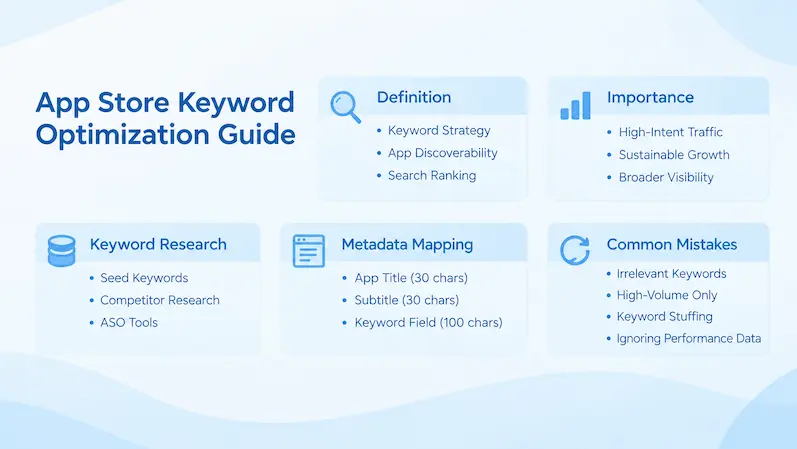
App Store keyword optimization is the process of researching, evaluating, and strategically placing relevant keywords in an app’s metadata to improve its visibility in App Store search results.
The goal of App Store keyword optimization is to help Apple’s search algorithm better understand your app’s core features and functionality, matching it with relevant user searches. By improving keyword relevance and metadata performance, ASO keyword optimization can uncover ranking opportunities, increase App Store visibility, and drive more qualified organic downloads.
Why App Store Keywords Matter for iOS Organic Growth
Keywords determine whether your app can reach the right audience in App Store search. Effective keyword optimization helps you improve rankings, attract users with stronger download intent, and drive more organic downloads. Therefore, choosing and optimizing the right keywords is a critical part of long-term app growth.
1. Match user search intent
App Store users often search with specific goals in mind. Relevant keywords help your app appear in front of users whose needs match your app’s features. For example, ranking for “photo editor for social media” can attract users who want to create and edit images for social media posts, helping you reach a more relevant audience and improve download potential.
2. Drive sustainable organic traffic
Unlike paid ads, keyword optimization can continue generating impressions and downloads without ongoing advertising costs, creating long-term growth opportunities.
3. Expand user coverage
Optimizing keywords for different relevant search terms helps your app appear across a wider range of user queries, increasing overall exposure and reaching more potential users.
How App Store Keyword Optimization Works
Apple’s App Store algorithm ranks apps based on keyword relevance and performance signals.
It analyzes your app’s metadata (title, subtitle, keywords field) and matches it with user search queries. Apps that closely match the query and perform well—based on factors like downloads, conversion rate, and user engagement—are more likely to rank higher.
Effective keyword optimization is not about stuffing as many keywords as possible. Instead, it focuses on selecting relevant, high-impact keywords and placing them strategically to send clear signals to the algorithm.
How to Research and Optimize App Store Keywords for iOS Apps
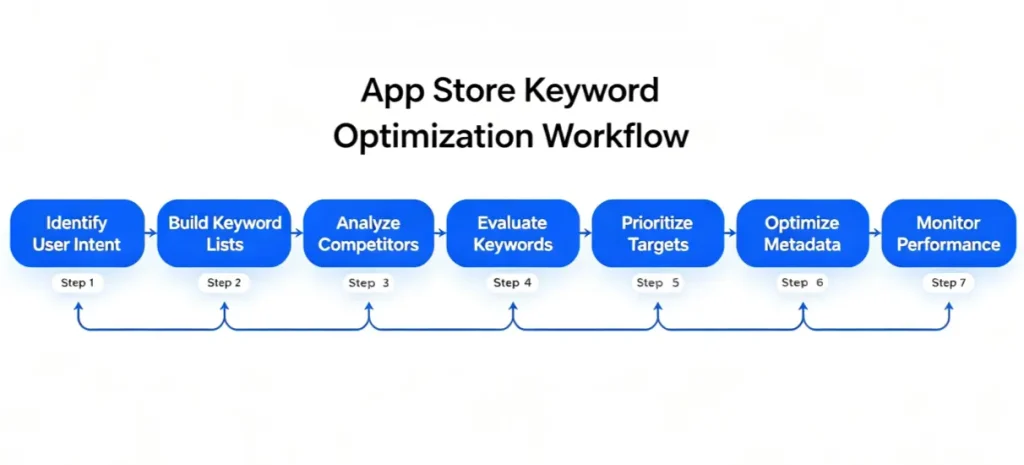
Understanding how users search and how Apple evaluates keywords helps you build a more effective keyword research and optimization strategy. The following steps walk through the process, from finding and evaluating keywords to mapping them to App Store metadata and monitoring performance.
1. Understand Your Target Users and Search Intent
Before creating a keyword list, identify:
- Who are your target users?
- What problems are they trying to solve?
- What features or benefits matter most to them?
- What terms would they type into the App Store search bar?
These questions help reveal user search intent and guide the creation of a more relevant keyword list. For example, for a fitness app, instead of only targeting broad keywords like “fitness” or “workout,” developers should first understand their users. If the target audience is beginners who want to lose weight at home, they may search for terms such as “home workout” or “beginner fitness plan.” By identifying these user needs and search behaviors, the app can target more relevant keywords that attract high-intent users.
2. Build a Seed Keyword List
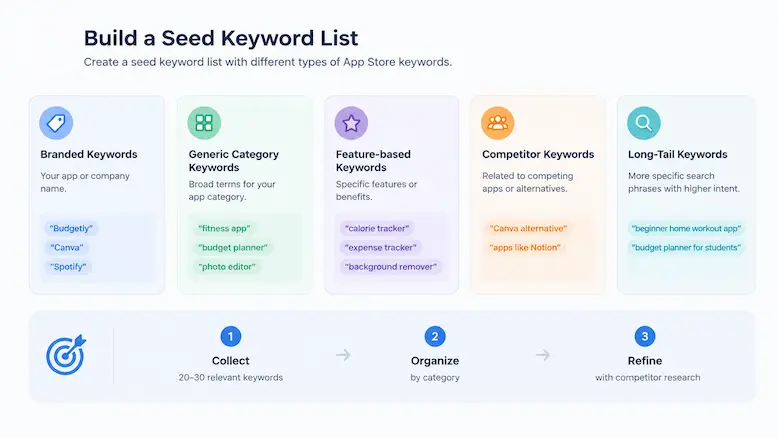
Before using ASO tools to analyze search volume and competition, start by creating a seed keyword list. A strong seed keyword list should include different types of App Store keywords, including:
Branded Keywords include your app or company name and are used to capture users who already know your brand, like “Budgetly,” “Canva,” and “Spotify.”
Generic Category Keywords are broad terms that describe your app category and attract users searching for general solutions, like “fitness app,” “budget planner,” and “photo editor.”
Feature-based Keywords describe specific app functions or user benefits and match searches based on what users want to achieve, like “calorie tracker,” “expense tracker,” and “background remover.”
Competitor Keywords are terms related to competing apps or alternative solutions, like “Canva alternative” and “apps like Notion.”
Long-Tail Keywords are more specific search phrases that target users with clearer needs and stronger intent. Although they usually have lower search volume, they often deliver higher conversion potential, like “beginner home workout app” and “budget planner for students.”
When building your initial keyword list, focus on relevance rather than search volume or competition. Start by collecting around 20–30 highly relevant seed keywords from these categories. The goal is not to find the perfect keywords immediately, but to create a comprehensive keyword foundation that can be expanded and refined through further ASO research — including the competitor research covered in the next step.
3. Expand Your Keyword List Through Competitor and Market Research
Once your seed list is in place, the next step is to expand it — both by studying competitors and by using dedicated ASO tools to surface terms you’d never find manually.
Use competitor keyword analysis to see which keywords top apps in your category rank for, how those terms appear in their titles and subtitles, and which relevant opportunities they may have missed. Comparing competitors can reveal keyword gaps and help you build a more focused keyword list.
Use ASO tools to scale your research. Manual research only gets you so far. Professional ASO tools collect and analyze App Store search data at scale — search suggestions, related searches, keyword variations, and ranking trends — helping you surface hundreds of terms based on real market data rather than intuition alone.
Together, competitor research and ASO tools give you a longer, more complete keyword list to carry into the evaluation step below.
4. Evaluate Keywords Based on Relevance, Search Volume and Competition
Not every keyword is worth targeting. The best App Store keywords balance three important factors:
(1) Relevance to Your App
Relevance is the most critical factor. No matter how high the search volume is or how low the competition is, keywords that are not highly relevant to your app’s core functionality are unlikely to drive meaningful downloads.
(2) Search Volume
App keyword volume represents the estimated level of search demand for a term and helps indicate how much potential audience a keyword can reach.
Apple Ads Search Popularity is one of the most reliable benchmarks for iOS keyword research. It provides a relative indication of how frequently users search for a term, rather than publishing exact search counts.
While high-volume keywords can offer greater visibility, they often attract stronger competition. Mid-to-low volume keywords may provide more targeted traffic and more realistic ranking opportunities for newer or smaller apps.
(3) Competition Level
Competition indicates how many apps are already ranking for that term and how strong those competitors are.
Look at the top 10 apps ranking for the keyword. Are they heavily established apps with millions of downloads and flawless ratings? If yes, the competition is high.
For newer or smaller apps, targeting long-tail keywords reduces competition drastically while maintaining high intent.
5. Prioritize Keywords Based on Ranking Potential
Not every keyword deserves the same priority. After evaluating your keyword list, prioritize terms based on their relevance, search volume, and competition level — not just how attractive they appear.
Step 1: Target highly relevant, low-competition keywords
Start with keywords that closely match your app’s features and have enough search demand. These keywords are easier to rank for and can help attract qualified users.
Step 2: Expand with moderate-competition keywords
Once your app gains some visibility, target keywords with balanced search volume and competition to increase reach while maintaining realistic ranking opportunities.
Step 3: Pursue high-volume keywords gradually
As your app builds stronger rankings and market authority, compete for high-volume, competitive keywords to capture more traffic and maximize exposure.
6. Map Keywords to Apple App Store Metadata
According to Apple’s App Store guidelines, effective metadata optimization is one part of broader app store optimization best practices. Your title, subtitle, and Keywords field help Apple understand your app and match it with relevant user searches.
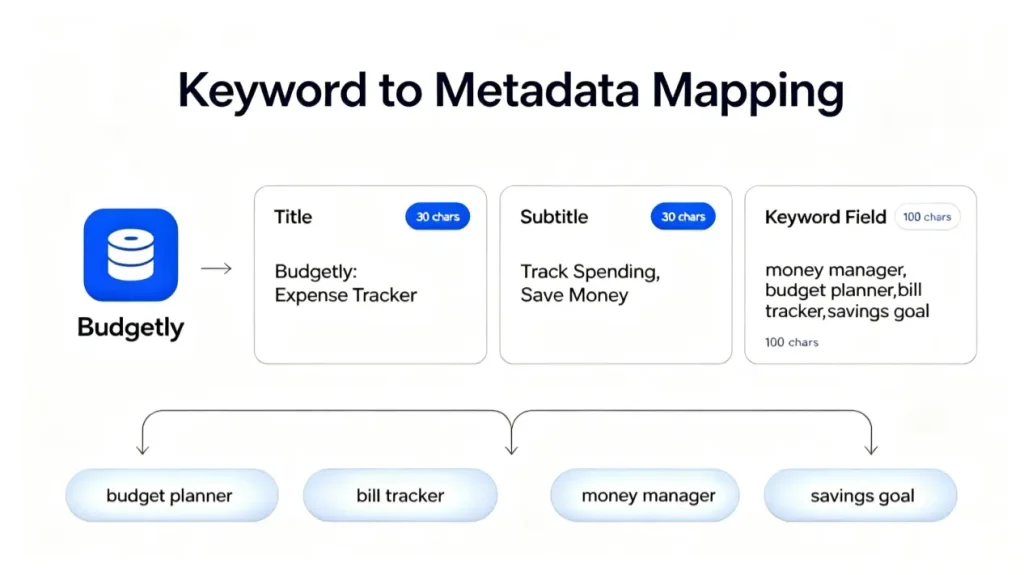
App Name (30 characters) — One of the most important metadata elements for keyword relevance. Keep your app name, but work your top keyword in right next to it. For example, a budgeting app called “Budgetly” could use the title “Budgetly: Expense Tracker” — this keeps the brand name while adding “expense tracker,” a term users are actually searching for.
Subtitle (30 characters) — Another important metadata field for keyword optimization. Use it for high-priority keywords the title didn’t fit, phrased to also sell the app’s value. For “Budgetly,” a subtitle like “Track Spending, Save Money” adds two more searchable terms — “spending” and “save money” — while also telling users what the app does for them.
Keywords field (100-byte limit) — Found in App Store Connect, this field is invisible to users but helps Apple understand what your app is about. It gives you up to 100 bytes to add terms that aren’t already covered by your app name or subtitle. Separate terms with commas, without spaces, to make the most of the available space. For “Budgetly,” this might look like: “money manager,budget planner,bill tracker,savings goal.”
7. Monitor, Test, and Continuously Improve Keywords
Keyword performance changes as user behavior, competitors, and market trends evolve. User search habits and competitor strategies keep shifting, so regular monitoring is what surfaces new market trends, fresh ranking opportunities, and high-potential keywords before your competitors catch on.
Track your keyword rankings on a regular basis and adjust your strategy based on what the data shows. Continuous optimization can help you keep pace with the competition, climb higher in search results, and bring in more users over time.
Common App Store Keyword Optimization Mistakes
Even experienced marketers can overlook critical factors when building an ASO keyword strategy. Avoiding these common issues helps improve keyword rankings, user relevance, and conversion rates.
Mistake 1: Choosing Irrelevant Keywords
Targeting keywords based only on popularity can attract users whose needs do not match your app. A keyword may have high search volume, but if it does not accurately reflect your app’s features, functionality, and user intent, it is unlikely to drive meaningful conversions. Prioritize keyword relevance over traffic potential to attract users who are more likely to engage with and download your app.
Mistake 2: Targeting Only High-Volume Keywords
High-volume keywords often attract intense competition, making them difficult for new or smaller apps to rank for. Instead of focusing only on the most popular terms, evaluate keyword difficulty, competition level, and ranking opportunities. A balanced strategy that combines competitive keywords with relevant long-tail and lower-competition terms can help your app gain visibility faster and build sustainable keyword rankings over time.
Mistake 3: Keyword Stuffing
Adding more keywords does not always improve rankings. Overloading your title, subtitle, or keywords field can make your metadata appear unnatural and reduce user trust. Instead of adding keywords excessively, focus on using relevant terms that clearly communicate your app’s value to both users and Apple’s search algorithm.
Mistake 4: Ignoring Keyword Performance Data
Setting your keywords once and walking away is a common mistake. Search trends shift and competitors change their strategy, so keywords that ranked well last quarter can quietly stop working — and you won’t notice until your visibility has already dropped. Check your rankings regularly and adjust based on what the data shows, not what worked months ago.
Make Every Keyword Count for Sustainable Growth
App Store keyword optimization is not simply about adding more keywords to your app listing. It requires a strategic approach that combines keyword research, relevance evaluation, metadata optimization, and performance analysis. By selecting the right keywords and aligning them with user intent and your app’s value, you can improve visibility, attract more qualified users, and build a stronger foundation for sustainable organic growth.


