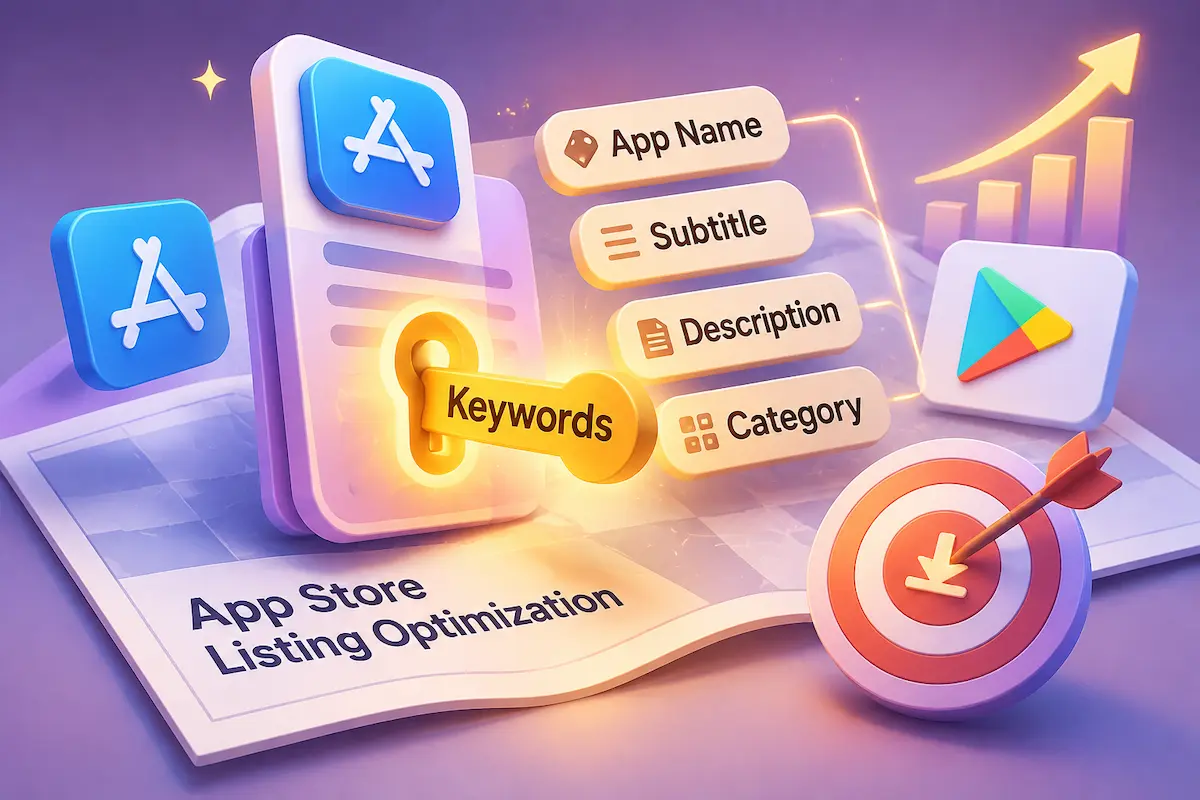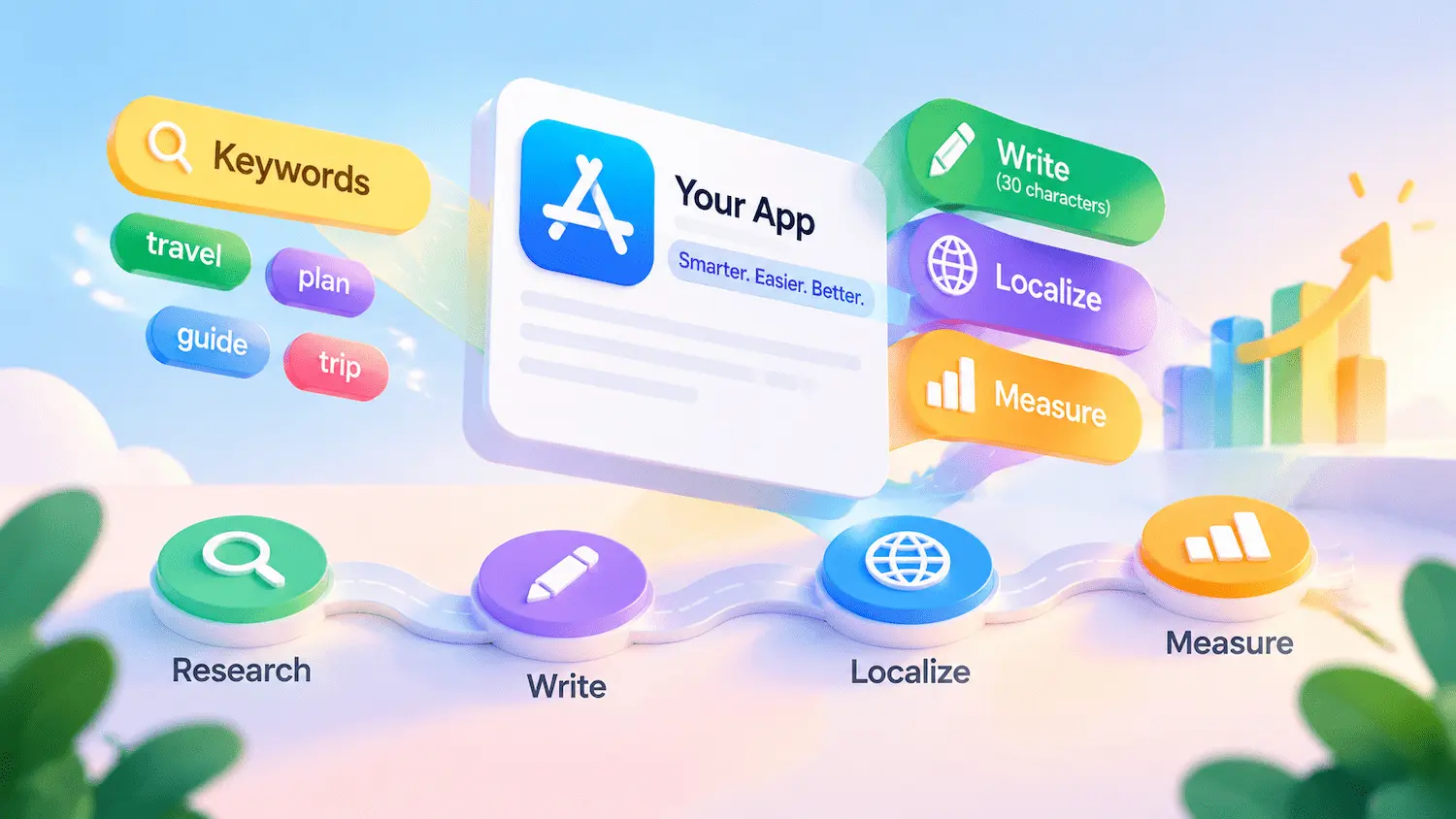


App Store Optimization (ASO) has changed significantly over the past few years. App Store search considers text relevance alongside user behavior, including downloads, ratings, and reviews. Effective ASO therefore combines relevant metadata with a store listing that helps users understand and evaluate the app.
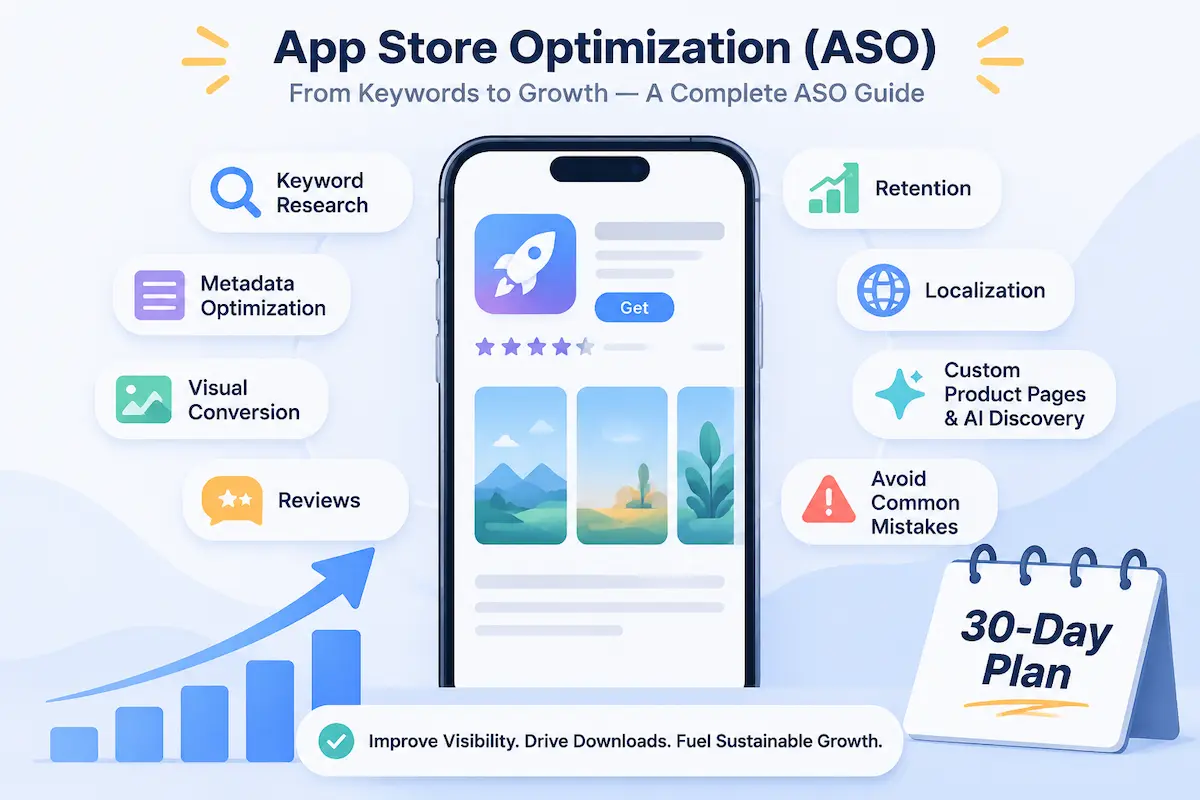
This guide explains the current ASO framework—from keyword research and metadata optimization to visual conversion, reviews, retention, localization, and emerging strategies such as Custom Product Pages and AI-driven discovery—along with the mistakes that undermine good ASO work and a 30-day plan for putting it into practice.
Whether you are launching a new app or scaling an existing product, this guide provides a practical framework for improving App Store visibility and sustainable growth.
What Is ASO and Why It Matters in 2026
App Store Optimization (ASO) is the process of improving an app’s visibility and conversion rate in the App Store. In 2026, ASO goes beyond keyword placement—it focuses on search relevance, user behavior, and the overall app experience.
As competition grows, successful ASO requires optimizing the full user journey: attracting the right users, converting store visits into installs, and building sustainable growth through better user experiences.
ASO rests on two pillars: visibility and conversion. Visibility helps users discover an app in the store, while conversion turns store visitors into installs. A strong ASO strategy connects both sides—bringing relevant users to the app page and giving them enough confidence to download.
How the App Store Algorithm Actually Works
Apple does not disclose the complete App Store ranking formula. However, platform guidance and long-term ASO testing show that visibility depends mainly on relevance and user performance. The sections below explain how these signals affect search and discovery.
The Two Core Ranking Factors: Relevance and Performance
App Store ranking systems influence which apps appear in search results and discovery surfaces. Apple identifies text relevance and user behavior as factors in App Store search. Its examples include the app’s title, subtitle, keywords, and primary category, alongside downloads, ratings, and reviews. This guide uses relevance and performance as an editorial framework, not an official weighting model.
Relevance signals help the platform evaluate whether an app matches a user’s search intent. These signals include metadata, keyword coverage, category alignment, tags, and localization.
Apple identifies downloads, ratings, and reviews as examples of user behavior considered in search. Conversion rate, engagement, and retention are also useful ASO diagnostic metrics, but their individual ranking weights are not publicly disclosed.
Relevance helps an app qualify for the right searches, while strong performance helps demonstrate that users find the app useful and continue engaging with it.
The following table translates these two core dimensions into practical signals, optimization actions, and contextual factors that can influence marketplace performance.
| Ranking Dimension / Supporting Factor | Main Components | Optimization Action | Common Mistake |
| Relevance | Title, Subtitle, Keyword Field, category, tags | Clarify function, use case, and audience | Adding unrelated high-volume terms |
| Conversion performance | Impression-to-install rate, screenshots, icon, video | Test the first-screen benefit statement | Measuring taps only |
| Post-install diagnostic metrics | Ratings, reviews, retention, refunds, uninstall behavior | Request ratings after users experience value | Improperly incentivizing reviews |
| Competitive environment | Competitor updates, ad activity, ranking changes | Monitor competitors and keyword gaps | Conducting keyword research only once |
| Platform and market context | Algorithm updates, policies, seasonal demand | Review and adjust monthly | Treating short-term volatility as a trend |
Documented Search Factors and Supporting ASO Metrics
Apple does not publish numerical weights or an official primary, secondary, and tertiary hierarchy. Separate documented search factors from diagnostic metrics when interpreting ASO results. The tiers below represent common ASO industry practices rather than confirmed Apple documentation:
| Signal Category | Primary Impact | Examples |
| Search relevance signals | Helping apps match user queries | App name, subtitle, keywords |
| Downloads, ratings, and reviews | Reflecting user satisfaction and engagement | Downloads, conversion rate, ratings, retention |
| Supporting growth signals | Strengthening long-term visibility | Updates, localization, external signals |
Apple’s algorithm remains undisclosed, but ASO signals follow a clear pattern: relevance drives discovery, performance reflects user value, and growth supports long-term visibility. Use documented factors to guide metadata decisions and supporting metrics to evaluate acquisition quality, without assigning unverified ranking weights.
Keyword Research: Building an ASO Foundation
Effective mobile keyword research is the foundation of ASO because every successful optimization cycle starts with understanding how real users search.
In practice, the highest-performing keywords are rarely the ones with the largest search volume. Teams that manage ASO campaigns often discover that specific, intent-driven queries bring fewer impressions but significantly stronger conversion and retention.
Without accurate keyword research, even optimized metadata may fail to reach the right users. A strong keyword strategy guides metadata decisions and creates a clearer path to app discovery.
The 5-Step Keyword System
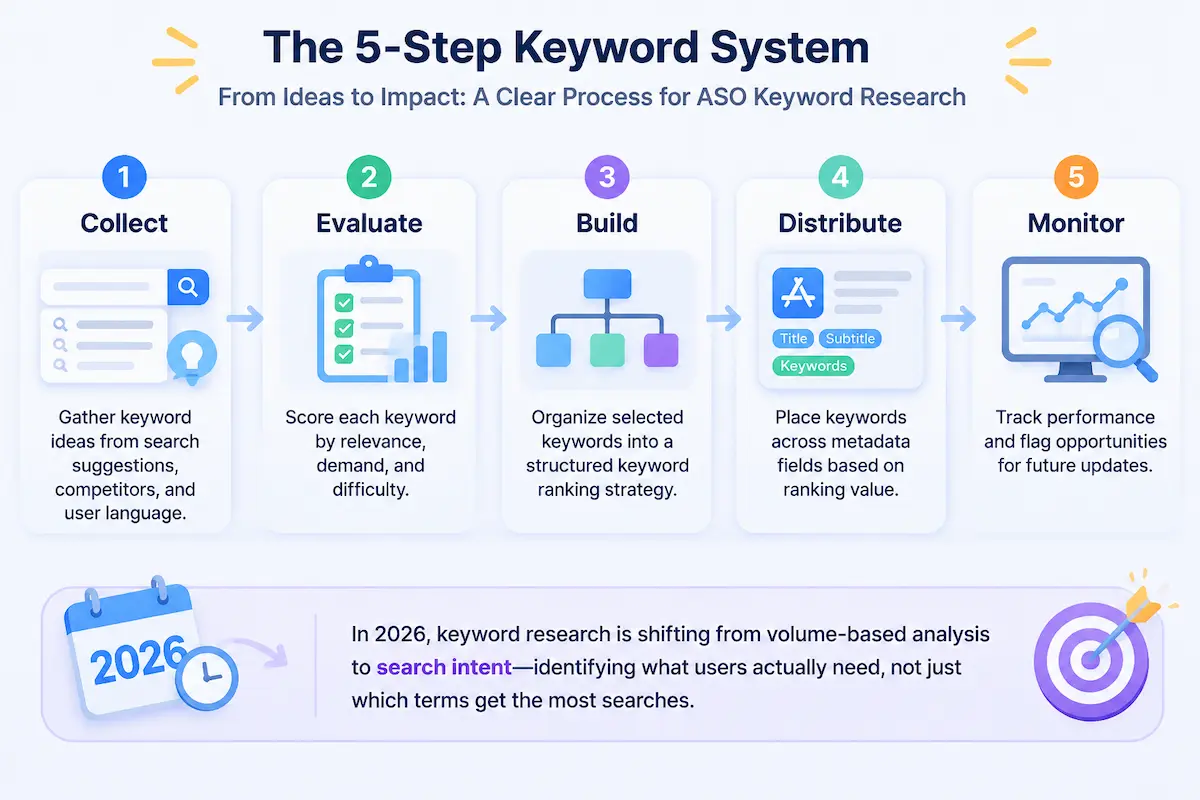
A reliable keyword process follows five stages. Collect gathers keyword ideas from search suggestions, competitors, and user language. Evaluate scores each keyword by relevance, demand, and difficulty. Build organizes selected keywords into a structured keyword ranking strategy. Distribute places keywords across metadata fields based on ranking value. Monitor tracks performance and flags opportunities for future updates.
In 2026, keyword research is shifting from volume-based analysis to search intent—identifying what users actually need, not just which terms get the most searches.
Understanding Different Types of ASO Keywords
A keyword’s potential comes from the relationship between search demand, competition, and user intent. Some keywords offer greater reach but require more effort to rank for, while others target a narrower audience and provide more achievable growth opportunities.
A balanced ASO strategy usually includes four keyword types, split across two dimensions: search scope (head terms vs. long-tail) and brand ownership (branded vs. generic). Together, they cover both how broadly a keyword reaches users and whether it targets existing or new demand.
| Keyword Type | Purpose | Competition | User Intent | Example |
| Head Terms | Increase visibility and reach broad audiences | High | General searches | “fitness app” |
| Long-Tail Keywords | Target specific users and improve conversion | Lower | Specific, high-intent searches | “home workout for beginners” |
| Branded Keywords | Capture users searching for a specific brand | Low | Brand-related searches | “Nike app” |
| Generic Keywords | Reach users looking for solutions | Medium to High | Problem-focused searches | “running tracker app” |
Head terms bring more exposure but are harder to rank for. Long-tail keywords usually have less traffic but attract more targeted users. Branded keywords help retain existing demand, while generic keywords help reach new users who aren’t yet familiar with the app. Which mix makes sense, though, depends less on the keyword type itself and more on where your app is in its growth curve.
Choosing Keywords Based on ASO Goals
A successful ASO strategy does not rely on one keyword type. The right mix shifts as an app grows.
New apps: prioritize long-tail keywords, where competition is lower and ranking is more achievable.
Growing apps: expand into broader head terms to scale visibility.
Established apps: lean on branded keywords to protect existing demand while using generic keywords to keep attracting new users.
The goal is never to rank for the most-searched keywords. The best keywords balance relevance, competition, and user intent.
Mining Competitor Keywords for New Opportunities
After understanding keyword types, competitor research helps uncover additional ASO opportunities. Top-ranking apps can reveal valuable keywords, market trends, and gaps in the search landscape. By analyzing competitor rankings, you can identify the terms they target, the demand behind those searches, and opportunities where competition may be lower than expected.
Competitor research isn’t about copying keywords—it’s about understanding how competitors attract users, then finding opportunities that fit your own app’s positioning and audience.
In 2026, ASO keyword research focuses more on user intent than exact keyword matches. Instead of targeting only terms like “workout app,” apps should also explore related searches such as “home fitness plan” or “beginner workout routine.” Understanding user needs this way helps apps uncover more keyword opportunities and build a long-term ASO strategy.
Metadata Optimization: Title, Subtitle & Keyword Field
Once keyword research is complete, metadata optimization turns those keywords into visibility. Title, subtitle, and keyword field each serve a different purpose—together, they help the App Store understand relevance while communicating value to users.
App Title Optimization: Most Valuable Keyword Space
The app title is one of the strongest metadata signals for search relevance. It should combine brand identity with the most important keywords, since character limits make every word valuable. In 2026, search systems increasingly evaluate keywords in context rather than as isolated terms—making natural, meaningful titles more effective than keyword stuffing.
Writing Effective Subtitles That Convert Searchers
After optimizing the app title, the subtitle provides another opportunity to strengthen keyword relevance and communicate the app’s core value.
The subtitle supports the title by adding context, secondary keywords, and a clear value proposition. A strong subtitle explains why users should choose the app, rather than simply repeating keywords already used in the title. The best subtitles balance search relevance with user-focused messaging to support both ranking and conversion.
Optimizing the Keyword Field
The iOS Keyword Field provides additional search coverage through relevant terms not already used in the app name or subtitle. Avoid duplication and prioritize terms that describe the app’s actual functions and use cases.Before finalizing your keyword list, check the app store keyword limit to ensure your entries fit within the available space.
⭐ ASO Expert Insight: The value of the iOS Keyword Field comes from incremental coverage, not repetition.
Apple already reads terms from the App Name and Subtitle, so repeating them in the Keyword Field usually wastes character space. Prioritize uncovered synonyms, use-case terms, and long-tail phrases. Replace terms that remain outside the top 50, while preserving keywords that have reached the top 20. Limiting each update to controlled changes makes ranking movement easier to interpret.
iOS vs. Android App Store Keyword Optimization Best Practices
iOS and Google Play require different keyword strategies. On iOS, the primary indexable fields include the App Name, Subtitle, Keyword Field, Category, and selected In-App Purchase names. The Keyword Field should be used for additional terms that do not already appear in the title or subtitle.
Google Play has no separate Keyword Field. It evaluates the App Title, Short Description, Long Description, category, reviews, and semantic relevance together.
Use this workflow:
- iOS: Place the highest-priority keyword in the App Name, expand the user intent in the Subtitle, and use the Keyword Field for uncovered long-tail terms.
- Google Play: Use the Title and Short Description to communicate the core function, then cover related terms and use cases naturally in the Long Description.
- Track separately: Use a platform-specific app store keyword search process to identify relevant terms, then maintain independent keyword lists, ranking baselines, and conversion reports for iOS and Android.
- Avoid direct copying: iOS keyword fragments should not be copied into a repetitive Google Play description.
The central difference is simple: iOS relies more heavily on field hierarchy, while Google Play evaluates semantic completeness across the entire listing.
Visual ASO: Icon, Screenshots & Video
With limited attention spans and smaller mobile screens, users often make decisions before reading every detail on an app page. In a mobile-first environment, visual signals shape first impressions within seconds, while feeds and short-form video have trained users to scan, compare, and decide quickly.
As competition grows across app marketplaces, visual ASO has evolved beyond creating attractive screenshots or polished designs. Its role is to communicate value faster, reduce user uncertainty, and provide a clear reason for users to install.
App Icon: The First Visual Signal
The icon is the first thing users see, often before they even reach the app page—in search results, category charts, and shared links. It needs to be instantly recognizable at a small size, distinct from competitors, and consistent with the app’s brand identity. A cluttered or generic icon can lose users before they ever scroll further.
Show, Don’t Tell: Screenshot Storytelling
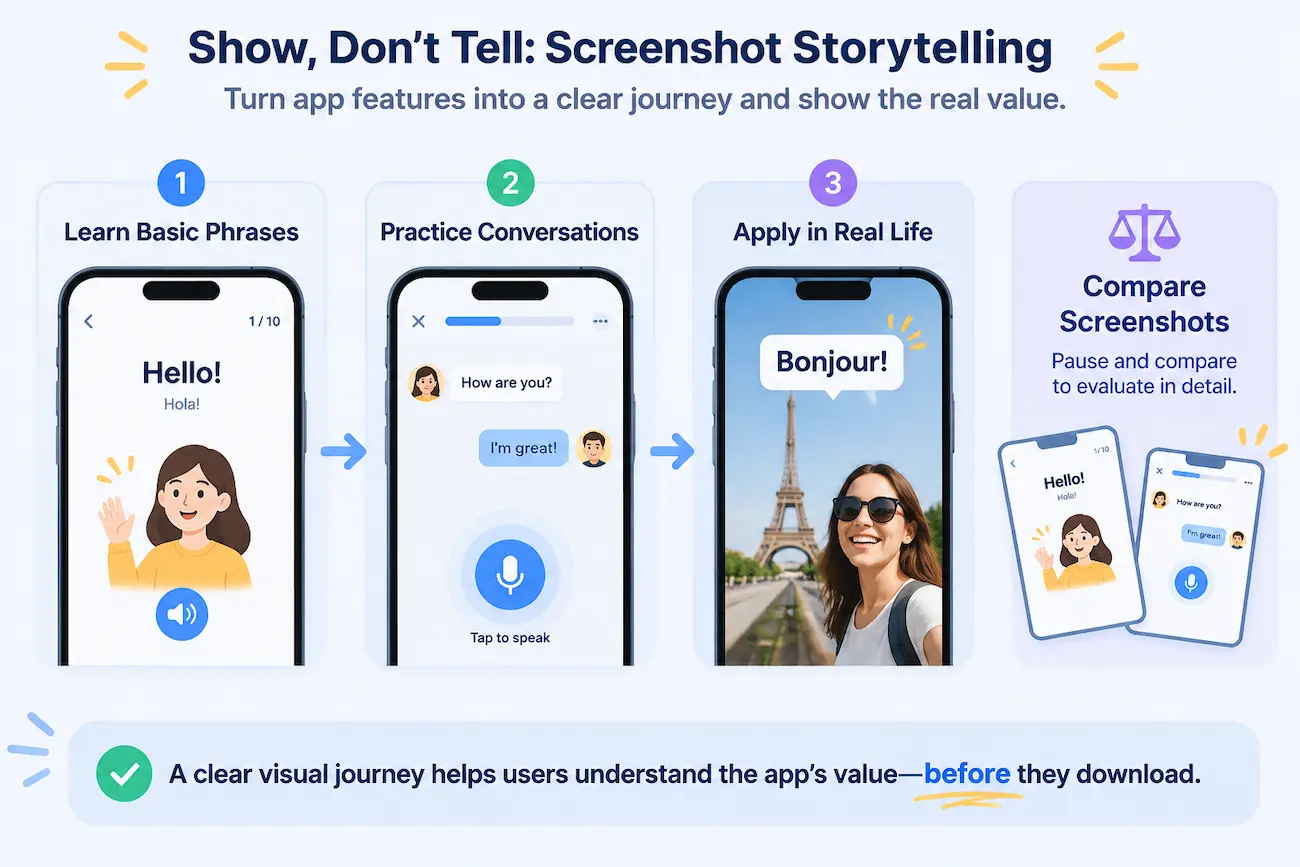
In today’s App Store landscape, screenshots play a much bigger role than simply showcasing app features—they serve as a visual narrative that helps users understand the app’s value and why it matters.
For example, a language-learning app should show more than vocabulary exercises, grammar lessons, or AI-powered practice tools. Arrange the screenshots around a clear progression: learning basic phrases, practicing conversations, and applying those skills in everyday situations. This sequence connects features to practical outcomes and helps users understand the app’s value before downloading.
Because users can pause and compare screenshots side by side, they work best for detailed, considered evaluation.
App Preview Videos That Convert
Video works differently: it lets users imagine the experience in motion. Effective app preview videos show real usage within seconds, highlighting the core benefit rather than a feature tour. AI tools have made video production easier, but strong storytelling is still what drives conversion.
The Scan-to-Hook Framework: Turning Views Into Installs
Screenshots and videos are the raw materials of an App Store page, while the Scan-to-Hook framework defines how these visual elements work together to guide users from attention to action. It combines natural scanning behavior with high-impact visual hooks to capture attention within the first few seconds and encourage users to keep exploring.
The framework follows three steps: Scan → Understand → Install.
Scan. Users first notice the app icon, first screenshot, and key visual message. A strong opening visual earns attention by immediately showing relevance—for example, a language learning app showing a real conversation scenario rather than a generic lesson screen.
Understand. Once attention is captured, screenshots should quickly communicate the app’s value. Focus on outcomes over features: “Practice real conversations” is more compelling than simply listing “AI speaking tools.”
Install. Before downloading, users look for reasons to trust the app. Ratings, user results, and real usage examples help turn interest into action.
Together, these three steps follow the natural user journey: capture attention, communicate value, and provide confidence to install.
Conversion Rate Optimization: What to Test and How to Measure It
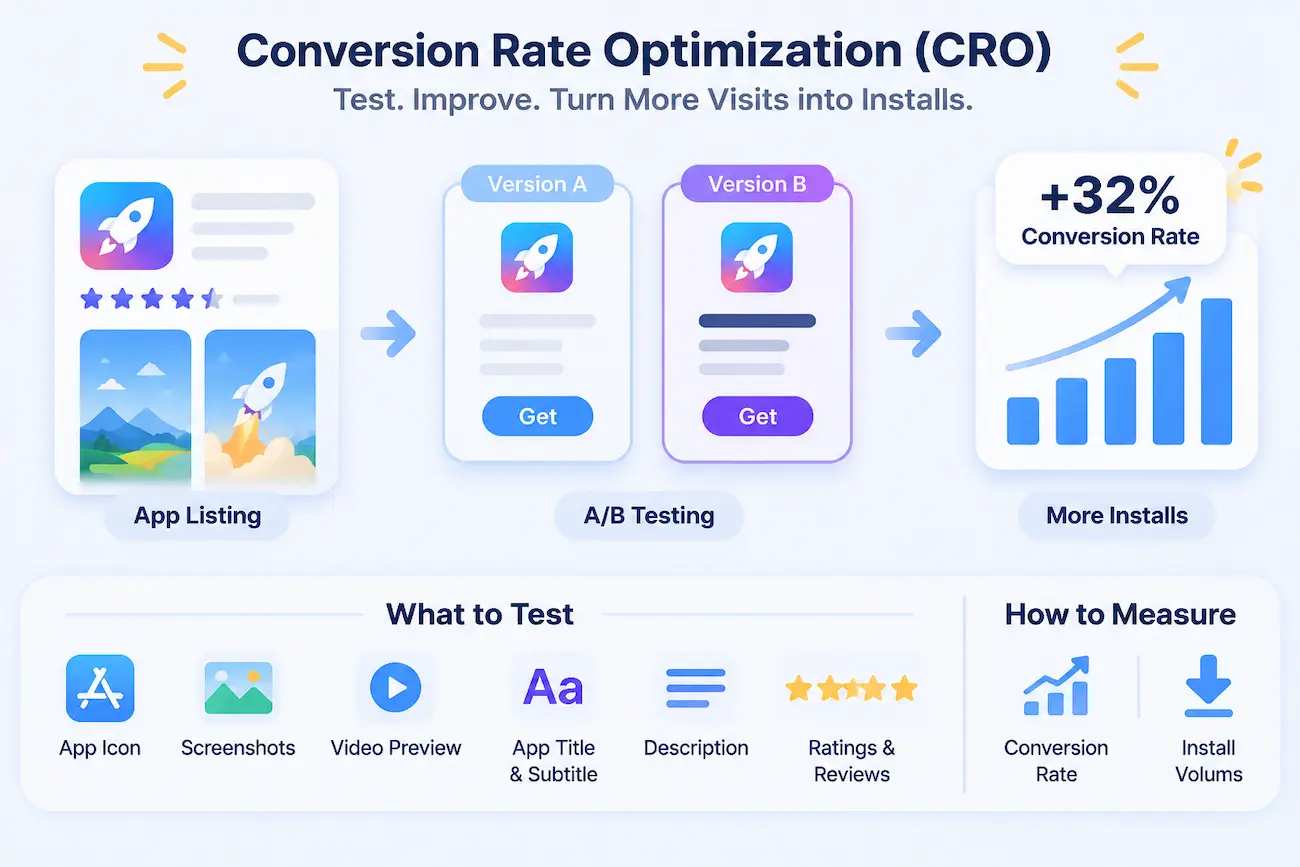
Visual ASO creates the first impression, but continuous improvement drives long-term growth. Conversion Rate Optimization (CRO) helps apps understand which elements actually influence user decisions—and improve the path from visit to install.
Understanding App Store Conversion Rate
In App Store Connect Analytics, conversion rate is calculated as total downloads divided by unique impressions. If you use product page views as the denominator, label that metric separately and keep its definition consistent across comparisons.
A strong conversion rate means users quickly understand the app’s value and feel confident acting on it. But downloads alone don’t define success—effective ASO balances traffic quality, conversion performance, and retention together.
Once you know what conversion rate measures, the next question is what to actually test to move it.
Which Creative Elements Should Test First
When optimizing an App Store product page, testing should begin with the elements most likely to influence user decisions, including the app icon, screenshots, video, and key messaging. Apple’s Product Page Optimization (PPO) in App Store Connect allows developers to test different product page versions with selected audiences and measure performance differences before choosing the strongest-performing variation.
High-impact tests reveal what users actually respond to, replacing guesswork with data.
Testing Recommendation: Isolate the screenshot message before redesigning the entire creative set.
Test a benefit-led headline against the existing version while keeping the other assets unchanged. Define the primary metric before launch, review the experiment’s reported confidence, and leave inconclusive results unresolved rather than declaring a winner.
Measuring ASO Results Without Misleading Data
Changing the title, screenshots, and keyword field in the same release makes it difficult to attribute a performance change to a specific edit. Record the baseline, isolate variables where possible, and compare equivalent periods by source and territory. Treat a before-and-after comparison as observational evidence rather than proof that one change caused the result.
The strongest ASO strategies connect visibility with real user behavior—not just surface-level metrics—to identify what actually drives sustainable growth.
Once the fundamentals are measured and stable, the next question is what else can move visibility beyond keywords and creative testing alone.
ASO Store Asset Preflight Checklist
Metadata
Screenshots
Video
Measurement
Ratings, Reviews & Retention Signals
Ratings, reviews, and retention all function as signals—data the algorithm reads to judge whether your app delivers on its promise. In 2026, these signals feed back into ranking faster than ever.
How Ratings and Reviews Influence User Decisions
Ratings and reviews work on two levels: they sway the person reading the page, and they feed the algorithm deciding who sees it. Volume often beats score—a 4.5-star app with thousands of reviews tends to convert better than a 4.8 with few, because volume signals reliability. That is why it pays to focus on strategies that increase app ratings and encourage users to leave genuine reviews consistently.
Recency matters in ASO because recent reviews often shape how users evaluate an app’s current experience. A wave of recent complaints can reduce conversion confidence, even if the overall rating remains strong, as users may look for signs that past issues have been resolved.
The same freshness bias applies to ranking. Based on ASO industry observations, review freshness and review velocity appear to play an increasingly important role in user trust and store performance. While Apple does not publicly disclose its ranking formula, consistent review activity remains a strong indicator of app quality.
If reviews carry this much weight, the question becomes when to ask for them.
When and How to Ask Users for Ratings
Timing makes or breaks a prompt. Asking right after onboarding catches users before they’ve felt any value—a fitness app prompting right after signup, before a user has finished a single workout, is asking someone to rate an experience they haven’t had yet. Asking after a clear win—a fitness app after a user’s 10th workout—catches them when satisfaction peaks instead.
That’s why native prompts like Apple’s perform best when triggered by an in-app milestone rather than a fixed day count, and why milestone-triggered prompts consistently outperform ones tied to elapsed time. The rule is simple: prompt after evidence of value, not a calendar.
But generating positive signals is only half the equation. What happens after install matters just as much.
Why Retention Matters More in Modern ASO
Retention is becoming increasingly important in ASO—not necessarily because it is a publicly confirmed direct ranking factor, but because it reflects whether an app delivers on the promise made by its store listing. Strong install numbers paired with weak day-one retention often signal a mismatch between what the listing promises and what the app delivers, and over time this mismatch can weaken reviews, engagement, and other satisfaction signals.
The logic is the same across ASO: the store page sets an expectation, the app meets it or doesn’t, and that gap shows up in the data. In 2026, the feedback loop closes faster—user quality signals can appear quickly after acquisition, making post-install experience an increasingly important part of ASO strategy.
ASO no longer stops at the install. It extends into the first session after.
Localization for Global Growth
Many apps still underestimate localization as a growth lever. In 2026, localization has become a major opportunity for improving visibility in global markets. The App Store uses localized metadata to better match users based on language and region, helping apps appear in more relevant searches. Without localization, apps may miss valuable opportunities to connect with local search behavior and user expectations.
Use territory-level acquisition data to identify markets worth investigating for localization. Existing downloads from a market can indicate interest, but local search research and the app’s language readiness are still needed before expanding the listing.
Localization Is More Than Translation
Translation gets you indexed. It doesn’t get you chosen. Real localization goes further—adapting screenshots, keywords, and value framing to how users in each market search, understand, and make decisions, not just what words mean literally. Take a meditation app entering Japan: translating “mindfulness” directly as 「マインドフルネス」 may be linguistically correct, but the borrowed term can feel abstract to users unfamiliar with the concept. Framing the same idea around more familiar concepts—such as 「瞑想習慣」(building a meditation habit) or 「心を整える時間」(taking time to reset the mind)—preserves the original meaning while making the value easier for local users to understand.
Practical Pitfall: Machine translation is not a local keyword strategy.
Search behavior, spelling, feature terminology, and user expectations vary by market. Re-research keywords for each locale and review local competitor titles, screenshot copy, and conversion rates. High impressions with low conversion usually indicate a messaging or creative problem. High installs with weak retention suggest that the localized promise does not match the product experience.
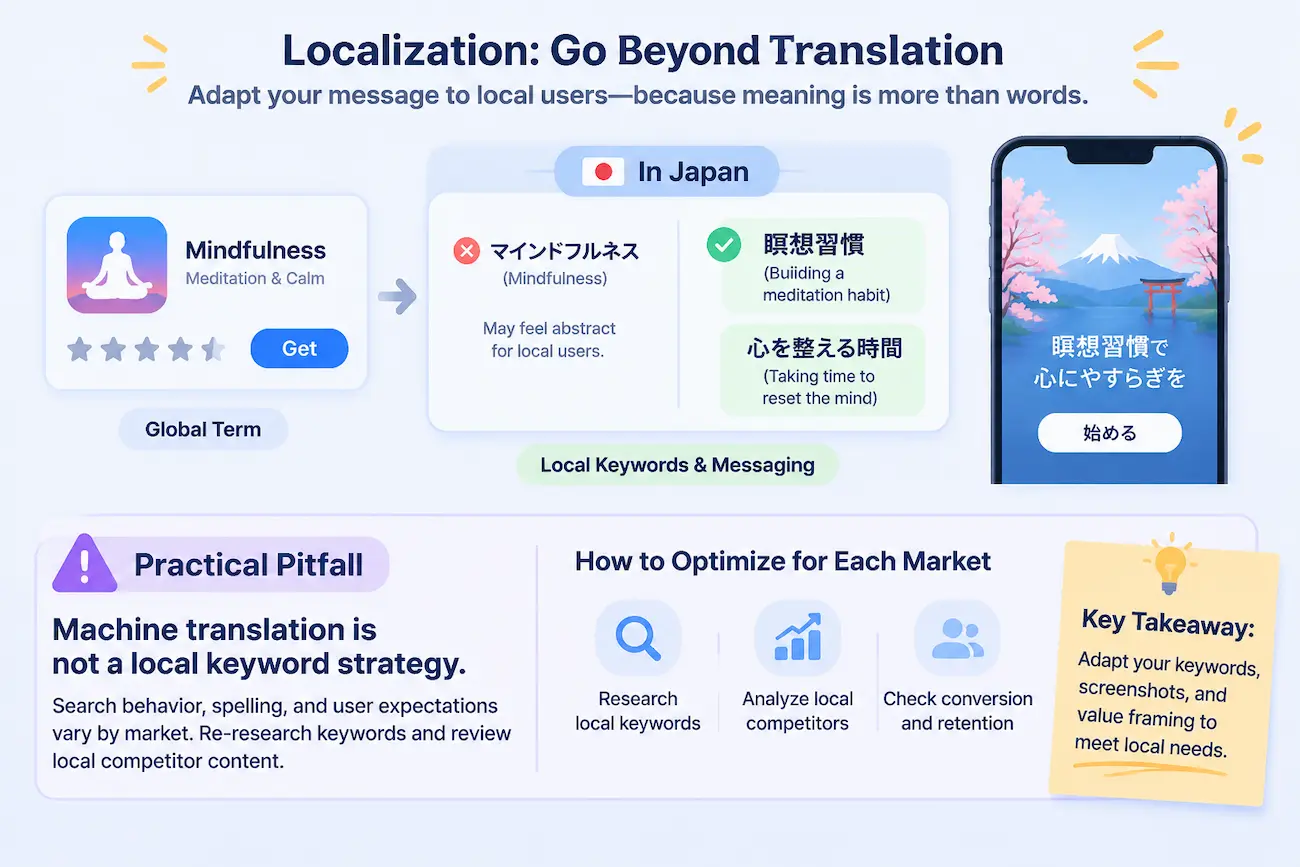
Localized screenshot copy helps users understand the app’s value in their language. Its role as a direct App Store search-ranking signal is not publicly established. Market-specific text and visual messaging can provide additional context for search relevance, helping apps better match user intent beyond translated metadata alone.
Full localization is expensive. The question is where to start.
Minimum Viable Localization (MVL): Where to Start
MVL prioritizes the few changes that unlock the most visibility per dollar. Baseline: localized metadata for your top three non-domestic locales. Next layer: localized screenshots for one priority locale. Skip full app-level translation—test demand cheaply first. In 2026, AI-assisted translation has made metadata fast.
Once MVL validates a market, the work shifts from presence to precision.
Choosing Markets and Managing Locale-Specific Optimization
Market expansion should be guided by user demand, competition, and performance data. Check App Store Connect’s region-level data—organic traffic from Germany without German localization is a signal to invest. Competitor gaps and language overlap (Spanish unlocks four markets at once) narrow the list.
Each locale requires its own optimization strategy based on search behavior and user expectations. Keywords don’t translate—they get re-researched. Monitor per-locale conversion and retention separately. High impressions, low conversion? Fix the creative, not the keywords. High installs, low retention? The app doesn’t match the localized promise.
In 2026, the challenge is no longer tracking data, but turning insights into action. The discipline to act on them isn’t there. Evaluate each market separately and use the results to guide the next update. Apply the same review cycle to metadata, creatives, and product changes over time.
Long-Term ASO Growth Strategy
ASO isn’t a one-time setup. It’s a cycle of testing, updating, and responding to shifting conditions. Apps that treat it as a checklist get overtaken by apps that treat it as a practice.
Why Regular App Updates Matter
A consistent update history can provide additional signals of ongoing app maintenance and quality. Regular updates create opportunities to fix defects, improve the product experience, and refresh version-linked metadata.
Update frequency alone should not be treated as a confirmed ranking lever. Each update also creates a chance to refresh metadata, test keywords, and rotate screenshots. Keep the listing aligned with the current product so users can evaluate the features and experience available in the latest release. But not everything affecting your ranking is within your control.
External Factors That Influence ASO Performance
ASO performance is shaped not only by what you optimize, but also by external changes you cannot fully control. Four factors can influence visibility over time:
Competitor activity. Competitors can change keyword targeting, update screenshots, improve ratings, or increase conversion performance—potentially affecting your rankings for shared search terms. Regular competitor monitoring helps identify new opportunities and protect your keyword position.
Algorithm updates. App Store search systems evolve over time. Changes in how platforms understand relevance, metadata, and user behavior can affect visibility. Apps with clear positioning, strong metadata, and consistent user signals are better prepared to adapt.
Seasonal demand changes. User search behavior shifts throughout the year. Apps may gain or lose visibility as demand rises or falls around holidays, events, or market trends. Understanding seasonal patterns helps teams adjust keywords and creatives at the right time.
Policy and platform changes. Updates to App Store guidelines, metadata rules, or review requirements can make previous optimization strategies less effective. Staying informed helps avoid unexpected ranking or compliance issues.
None of these factors are fully controllable, but all are monitorable—and the apps that stay competitive are the ones that detect changes early and adapt quickly. Monitoring limits how much visibility you lose when the landscape shifts; continuous optimization is what turns that stability into long-term growth.
The ASO and Paid Acquisition Growth Loop
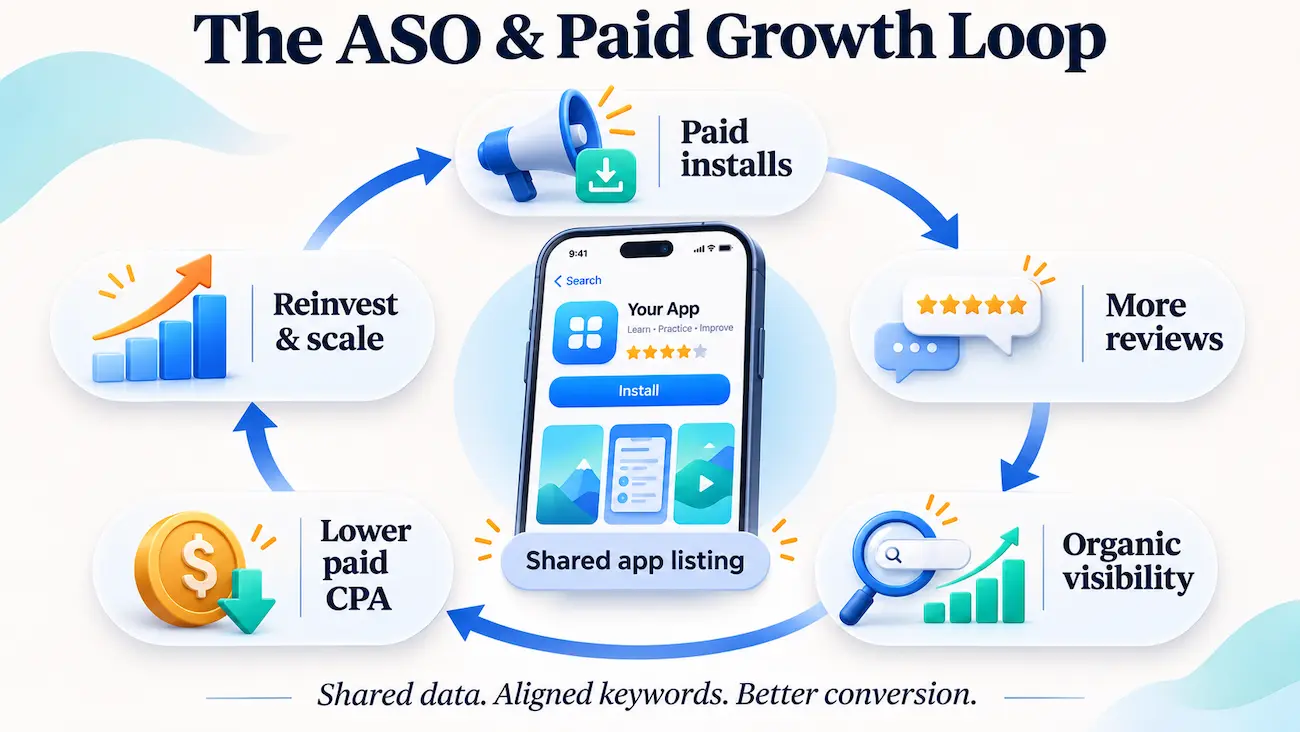
When ASO and paid acquisition work together, each channel can strengthen the other through a continuous feedback cycle. Paid campaigns that increase app installs generate volume that drives reviews. Reviews improve organic ranking. Higher ranking lowers paid CPA, which funds more installs, which generates more reviews. The loop compounds.
This cycle loses momentum when organic optimization and paid growth are managed separately rather than as connected efforts. Paid traffic to an unoptimized listing wastes budget. ASO improvements with no paid velocity wait months for traction. In 2026, the fastest-growing apps share data across paid and ASO teams, align on keywords, and optimize the same conversion surface together. The listing isn’t the end of ASO—it’s the shared interface between organic and paid.
Does Apple Search Ads Affect Organic App Store Rankings?
Apple Search Ads should not be treated as a direct way to purchase organic rankings. Paid visibility does not automatically move an app higher in organic search results. However, high-quality paid traffic can indirectly support ASO by generating installs, ratings, reviews, and retention.
Use the following testing process:
- Select relevant keywords with stable organic rankings as a baseline.
- Run Search Ads for two to four weeks and record impressions, taps, installs, CPT, organic downloads, and keyword rankings.
- Compare the results with similar keywords that did not receive paid traffic.
- If paid installs increase but organic ranking and retention do not improve, investigate traffic quality or listing-message mismatch.
- Feed high-converting paid search terms back into the title, subtitle, screenshots, and Custom Product Pages.
The most effective relationship is practical: use paid acquisition to validate search intent, then use ASO to reduce long-term acquisition costs.
Advanced ASO Strategies for 2026
Once ratings, reviews, and retention are working as reliable feedback signals, that data becomes the raw material for a few newer levers that now shape visibility just as much: Custom Product Pages, In-App Events, and AI-driven search.
Custom Product Pages: From Paid Tool to Organic Search Asset
Custom Product Pages (CPPs) started as landing pages for paid campaigns. In 2026, they do more—aligning store content with specific user segments and search themes, not just ad traffic. CPPs provide tailored product pages for specific audiences and acquisition paths. Use Product Page Optimization for randomized creative testing on the default product page; comparing CPPs requires controlled traffic allocation because audience differences can distort the result.
But they now double as a visibility asset: a fitness app building a CPP around “home workouts for beginners” reinforces relevance for that keyword theme while giving that audience a more targeted reason to install. The same mechanism that improves conversion—matching content to intent—also signals topical relevance to App Store search.
In-App Events: Creating New Discovery Opportunities
In-App Events promote timely content—challenges, competitions, seasonal updates—directly in the App Store. What’s changed in 2026 is the events’ reach into discovery, not just retention.
A well-titled event with relevant keywords can surface in search results and editorial placements, reaching users who’ve never opened the app. A “30-Day Summer Challenge” isn’t just re-engaging current users—it’s a fresh entry point for people searching seasonal fitness goals. Run consistently, events become a recurring discovery channel.
AI-Powered Discovery: Preparing for the Next Search Model
Search is evolving beyond exact keyword matching. As app marketplaces become better at understanding context and user intent, ASO is shifting from keyword placement alone toward clearer descriptions of what an app does, who it serves, and which problems it solves.
Apple supports natural-language search and uses large language models to generate app tags from sources that include app metadata. Describe the app’s actual functions and use cases clearly, while keeping keyword targeting relevant.
These features do not establish that Apple cross-checks reviews against listing claims or uses screenshot text as a direct ranking signal. Treat those mechanisms as unverified unless Apple documents them or controlled evidence supports the claim.
Common ASO Mistakes to Avoid
Most ASO underperformance comes from a handful of recurring mistakes—not from lack of effort, but from effort aimed in the wrong direction.
Treating ASO as a One-Time Setup
ASO isn’t “set it and forget it.” Competitors change, algorithms update, search behavior evolves. A listing optimized in January can underperform by April. Fix: revisit your strategy quarterly at minimum, and treat every update as a chance to retest.
Copying Competitors Blindly
Just because a rival ranks for certain keywords doesn’t mean those keywords work. They might be making the same mistake you’re about to copy. Fix: validate with your own search volume and conversion data before following anyone’s lead.
Ignoring User Intent
Ranking for a keyword is meaningless if searchers don’t want what you offer. A meditation app ranking for “sleeping music” may attract users looking for simple audio tracks rather than meditation guidance, leading to poor retention and weaker ranking signals over time. A better match would be targeting terms like “guided meditation” or “stress relief meditation,” where users are more likely to value the app’s actual experience. The goal is not to rank for the highest-volume keywords, but to attract users whose intent matches what the app delivers.
Keyword Stuffing in 2026
Use the iOS Keyword Field for relevant, comma-separated terms rather than full sentences or repeated words. Write visible metadata and descriptions for clarity, but do not apply prose-writing rules to a field designed for keyword entries.
Neglecting Retention After Install
ASO gets users in the door. If they leave immediately, the algorithm notices—high day-one churn signals that the listing overpromised, and the store suppresses future visibility accordingly. Fix: treat the first session as part of ASO, not a separate product problem.
Underneath all of these is one root cause: optimizing for the algorithm instead of the person reading the page. The algorithm is a proxy for user judgment, not a target in itself—listings that read well to humans tend to perform well in search. Chase indexing rules while ignoring whether real users understand the app’s value, and the result is the same every time: you win the query and lose the install.
Quick-Start Checklist: First 30 Days
You don’t need to do everything at once, you can proceed in a planned and organized way. Here’s a 30-day sequence that covers the highest-impact actions first, with each week building on the last.
| Week | Focus | Main Actions | Goal |
| Week 1 | Research | Keywords, competitors, intent | Build ASO foundation |
| Week 2 | Optimize | Metadata, screenshots, localization | Improve visibility & conversion |
| Week 3 | Test | CPPs, creatives, reviews | Increase installs |
| Week 4 | Measure | Analytics, retention, iteration | Build growth loop |
Week 1: Research Market and Keywords
Build an initial list of 20 candidate keywords using search suggestions and keyword research tools for ASO. Track organic rankings separately, use App Store Connect to monitor acquisition by source and territory, and keep paid search-term reports separate from organic performance. Investigate intent, traffic mix, and listing clarity when conversion underperforms.
Research 3-5 competitors per market and log their title, subtitle, and top keywords. Don’t copy—look for terms they’re missing. Group your keywords by intent: brand, feature, and use-case clusters. By end of week, you should have a prioritized keyword list mapped to user intent, not just search volume.
Week 2: Optimize Metadata and Creatives
Rewrite your title and subtitle first—they carry the most indexing weight. Lead with your core keyword and a clear benefit, not your brand name alone. Rewrite your description for clarity: explain what the app does, who it serves, and what outcomes users can expect. Use relevant app description keywords naturally, adapting their placement to each platform’s indexing rules without sacrificing readability.
Build localized metadata for your top three non-domestic locales—translated keywords won’t match local search behavior, so re-research each market. Update your screenshots: lead with the single most compelling benefit, with readable text stating a concrete outcome. If you have Custom Product Pages, create one for your highest-intent segment this week.
Week 3: Test Conversion Improvements
This is where ASO turns from setup to experiment. Use Product Page Optimization to test eligible default-page creative assets. When comparing Custom Product Pages, control or account for audience, traffic source, and timing before attributing performance differences to the creative. Track which variant lifts conversion, not just click-through.
Set up a rating prompt tied to an in-app milestone, not a timer—if you haven’t already. Review your newest App Store reviews and flag any contradiction between what users say and what your listing claims. Fix the gap in copy or product, whichever is faster. Plan your first In-App Event with a keyword-rich title tied to a seasonal or use-case theme.
Week 4: Measure Results and Iterate
Open App Store Connect and focus on meaningful changes rather than normal fluctuations. Small week-over-week changes can happen naturally, so avoid overreacting to minor movements. Compare relative changes in impressions and conversion from App Store Search and Browse separately, as each source reflects different discovery behaviors. Apple’s App Store Connect Analytics provides source-level acquisition data and conversion metrics to help evaluate these trends.
Compare day-one retention before and after your metadata changes—retention and user engagement can provide important quality signals, and changes that increase installs but reduce user satisfaction may hurt long-term performance. Document what worked, what didn’t, and what to test next. ASO is a cycle, not a launch—schedule your next quarterly review now.
Conclusion: ASO in 2026 Rewards Clarity
ASO in 2026 rewards clarity over guesswork. The apps that win are the ones whose store presence is honest enough for a human to trust and precise enough for search to surface—everything else is just noise in between.