App Store keyword research, also called app store keywords research, is the process of finding the terms users search for and evaluating which keywords your mobile app can realistically rank for. It turns those keywords into a prioritized ASO plan for your store listings on the App Store and Google Play.
Effective ASO keyword research answers three questions: what users are searching for, which keywords match your app, and which keywords have realistic ranking and growth potential.
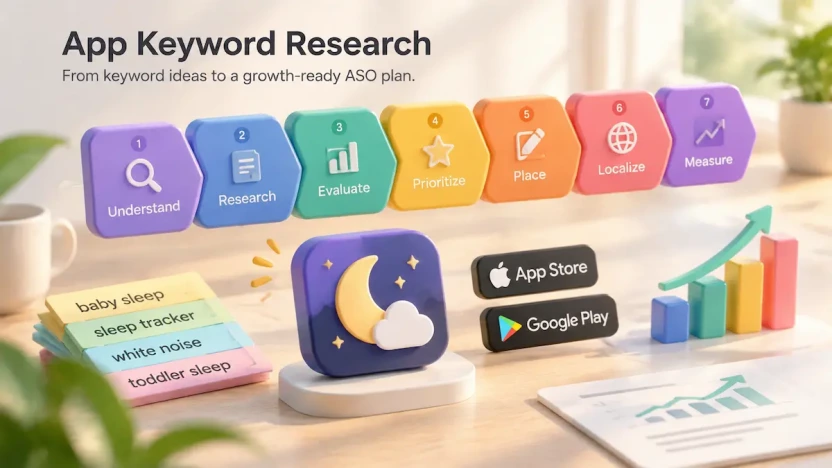
This guide breaks app keyword research into seven steps:
Understand → Research → Evaluate → Prioritize → Place → Localize → Measure
Each section covers one step, from discovering keyword ideas to tracking results after optimization. The process works across every stage of mobile app keyword research, from discovering initial keywords to expanding into new markets through localization.
Claims are labeled Platform data (from official consoles) or Estimate (from third-party tools); validate estimates with your own app data. SleepNest is a fictional baby sleep app, and its figures are illustrative.
Key Takeaways
- iOS has a 100-byte Keyword Field; Google Play has no equivalent.
- Autocomplete shows phrasing, not volume. Tool data are estimates.
- Prioritize relevance before demand; avoid unrelated terms.
- Opportunity Score = Relevance × Demand × Conversion ÷ Competition.
- Use Core, Growth, and Experimental keyword tiers.
- Localize by market, then monitor and update.
How App Store Search Works: Where iOS and Google Play Read Keywords
Step 1 of 7: Understand
Before you research a single keyword, you need to understand where each store uses keywords and how those fields influence discoverability. iOS and Google Play use different metadata fields, limits and search signals. This section covers only the mechanics needed for the keyword research steps that follow.
Where Each Store Reads Your Keywords
| Platform | Field | Limit | What it does |
| iOS | App Name | 30 characters | Searchable; communicates your app’s core identity |
| Subtitle | 30 characters | Searchable; adds supporting keyword context | |
| Keyword Field | 100 bytes | Hidden from users; adds extra searchable terms while avoiding unnecessary repetition with App Name or Subtitle keywords | |
| Google Play | Title | 30 characters | Searchable; communicates your app’s main purpose |
| Short Description | 80 characters | Communicates value and provides keyword context | |
| Full Description | 4,000 characters | Provides additional listing context; no separate keyword field exists |
Sources are Apple App Store Connect Help and Google Play Console Help. Apple’s keyword field allows up to 100 bytes of content. Google Play titles must be 30 characters or fewer, and short descriptions must be 80 characters or fewer. The iOS Keyword Field is measured in bytes, not characters, which matters when selecting and localizing keywords.
What Apple Uses for Search Relevance
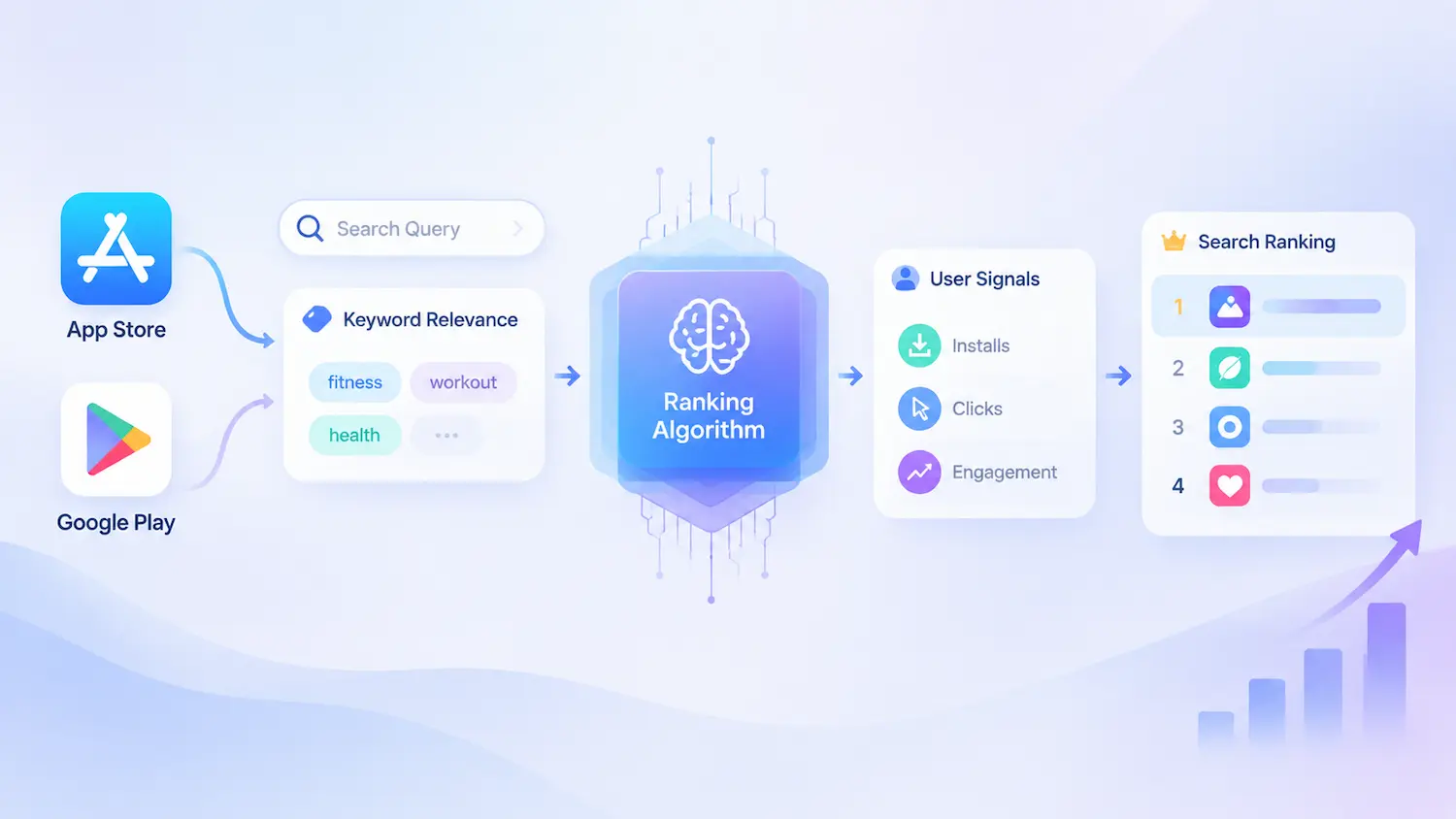
Apple states that App Store search results are influenced by text relevance and user behavior. Text relevance includes matches in your app’s title, subtitle, keywords and primary category. User behavior includes signals such as downloads, ratings and reviews.
Apple also states that promotional text does not affect search ranking, so it should not be used as a place to store keywords. Apple has not disclosed the exact weight of each ranking factor, so treat any claim about which field has the strongest impact as a Practitioner heuristic, not an official rule.
For keyword research, this means relevant terms are only the first step. Keywords must also match user intent and support conversion after users reach your product page.
How Google Play Uses Listing Context
Google Play does not provide a separate keyword field. Developers optimize their store listing metadata instead. ASO practitioners typically use the title, short description and full description to provide keyword context while keeping the text natural and user-focused.
Google’s Metadata policy warns that excessive length, unnecessary detail, formatting or repetition can lead to a violation. Google also advises against repeating the short description in the full description. Do not assume Apple and Google Play work the same way. Each platform has different metadata fields and search systems.
What This Means for Keyword Research
Keywords are the foundation of store discoverability, but they do not work alone. A strong keyword must be relevant to your app, realistic to target and aligned with user intent. You now know where each store reads your keywords. Next, detailed placement tactics are covered in our Keyword Optimization Strategy guide.
How to Find App Keyword Ideas: A Complete Research Framework
Step 2 of 7: Research
The goal of this app store optimization keyword research step is to understand how users search and build a keyword pool for the Evaluate step, not to collect as many terms as possible. Every method below is a way to generate app store keyword ideas from real user language. Record the source of every term you add.
App Store Optimization Keyword Research Methods
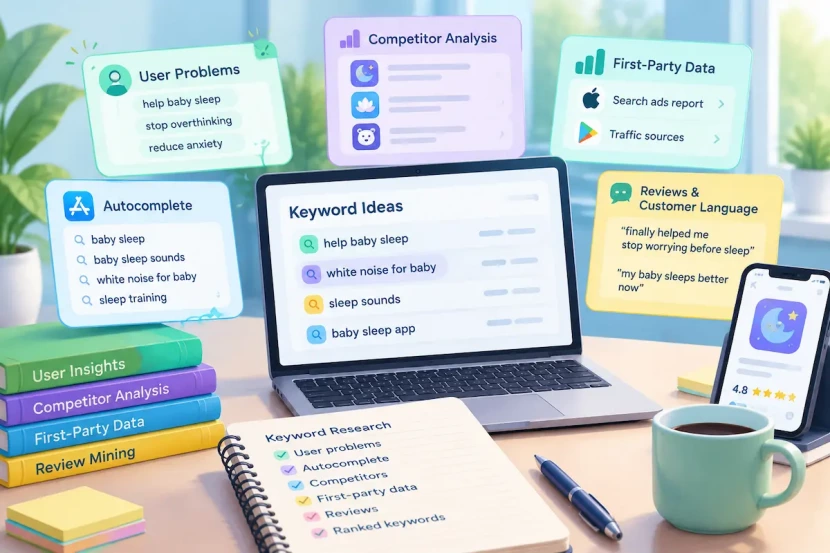
Effective app store optimization keyword research methods combine user problem analysis, autocomplete research, competitor analysis, first-party data, review mining, and expanding keywords you already rank for. These methods help identify keywords based on real user language instead of assumptions.
Start With User Problems
Users often search for solutions, not product terminology. A developer might call a feature a “sleep sounds library” while a parent searches “help my baby sleep”, and an “AI meditation assistant” may be searched as “stop overthinking at night”. Ask what problem the user wants to solve and what they would search before finding your app.
Problem-based terms are a strong starting point and a good source of app long tail keywords. They should not replace broad category terms such as “baby sleep app”, which often carry more demand.
Use Autocomplete
Autocomplete is one of the fastest ways to see how users phrase their searches. Type a broad category or problem-related keyword into the App Store or Google Play search bar and review the suggested terms that appear.
Expand your research by testing variations, such as adding letters from A to Z after your keyword to uncover additional phrases. For example, searching “baby sleep” may surface terms like “baby sleep sounds” or “baby sleep routine.” These suggestions reveal common wording patterns and app store keyword ideas that are often long-tail.
Autocomplete is useful because it reflects search behavior and shows the phrases users commonly use when looking for solutions. It can reveal the gap between how developers describe features and how users describe problems.
However, neither store shows exact search volume, ranking difficulty, or keyword opportunity for these suggestions. A suggested phrase may have strong competition or unclear intent, so treat autocomplete as a source of keyword ideas, not proof of value.
Suggestions can also differ by platform and language. Record each term in your keyword log with its platform and locale, then validate it during the Evaluate step.
Analyze Competitors by Search Intent
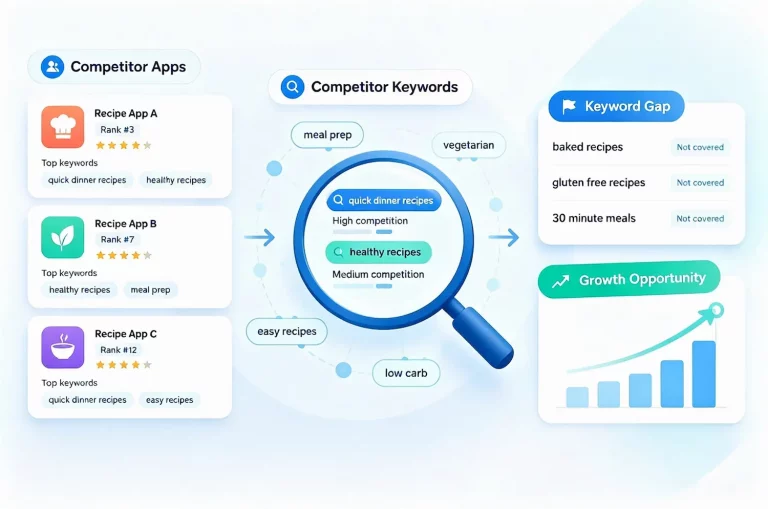
The key question is which apps compete for the same search intent, even if their features differ. Review competitors’ titles, subtitles (iOS), short and full descriptions (Google Play), and ranking keywords from ASO tools. For a deeper process, see our guide to finding the App Store keywords competitors rank for. The iOS keyword field is hidden, so tool data is only an estimate.
Apple and Google restrict irrelevant or misleading metadata, including other companies’ names and trademarks. Do not copy competitor names into your own metadata. Use competitor analysis to learn search intent and market language, not to replicate metadata.
Use First-Party Data
Apple Ads search term reports show the search terms that triggered your ads, though paid behavior may differ from organic search. App Store Connect analytics show impressions and views by source, but no organic keyword data. Google Play Console shows listing acquisition and traffic sources, with detail depending on the reports currently available.
Keyword-level insight on iOS mostly comes from Apple Ads, while Play Console is closer to organic traffic. Keep a separate list per platform, and use these sources to validate ideas, not replace broader research. For Android-specific keyword discovery, see our guide on Google Play keyword research.
Mine Reviews and Customer Language
Reviews of your app and competitors’ apps, and support conversations, show how people describe problems in their own words. A review like “finally helped me stop worrying before sleep” points to themes such as sleep support and anxiety relief that your product description may not use.
If you target several markets, research each language on its own, because users do not phrase the same problem as a direct translation. Step 6 (Localize) covers this in detail.
Expand Keywords You Already Rank For
Keywords ranking around positions 5–15 are often reviewed first because small gains can raise visibility. The range is a rule of thumb and varies by category. Position alone is not enough: check relevance, demand, competition and conversion potential. A lower-ranking keyword with stronger intent can be worth more than a higher-ranking one that brings poor traffic.
Building Your Initial Keyword List
During app store keyword research, do not filter too aggressively yet. Log each keyword with its context:
| Keyword | Source | Intent | Platform / locale |
| help baby sleep | Review mining | Solve a problem | iOS, en-US |
| white noise for baby | Autocomplete | Find a tool | Google Play, en-US |
The next step, Evaluate, will identify which keywords are relevant, valuable and realistic to target.
App Store Keyword Analysis: How to Evaluate Keyword Value and Ranking Potential
Step 3 of 7: Evaluate
After collecting keyword ideas in the Research step, app store keyword analysis helps determine which keywords deserve attention. A strong keyword balances relevance, demand, competition and conversion potential.
Relevance Comes Before Demand
Ask whether users searching this keyword would expect to find your app. “health” is too broad and unclear, while “sleep sounds for baby” is a specific need with clear intent. Remove keywords that do not match your app (for example, relevance of 2 or lower on a 1–5 scale) before evaluating anything else.
Popularity Is a Directional Signal
Neither Apple nor Google publishes exact App Store keyword search volume. Apple Ads shows a relative popularity indicator, not a number of searches. Google Play has no comparable official indicator in Play Console (verify what your account shows). Popularity scores in ASO tools are third-party estimates and can differ between tools. Compare keyword interest with them, but never rely on them alone.
Read Competition, Not Just a Difficulty Score
ASO difficulty scores are estimates. Check the search results yourself: who ranks at the top, whether those apps are relevant, and whether strong brands dominate. Also consider your own app’s strength. A new app and an established one face different odds for the same keyword.
Estimate Conversion Potential
Conversion is the hardest factor to score. Use how well the keyword matches your screenshots and description, Apple Ads conversion data if you run ads, and the history of similar keywords you already rank for. Paid conversion is a reference only, because paid behavior may differ from organic search. Revisit the score once you have real results.
Classify Keywords by Type
For SleepNest, category keywords look like “baby sleep app”, problem keywords like “help my baby sleep”, feature keywords like “white noise machine”, and audience keywords like “sleep sounds for newborns”. Brand keywords are your own name, such as “SleepNest”. Competitor terms are for research only and are not scored.
Type is not the same as intent: “white noise machine” suggests someone seeking a tool, while “how to use white noise for baby” suggests someone seeking guidance. Record intent separately.
Apple and Google restrict the use of other companies’ names and trademarks in metadata, so use competitor terms to understand intent, not as metadata targets. Your own brand name usually ranks well on its own, so it rarely needs much metadata space.
Build a Keyword Opportunity Model
Opportunity Score = (Relevance × Demand × Conversion Potential) ÷ Competition
Score each factor from 1 to 5. For Competition, 5 means very strong competition, which lowers the result. Score only keywords you could actually use in your metadata, so leave competitor terms out. This is a practical prioritization model, not an industry standard. Use it to rank and discuss keywords, and treat close scores as ties.
| Keyword | R | D | C | Competition | Score |
| sleep sounds for baby | 5 | 3 | 4 | 2 | 30 |
| baby sleep app | 5 | 5 | 3 | 5 | 15 |
| health | 1 | 5 | 1 | 5 | 1 (remove) |
R = Relevance, D = Demand, C = Conversion potential, Comp = Competition. The scores are illustrative.
Building Your Keyword Shortlist
Keep keywords that are relevant, supported by demand signals and realistic to compete for. Add the scores to your Research keyword log as extra columns, then shortlist the top group or set a minimum score based on how many keywords your metadata can hold.
Before prioritizing, one more check is needed for low-competition and emerging keywords. The next section covers it, then Prioritize decides which keywords get your limited metadata space.
Finding Emerging Low-Competition Keyword Opportunities
Step 3 helps you evaluate the overall value of your keyword list. This section focuses on a narrower opportunity: emerging and low-competition keywords that may create growth opportunities before competition increases. Teams often look for app store trending keywords low competition in the hope of an easy win, but each candidate still needs validation.
The goal is to identify promising signals and validate them before adding them to your priority list. An emerging keyword is not the same as a trending one. A rising trend is a reason to investigate, not a requirement. Few terms qualify as trending app store keywords low competition high popularity at the same time, so check each signal separately.
Why Low Competition Does Not Always Mean Opportunity
A keyword with few competing apps may indicate an opportunity, but it may also signal limited demand or unclear search intent.
If few strong apps rank, demand may be limited or still developing, so check demand signals. If unrelated apps rank, the intent is unclear, so review the results manually. If competition is low but the fit is poor, the keyword attracts the wrong users and should be removed. If weak apps rank for a relevant term with demand signals, a potential opportunity exists and is worth validating further.
A keyword can look promising and still fail one test. “Newborn sleep schedule” may show growing interest, but many people who search it want a schedule or advice, not a sleep app. For SleepNest it passes the demand signal, while intent fit is uncertain, so it goes on the watch list until search results show apps like SleepNest ranking for it.
How to Discover Emerging Keyword Opportunities
Emerging keywords often appear when user behavior, technology or market needs change. Reviews, communities and support conversations can reveal new ways users describe their problems. New devices, platform features and technologies may sometimes introduce new search terms, while changing user needs can create opportunities before competition increases.
Treat emerging keywords as hypotheses rather than proven opportunities. Validate them through platform data, search results, dated reports or ASO tool estimates.
Apply the Opportunity Filter
At this stage, use a quick intent check while focusing mainly on three signals: demand, intent fit and competition gap.
| Signal | Question | Source |
| Demand | Are users searching for this term? | Apple Ads popularity (Platform data); ASO tools (Estimate) |
| Intent fit | Does the keyword match what your app solves? | Search result review |
| Competition gap | Can your app realistically compete? | Manual ranking analysis |
No single metric can determine keyword value. A keyword may have demand but poor intent fit, or strong relevance but competition that is too difficult to overcome. The strongest opportunities combine user demand, clear intent and realistic ranking potential.
Google Play has no comparable official popularity indicator in Play Console (verify what your account shows), so Android demand evaluation relies more on ASO tool estimates and other market signals.
If a keyword passes most signals but one signal is weak or unverified, keep it on a watch list. Review the list during releases or regular keyword updates, and promote a keyword once its weak signal improves.
Validate Before Prioritizing Emerging Keywords
Before prioritizing an emerging keyword, confirm that ranking apps solve the same problem users are searching for, competitors are not overwhelmingly strong, and your store listing can convert the expected audience.
Apple Ads data can provide additional signals about keyword relevance and user response, but paid behavior may differ from organic search. On Google Play, store listing experiments can help evaluate conversion, but they do not directly measure keyword ranking, so check what Play Console currently lets you test.
Trend data can provide supporting context, but it should not replace keyword evaluation. A keyword does not need to be trending to be valuable, and stable demand can be more useful than short-term growth. ASO tool trends (Estimate) can track changes in keyword interest signals but are third-party estimates. Google Trends shows broader web search interest but does not represent app store searches.
Once a keyword passes these checks, move to Prioritize to decide which opportunities deserve your limited metadata space.
How to Prioritize and Organize Your Keyword List
Step 4 of 7: Prioritize
After evaluation, you have a scored shortlist. Prioritization turns that list into a strategy by deciding which keywords deserve your limited metadata space first, which should wait, and which should be excluded. Examples use SleepNest, the fictional baby sleep app from this guide, and all scores are illustrative.
Turn Scores Into Keyword Tiers
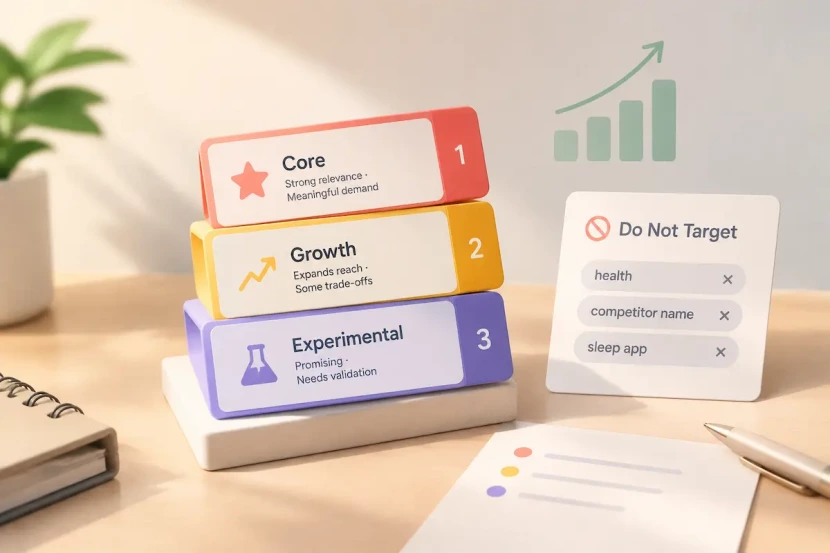
Scores help rank keywords, but tiers define the role each keyword plays in your strategy. A simple structure uses three tiers. Core keywords are your main growth terms. They combine strong relevance, meaningful demand and realistic ranking potential, and they form the foundation of your metadata strategy.
Growth keywords are relevant candidates that expand your reach but involve trade-offs, such as smaller demand, tougher competition or less predictable conversion. Experimental keywords are promising terms whose value is not yet validated, such as keywords from your watch list. Test them before committing more metadata space.
| Keyword | Score | Tier | Reason |
| sleep sounds for baby | 30 | Core | Strong relevance and realistic ranking potential |
| baby sleep app | 15 | Growth | Strong demand but more competition |
| newborn sleep schedule | Not scored yet | Experimental | Validate demand, intent fit and ranking potential first |
Scores are relative within your keyword set, not universal platform benchmarks. A keyword with a lower score can still become a priority if it fits your strategy, audience or growth stage.
There is no official rule for how many keywords to prioritize. The right number depends on your metadata capacity, maintenance effort and available resources. A keyword should not become a priority if you cannot place, track and review it consistently.
Balance Keyword Types Based on Growth Stage
Keyword length and priority are not the same. A long-tail keyword can be a Core keyword if it attracts valuable users, while a broad head term may remain a Growth keyword if competition is too difficult. There is no official threshold between the two types, so treat the distinction as a way of thinking rather than a fixed rule.
Head terms are broader searches, such as “baby sleep app.” They usually have higher demand but stronger competition and wider user intent. App long tail keywords are more specific, such as “sleep sounds for newborn at night.” They often have lower demand but clearer intent and may produce stronger conversion when the search matches the user’s need.
The right balance changes as your app grows. New apps usually benefit from more specific, intent-driven keywords while building ranking strength. Growing apps can gradually expand into related themes and more competitive head terms as ratings, installs and visibility improve. Mature apps can focus on protecting valuable rankings while exploring new markets through localization.
Revisit your priorities when your app stage, competitive landscape or user demand changes.
Decide What Not to Target
A focused keyword list is as important as a large one. Exclude keywords that have low relevance, create compliance risks or are currently unrealistic to compete for.
Apple and Google restrict misleading or irrelevant metadata practices, including inappropriate use of competitors’ names or trademarks. Keywords should describe your app’s value rather than attempt to capture unrelated searches.
For example, “health” may be excluded because it is too broad and does not match SleepNest’s specific value. Competitor names or trademarks should be excluded from metadata because they create compliance risks. A broad term like “sleep app” may be postponed because strong brands already dominate the results.
An excluded keyword is not always permanently rejected. Record the reason and review it when your app, market position or competition changes.
Building Your Prioritized Keyword Plan
By the end of this step, each keyword in your research log should have a tier or an exclusion reason. The next step, Place, will decide where each keyword should appear in your store listing and metadata.
Place Keywords Into iOS and Google Play Metadata
Step 5 of 7: Place
Now that each keyword has a tier, the next job is deciding where each keyword should appear. This step connects your keyword priorities to store metadata fields. Field limits are covered in Step 1, and detailed placement tactics are covered in our Keyword Optimization Strategy guide.
Give Every Keyword One Job
Each keyword should have a purpose and a primary location. Your strongest terms should communicate what your app does, while supporting keywords can expand coverage without making your listing unnatural.
On iOS, place your strongest Core keywords in the App Name and Subtitle to maximize visibility and relevance. Use the Keyword Field to expand search coverage with additional relevant terms that are not already covered in visible metadata.
On Google Play, distribute priority keywords naturally across the listing while keeping readability and conversion as the priority.
Many teams prioritize important terms in the Title and Short Description and use the Full Description for broader context, but this is common practice rather than a platform rule. Avoid keyword stuffing, because Google’s metadata policy discourages excessive repetition, unnecessary detail and unnatural text.
Build a Keyword Mapping Document
A keyword mapping document records where each prioritized keyword appears and its current status, helping you identify gaps, overlaps and unused opportunities before publishing updates. Keep a separate mapping for each language market. The next step, Localize, covers language and market adaptation in detail.
| Keyword | Type | Tier | Field | Platform | Locale | Status |
| sleep sounds for baby | Audience | Core | Subtitle | iOS | en-US | Placed |
| baby sleep routine | Problem | Growth | Short Description | Google Play | en-US | Placed |
| newborn sleep schedule | Problem | Experimental | Full Description | Google Play | en-US | Testing |
The goal is not to place every keyword. Cramming every researched term into your metadata makes the text unnatural and can weaken your strongest keyword focus. Keywords that do not fit should stay in your keyword log with their tier and status for future review.
Experimental keywords can be tested through supporting placements or future metadata updates before replacing stronger terms in higher-priority fields. Their placement should change based on performance data and the available space in your listing.
Plan Around Release Cycles
Metadata changes require planning. On iOS, updates to fields such as the App Name, Subtitle and Keyword Field are submitted through App Store Connect and reviewed by Apple. Google Play listing updates also take time to process and appear. Check current platform behavior before planning changes.
This means app store keyword changes should not be treated as a weekly adjustment. Batch related changes, allow enough time to observe results, and record what changed and when. A clear change history makes the Measure step more reliable because you can compare performance before and after each update.
The next step, Localize, will adapt this keyword plan to different languages, markets and user search behaviors.
Localize Keyword Research for Different Markets
Step 6 of 7: Localize
Once you have a validated keyword approach in one market, the next step is adapting it to other languages and regions. This section covers the principles of keyword localization. Detailed tactics are covered in our Keyword Optimization Strategy guide.
Translation Is Not Keyword Localization
Users in different markets search in different ways. A direct translation of your keyword list often misses the terms people actually use and may target phrases with little search demand. Treat each market as a new research project, not a simple language conversion.
The same need may also be described with different concepts across markets, not just different words, so start by learning how local users describe their problems and expectations.
Research Each Market Separately
Repeat the Research and Evaluate steps for each target market, and keep a separate keyword log and mapping document for each one (the Locale column exists for this). Consider three major differences. Language affects the everyday words, phrasing and spelling users prefer. Competition varies by region, so a keyword that is highly competitive in one market may be less so in another. User behavior influences how people discover apps and what they expect from a store listing.
Capacity matters too. The iOS Keyword Field is measured in bytes, and languages that use multibyte characters, such as Japanese, Chinese or Korean, may require more bytes per character. This changes how many terms fit in the available space, so check current byte counting for each language before planning your metadata.
Start With Minimum Viable Localization
You do not need to localize everything at once. Start with the markets that bring the most revenue or show the strongest demand, as long as you have a realistic chance to compete and can maintain the content. Localize your Core keywords and the fields that hold them in your mapping document, then expand as you collect performance data.
A focused rollout also makes results easier to read. That helps the next step, Measure, where you will track rankings, visibility and keyword performance after optimization.

Track Keyword Performance and Improve Your Strategy
Step 7 of 7: Measure
App Store optimization research does not end when you publish your metadata. Keyword research continues through measurement, testing and iteration.
Track More Than Rankings
A ranking tells you where your app appears, not whether the traffic was valuable. Rankings are only one part of ASO performance. Learn more about how store ranking systems work in our guide to Google Play ranking factors.
Track visibility and conversion together, and note that the two platforms report different data.
| Metric | iOS source | Google Play source | Note |
| Keyword ranking | Third-party tools (Estimate) | Third-party tools (Estimate) | Rankings fluctuate, so watch trends rather than single days |
| Impressions and product page views | App Store Connect (Platform data) | Play Console (Platform data) | The two platforms define these metrics differently |
| Page-level conversion rate | App Store Connect | Play Console | Reflects page appeal, not keyword quality |
| Keyword-level conversion | Apple Ads only (paid), or estimates | Search-term related reports in Play Console (check what your account shows) | Organic keyword conversion on iOS is hard to get first-hand |
Compare results against the baseline you recorded before each change, so you can tell whether an update helped.
Diagnose Visibility vs Conversion Problems
When results disappoint, first decide whether the problem is visibility or conversion.
If impressions and rankings are low, it is a visibility problem: users are not seeing your app for the keyword. Return to Step 3 and Step 5 and check the keyword’s relevance and where you placed it.
If you have impressions but few product page views, your title or icon may not match the search term. Check whether the keyword is consistent with the first screen of your store listing.
If you have page views but few installs, it is a conversion problem: your page is not persuasive enough. Improve your screenshots, ratings and description.
If rankings rise but installs stay flat, the keyword may not match user intent. Re-evaluate its relevance and conversion potential.
Know When to Update Keywords
Do not change keywords every week or at random. Base your app store keyword changes on your release cycle, market changes and performance trends. Frequent changes also make results harder to read, because you cannot tell which change caused which effect. Observe each change for at least 2 to 4 weeks before judging it. The right window depends on your traffic volume and category, so lengthen it if your data is sparse.
Keep a keyword changelog that records the date, the keywords added or removed, the field, the platform, the locale and the reason for each change. A clear history lets you compare performance before and after each update, and it shows which decisions to repeat and which to reverse.
The results then feed back into Research. Keywords that perform well suggest related terms to explore, and keywords that fall short return to Evaluate or move to your watch list. This turns keyword research into an ongoing cycle rather than a one-time task.
Common App Keyword Research Mistakes
Most keyword problems show up in your data before they become costly. Use this table as a checklist when results look wrong. Each row shows what the mistake looks like in practice and where to go back in the framework.
| Mistake | How to spot it | Fix |
| Choosing keywords only by popularity scores | High-popularity keywords bring few installs | Return to relevance and the opportunity score (Step 3) |
| Ignoring keyword types and intent | Your list is mostly one type of keyword | Add Problem and Audience terms, and record intent (Step 3) |
| Assuming low competition means easy growth | Low-competition keywords get no impressions | Validate them with the opportunity filter (emerging keywords section) |
| Copying competitors blindly | Your list nearly matches a competitor’s | Start from user language and reviews (Step 2) |
| Translating keywords directly | New markets get almost no impressions | Research each market separately (Step 6) |
| Updating too frequently | You cannot tell which change worked | Set an observation window and keep a changelog (Step 7) |
| Keyword stuffing | The text reads unnaturally, which risks a policy violation | Give each keyword one job and write naturally (Step 5) |
If several rows describe your listing at once, start with the earliest step in the framework. Fixing relevance and intent first usually makes the later problems easier to see.
ASO Keyword Research Tools and Data Sources
You do not need every tool to do good keyword research. What matters is knowing what each type of source can tell you, and what it cannot. This section summarizes your options and how to choose between them.
Free Sources
Free sources such as autocomplete, reviews and search results are useful for discovering user language and validating search intent, but they provide limited demand data.
First-Party Data
First-party data is the strongest source for validating keyword performance because it reflects your own users and conversion behavior. However, it does not replace broader market research or competitor analysis. The Research step compares what each one shows and where its limits are, so use that comparison rather than repeating it here.
Paid ASO Platforms
Paid tools add ranking tracking, popularity and difficulty scores, competitor keyword data and trend views. Treat their numbers as Estimate values: they are directional, built from third-party models, and they are not official platform figures. Two tools can report different numbers for the same keyword, so compare trends within one tool rather than values across tools.
When choosing a platform, check the following:
Country coverage matters if you plan to localize. Update frequency affects how current rankings and trends are. Methodology transparency tells you how popularity and difficulty scores are calculated. Export options determine whether you can move data into your own keyword log. Finally, coverage often differs between iOS and Google Play, so confirm the tool is strong on the platform you care about most.
Whichever tool you choose, use it to support your own judgment. Validate important keywords with search results and first-party data before you commit metadata space.
Keyword Research Is a Loop, Not a List
A keyword list is a snapshot. Users change how they describe their problems, competitors update their listings, and store policies and search systems evolve. The list you build today will become less accurate over time, and that is not a failure of the process. It is the reason the process exists.
Think back to SleepNest. Its first keyword ideas were assumptions about what a parent might search when looking for a solution. Research and evaluation turned those assumptions into structured decisions: user language from reviews, keyword evaluations and prioritization choices. Tiers, placement and localization turned that evidence into decisions. The result is more than a ranked list of terms. It is a record of what you have learned about your users and how they search.
Do not aim for the perfect keyword list. Aim for a repeatable loop: research, adjust, measure and learn. Competitors can copy your title. They cannot copy what you have learned about your users.