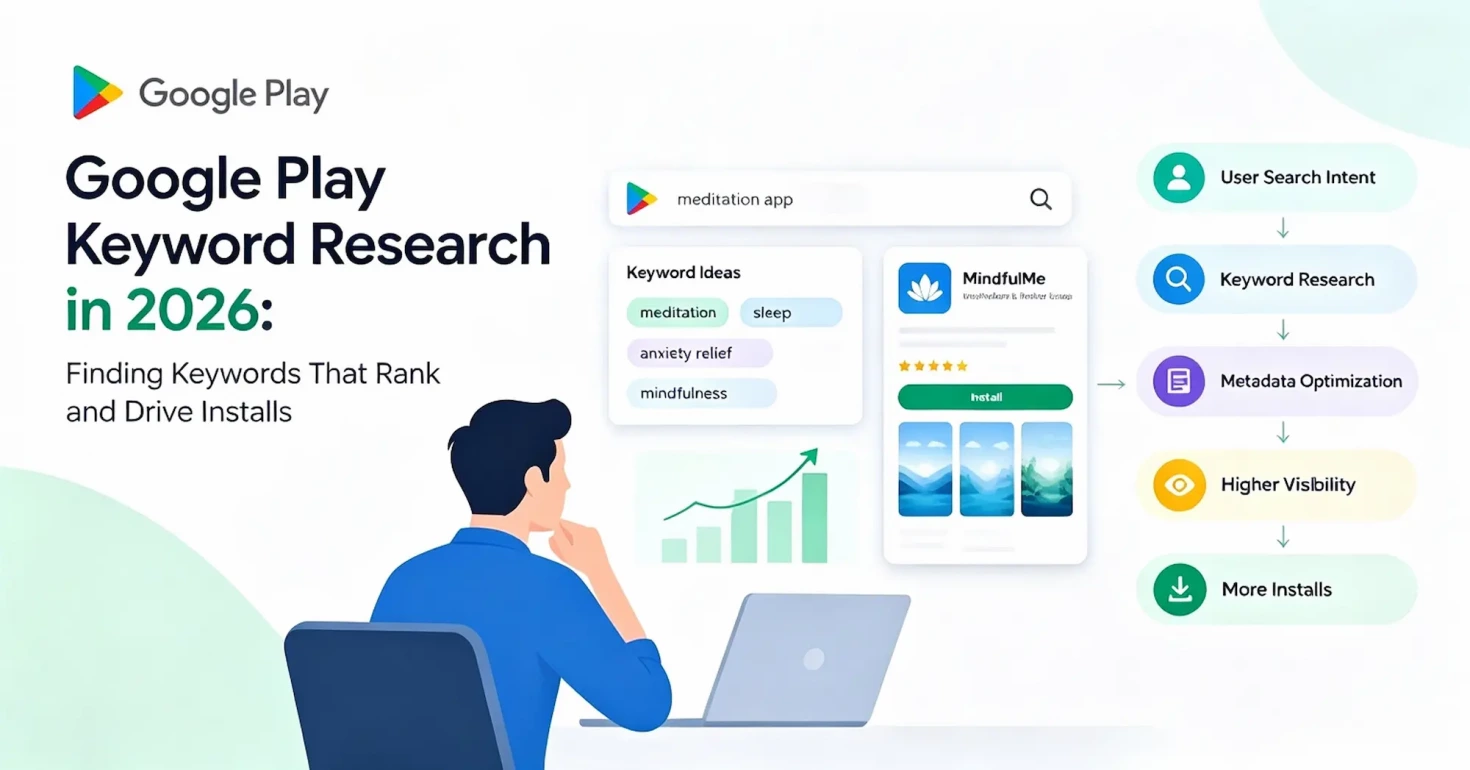
Most Google Play keyword advice still follows Apple’s App Store playbook: find high-volume keywords, drop them into the listing, wait for rankings to climb. That works on Apple’s App Store, which has a dedicated keyword field. Google Play has no such field, and no official keyword search volume — every number a third-party tool shows you is an estimate.
So what decides whether your app shows up? Google Play reads your listing text — title, short description, full description — and matches it against what users actually search. The closer the match, the more your app gets shown, and the more it gets shown to the right users, the more installs you earn.
On Google Play, method matters more than data. Your own app is the only search data you can fully trust.
Key Takeaways
- No keyword field — your whole listing is the ranking signal
- Relevance and intent beat estimated search volume
- Find keywords via seeds, autocomplete, competitors, reviews, Console
- Score by relevance, intent, demand, competition — relevance is the gate
- Place keywords by field: title, short description, full description
- Optimization never ends — track, measure, refresh
What Are Google Play Keywords and How Does Keyword Research Work?
What Are Google Play Keywords?
Understanding Google Play ASO keywords starts with a simple idea: a keyword is any search query a user types when looking for an app like yours: “sleep meditation,” “anxiety relief app,” “guided breathing.” Each one is a potential opportunity, because it reflects a real need.
Google Play has no keyword field for developers to fill in. It decides which searches your app is relevant for based on your listing text — which changes what “keyword” even means: not a word you add to your listing, but a search query where Google Play decides your app fits the user’s intent.
How Google Play Keywords Differ From Apple App Store Keywords
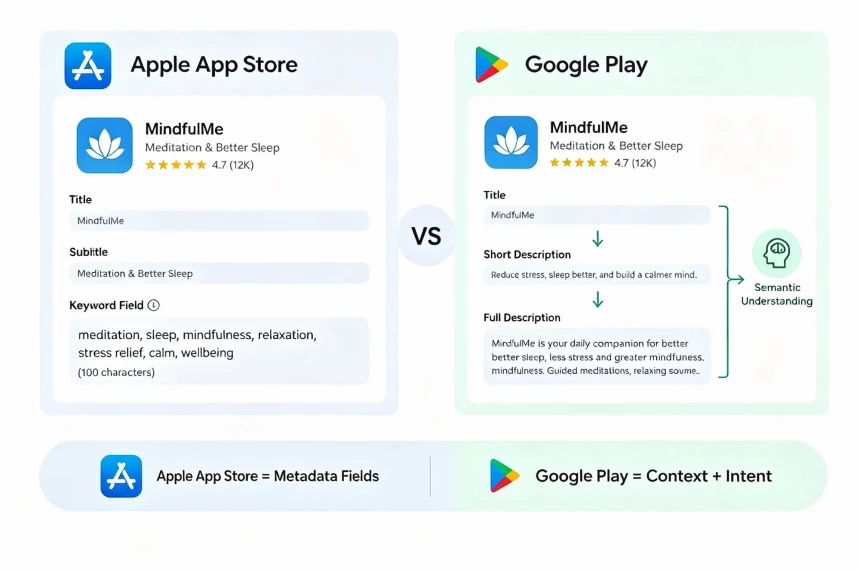
Apple’s App Store gives developers a dedicated keyword field — up to 100 characters — that Apple uses, alongside title and subtitle, as a search-matching signal, and App Store keyword field optimization follows its own set of rules. Google Play draws that same signal from your full listing instead: title, short description, and full description together. For a side-by-side view, see our overview of ASO keyword optimization guide.
Because of this, keyword optimization on Google Play is less about placing isolated keywords and more about building clear relevance through natural language. Keyword stuffing is also a policy risk, not just a weak strategy — Google’s metadata policy explicitly prohibits spammy keywords, warning against descriptions written in a “car racing, car driving, race cars” style. A listing that explains your app’s value in natural language beats one packed with repetitive terms, and it stays out of policy trouble.
How Does Google Play Understand and Index Keywords?
Google Play doesn’t just match literal text — it reads for meaning, the way a search engine reads a page. That’s why a sleep-focused meditation app can surface for searches like “insomnia help” or “calm before bed,” even when those exact words never appear in the listing.
User behavior feeds this process too. Signals like installs, engagement, and retention are widely believed to shape how Google Play evaluates matches, though Google has never published its exact formula. These signals are part of the broader Google Play Store ranking factors that influence app visibility.
What Does Google Play Keyword Research Include?
Google Play keyword research is the process of discovering, evaluating, and prioritizing keywords that connect your app with the right users. A complete process usually includes four steps:
Keyword discovery — find potential keywords from seed terms, autocomplete suggestions, competitor listings, and user reviews.
Search intent analysis — understand what users want when they search a term, and whether that matches your app’s purpose.
Keyword evaluation — weigh relevance, competition, and estimated demand together, instead of relying on any single number.
Performance validation — use your own Google Play Console data and rank tracking to see which keywords actually drive installs.
Finding keywords is only the first step. The real goal is finding searches where your app can be discovered, chosen, and installed.
Why Relevance and Search Intent Beat Keyword Volume on Google Play
Google Play never reveals its complete ranking system, so good ASO comes down to three questions: How is keyword demand estimated? How does Google connect keywords to your app? And how does user intent affect keyword value?
Does Google Play Provide Official Keyword Search Volume?
No. Unlike Google Search, Google Play never publishes how many times a keyword gets searched. Play Console gives you your own app’s performance data — impressions, clicks, installs — but not store-wide search totals for any keyword.
Since no official source exists, ASO tools estimate demand instead, drawing on search suggestions, ranking data, category trends, and proprietary datasets. That’s why different platforms show different volume numbers for the same keyword.
Treat keyword volume as a directional signal, not an exact measurement. Its real value is comparison: if one keyword shows meaningfully higher demand than another, that’s the signal worth acting on. For your own app, the most reliable data still comes straight from Google Play Console.
Keywords Help Google Understand Your App
Your listing text does double duty: it sells the app to users, and it tells Google Play what your app is about. Every topic you cover — not just your top keyword — adds to that picture. For our meditation app example, that might mean naming distinct needs like better sleep, lower anxiety, or a calmer bedtime routine, rather than repeating one phrase. The more real needs your listing names, the more searches Google Play can confidently connect you to.
Better Keyword Targeting Improves Organic Discovery
Keywords help your app appear in search results, but visibility only matters when it reaches users with the right intent. A keyword that attracts the wrong audience may increase impressions while lowering conversion quality. The goal is not maximum traffic — it is attracting users whose expectations match your app.
Why Search Intent Matters More Than Keyword Volume in 2026
Keyword volume shows demand; search intent shows motivation — and these are not the same thing. “Meditation app” may just be exploratory browsing, while “meditation for anxious thoughts before sleep” signals a specific problem and a clear goal. The second search may have lower volume, but it often attracts users much closer to installing.
This shift matters even more now: in 2026, Google Play shifted its store listing performance reports toward intent-based metrics, measuring user actions such as Install, Open, and Pre-register clicks to better understand listing performance, while acquisition data remains available in other reports. Good keyword research in 2026 isn’t about collecting more keywords. It’s about finding the ones that connect your app with users who are most likely to install.
How to Find Google Play Keywords
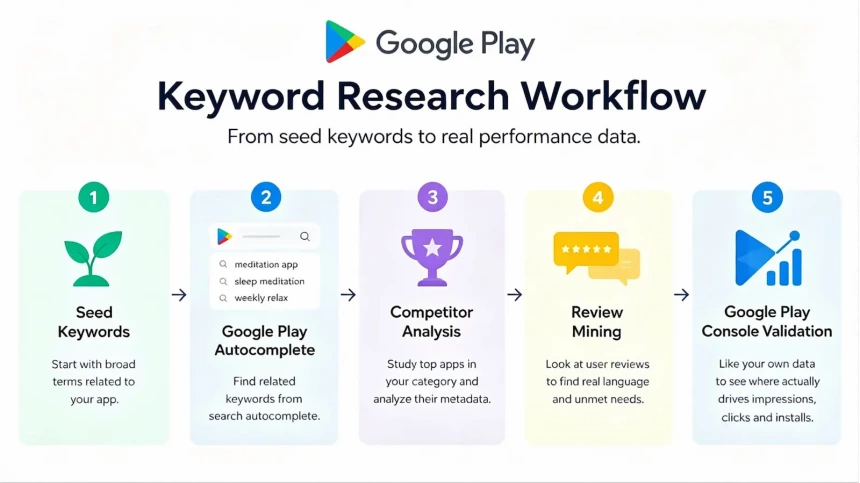
Five methods take you from broad discovery to real performance data, each illustrated with examples from one meditation app. Each method produces something you keep: a seed list, a candidate pool, a competitor matrix, a review phrase bank, and a validated shortlist. The goal is not collecting keywords — it’s finding searches whose users are close to installing.
Start With Seed Keywords Based on Your App
Every keyword list starts with seed keywords describing what your app does and which problems it solves. For a meditation app, seeds might group like this:
- What the app is: meditation, guided meditation
- Problems it solves: stress relief, anxiety management
- When people use it: sleep support, focus breaks
Don’t stop at features — users search for solutions, not product descriptions. A meditation app may offer breathing exercises, but users type “calm my anxiety” or “sleep faster at night.” Cover all three angles, and your seeds will span categories, problems, and use cases. Seed keywords are raw material, not final targets — each method below expands this list.
Use Google Play Autocomplete to Discover User Searches
The Play Store search bar suggests completions as you type, and those suggestions come from real user searches. Enter each seed keyword one at a time and record every suggestion. Typing “meditation” may surface searches like meditation for sleep, meditation music, and meditation for anxiety.
Then vary the seeds with modifiers — app, free, beginner, guided, daily — since each combination can reveal a new pattern. Suggestions can differ by region and account history, so test in the markets you target and note where you tested. Keep a running list, logging each suggestion next to the seed that produced it.
Analyze Competitor App Listings
Competitor listings show which topics the market rewards and the language top apps use to describe themselves. Start with apps that rank for your seed terms, then add apps solving the same user problem even if they rank elsewhere. For each competitor, review the title, short description, full description, and feature positioning.
Look for patterns across several apps — if leading meditation apps all mention sleep stories, anxiety relief, or guided meditation, those themes reflect real user needs. Gaps matter just as much: if nobody covers “meditation for teens” or “quick meditation breaks,” that topic may be an opening. Build a matrix with competitors on one axis and themes on the other. Terms many apps use are table stakes; terms few apps use are your opportunities. Don’t copy competitor listings — treat them as research input on market expectations.
Mine User Reviews for Keyword Ideas
User reviews hold the exact language people use for their problems and goals — often closer to real searches than any marketer’s guess. Start with your own reviews, then move to competitors’. Use Play Console and other review workflows to collect and analyze them at scale, looking for phrases that explain why users downloaded the app, what problem they wanted to solve, and which features they value.
Group similar comments by the need they express — a theme that appears again and again is a keyword candidate, a single comment is not. Reviews often read like “helps me fall asleep faster” or “good for racing thoughts.” Keep the user’s wording, but translate it into natural listing language rather than pasting phrases in verbatim.
Validate Keywords With Google Play Console Data
Play Console data is retrospective — it shows searches that already reached your app, not keywords you haven’t ranked for yet. Start with the queries behind your traffic; Console reports split impressions and clicks by search term, so you can see which candidates already perform.
Use the funnel to diagnose, not just to count: high impressions with low click-through means your listing doesn’t match the query, while high clicks with low installs means your listing page doesn’t convince users to install. Mark every candidate that already earns impressions or clicks as a proven starter — the rest of your list still lacks real data, which is where the prioritization framework below becomes useful.
How to Choose Google Play Keywords by Search Intent
Not every keyword deserves the same attention. Some already show real performance signals; others are new ideas without data behind them yet. The goal isn’t to find the biggest keywords — it’s to find keywords that match your app, attract the right users, and create realistic growth opportunities.
Understand Four Different Types of Search Intent
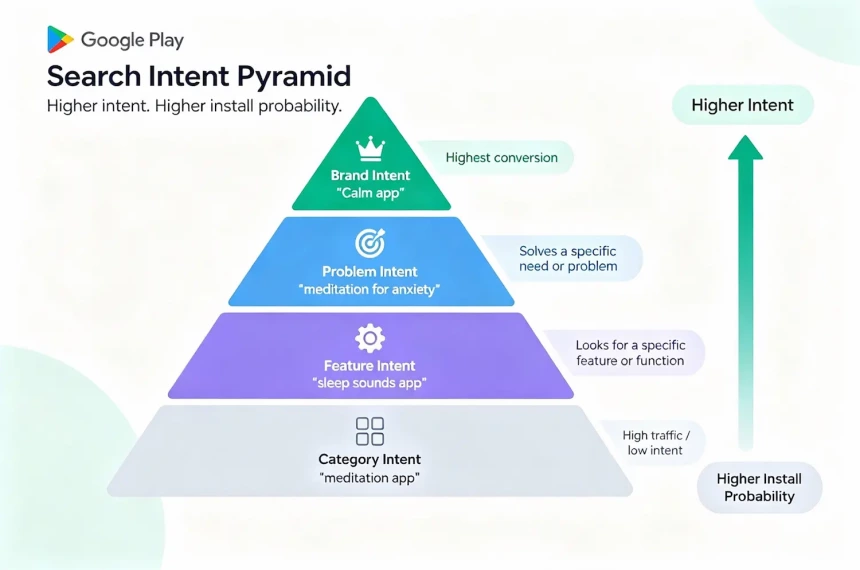
Google Play searches usually fall into four intent types, and how well your google play store keywords match each one is one of the clearest signals Google Play uses to evaluate your listing:
Category intent — broad searches like “meditation app” or “fitness app.” These reach the largest audiences but carry the weakest conversion.
Feature intent — searches for a specific capability, like “sleep sounds app” or “calorie tracker with barcode scanner.” These users know what solution they want.
Problem intent — searches describing a need or goal, such as “meditation for anxiety.” The user is hunting for a fix, making this the most valuable type for conversion.
Brand intent — searches naming a specific app, like “Calm app.” These carry the strongest install intent, but only matter when the brand is yours.
Modifiers like “free,” “offline,” or “for beginners” can attach to any intent type without changing it. Category terms build awareness; problem terms convert.
Use a Keyword Prioritization Framework When Volume Data Is Unavailable
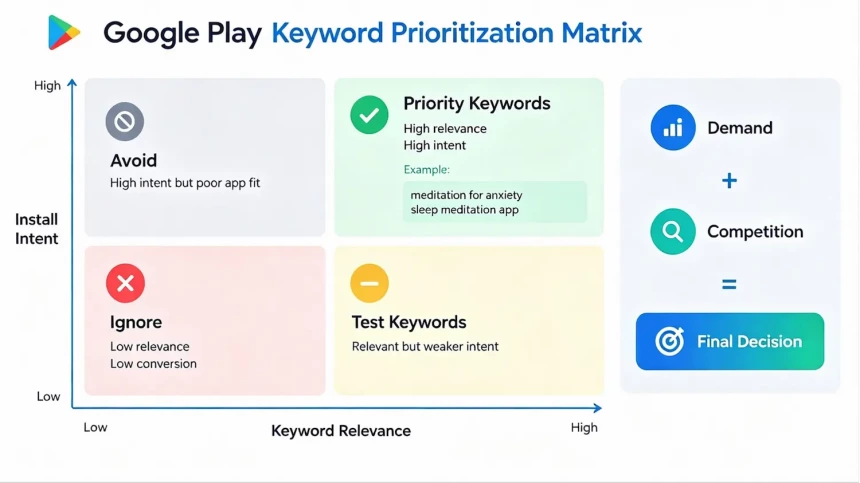
Since volume numbers are only ever estimates, a simple framework compares your candidates across four factors instead:
1. Relevance — does this keyword describe what your app actually offers? If users search for a feature your app lacks, ranking for that term builds nothing lasting.
2. Intent strength — how close is this user to installing? Problem-based searches usually beat broad category searches on intent.
3. Demand — how many users might search this keyword? Treat estimates as directional and use them to compare options, never as the deciding factor alone.
4. Competition — how hard will it be to rank? Look at how strong the competing apps are — established brands, strong ratings, category dominance — not just how many target the term.
Score each keyword High, Medium, or Low on every factor. One rule comes first: relevance is the gate, not a tiebreaker — if a keyword scores below High on relevance, drop it or set it aside as low priority. No other factor can rescue a mismatch.
Think in three tiers: top priority keywords already show demand or score well on intent and competition together, so build your listing around them. Second-tier keywords get tested inside your description first. Third-tier keywords stay on a watchlist until you have more data.
Balance and Evolve: Head Keywords vs. Long-Tail Keywords
Head keywords are short and broad; long-tail keywords are longer and more specific. Head keywords build visibility and reach bigger audiences, but they’re harder to rank for since established apps compete hardest there. Long-tail keywords capture specific needs with less direct competition — though bigger apps can still surface through semantic matching — and often come from users further along in their decision, closer to installing.
For our meditation app, head keywords might be “meditation” and “sleep meditation,” while long-tail keywords might include “meditation for racing thoughts at night” or “guided meditation before sleep.” A balanced strategy uses both, since together they cover more of the search journey than either one alone.
This balance should shift as your app grows. For new apps, long-tail keywords are usually the best starting point — more specific, less competition, clearer intent. As your app gains installs, reviews, and ranking history, broader head keywords that were unrealistic at launch can become achievable, since your app authority grows and Google Play has more signals to evaluate your relevance. Growth means expanding coverage, not replacing long-tail terms — the strongest strategies keep both working together over time.
Google Play Keyword Tools and the Search Volume Reality
Which Tools Can Help With Google Play Keyword Research?
You don’t need a paid tool to start tracking Google Play keyword search volume. Google Play Console is the most important source, since it’s the only place showing your app’s own real performance data. Google Trends helps too, comparing relative interest between terms over time, and store autocomplete remains one of the simplest and most reliable free methods.
Paid ASO platforms estimate keyword search volume, track your rankings over time, and show which keywords competitors target — useful once you’re managing dozens or hundreds of keywords across markets. A solo developer with one app may only need free sources and manual tracking, while a team managing multiple apps across countries often benefits from a paid platform’s rank tracking and competitor visibility. Whichever tools you use, remember that every number they show is still an estimate, never Google’s actual search volume.
How to Use Search Volume Estimates Correctly
Use estimates for comparison, not prediction — if one keyword shows meaningfully higher estimated demand than another, that’s a useful signal for prioritization, not a forecast of installs. Cross-check estimates against your own data whenever you can: if a tool shows high volume for a keyword but your Console data shows low impressions once you rank for it, trust your own performance data over the third-party estimate.
Watch for consistency over precision — a keyword that scores high across multiple tools is a stronger signal than any single number. And remember relevance still comes first: a keyword with impressive volume still isn’t worth pursuing if it doesn’t match what your app actually does.
How to Optimize Google Play Metadata With Keywords
Google Play keyword optimization happens in your metadata — this is where all of this becomes visible, to users and to Google Play’s search systems.. Your goal isn’t inserting as many keywords as possible; it’s placing the right ones in the right field so your listing explains your app and matches the searches that matter.
Understand Google Play Metadata Fields
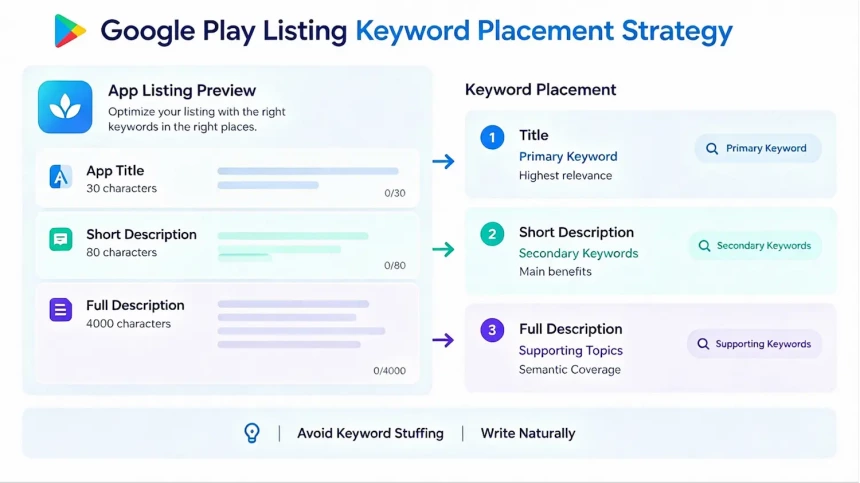
Google Play gives you three main text fields, each playing a different role in search relevance and conversion:
Title (up to 30 characters) — the most prominent field and one of the first things users see in search results.
Short description (up to 80 characters) — appears directly below your title, helping users quickly understand your value while giving Google Play additional context.
Full description (up to 4,000 characters) — the most space to explain your app, cover related topics, and build semantic relevance.
A simple keyword placement strategy: primary keywords go in the title when they clearly describe your app; secondary keywords appear naturally in the short description; supporting topics get covered throughout the full description.
Optimize Your App Title for Keywords and Conversion
With only 30 characters, your title must balance brand recognition, app clarity, and keyword relevance. A practical structure is brand name + core keyword or value proposition. Avoid adding multiple keywords just for ranking purposes, as keyword-stuffed titles can reduce readability and user trust.
Choose title keywords based on search relevance, user intent, and competitive relevance. The best keywords should match what users search for, describe your app’s core purpose, and align with competitors targeting similar audiences.
Keep your title focused and natural. For new apps, leave space for a descriptive keyword instead of using all characters on a long brand name. Use the title for your primary keyword, while the short description supports related benefits and secondary terms.
Write a Keyword-Rich Short Description
With only 80 characters, every word needs to add value. Lead with your app’s main benefit in natural language — “Guided meditation for better sleep and less anxiety” communicates both the solution and the benefit without sounding forced. Use phrases that reflect real user searches rather than vague marketing language: if users search “sleep meditation,” that phrase is more valuable than a broader term like “mindfulness journey.” Test different versions over time using store listing experiments to see how messaging changes affect conversion.
Optimize Full Description With Semantic Coverage
The full description is where you expand your app’s topic coverage — features, use cases, and problems solved. This isn’t the place to repeat your main keyword; more space just means more topics to cover, not more repetition. For our meditation app, that might include sleep meditation, guided breathing, anxiety relief, stress management, and mindfulness, each appearing in a sentence that helps users understand the app.
Write for people first, search systems second — a clear description that explains what your app does, who it helps, and why users should choose it will naturally include relevant language. Most users scan rather than read every word, so use short sections, clear headings, and readable paragraphs. Don’t write simply to reach the 4,000-character limit — use only the space you actually need.
Localize Keywords for Different Languages and Regions
Keywords don’t translate word for word, because search behavior changes across languages and markets. A direct translation of “sleep meditation” may be grammatically correct but still fail to match how local users actually search — different markets often describe the same problem differently.
Research keywords separately for each target market, repeating the discovery process from earlier sections — autocomplete, competitor listings, and user reviews — in each language and region, and paying attention to cultural differences in how users describe problems like anxiety, stress, or productivity. Localization is a separate keyword research process for every market where you want to grow, since the best-performing keywords in one country may not be the best opportunities in another.
How to Track, Test, and Iterate on Keyword Rankings
Google Play keyword analysis and monitoring are not one-time projects. Understanding how the keyword ranking algorithm works can help you interpret ranking changes as competitors update their listings and user search behavior evolves. Keyword optimization only works when you connect ranking changes with user behavior.
Build a Keyword Tracking Framework
Start with your priority keywords — both the ones that already show performance signals and the new targets you want to test. Track by category rather than alphabetically: separate head keywords from long-tail, and organize by market if you operate in multiple countries.
Choose a tracking schedule based on your situation — weekly is usually enough for established apps, while new launches, major updates, or active tests may need more frequent checks. Don’t track rankings in isolation; a change means little without context, since it could come from a metadata update, a competitor change, or seasonal search behavior. The goal is understanding why a keyword moved and what action to take next.
Measure Rankings Together With Store Performance
Rankings alone don’t tell you whether your keyword strategy is working — a keyword can rank well and still bring limited growth, since visibility only matters when it attracts users likely to install. Combine ranking trends with Console’s impressions, clicks, and click-through rate to see whether increased visibility leads to meaningful results.
A rising rank with flat installs can signal a conversion problem, but it may also mean the keyword has limited demand or attracts users with weak intent. A falling rank with stable installs isn’t always a crisis — your app may still attract valuable users from a smaller but more relevant audience. Reviewing ranking changes together with performance signals turns tracking from a vanity metric into a real optimization process.
Validate Keyword Changes With Store Listing Experiments
Store listing experiments let you compare different versions of your listing — icon, screenshots, feature graphic, short description, and full description — against real users. (The app title itself can’t be tested this way, since title changes affect both relevance and perception and require more careful evaluation.)
Experiments are especially useful for testing messaging changes, such as replacing a broad phrase with a more intent-focused keyword in your short description. Run tests long enough to collect meaningful data, and change one major element at a time — if you update screenshots, description, and other metadata together, you won’t know which change caused the result.
Build a Continuous Optimization Loop and Know When to Refresh
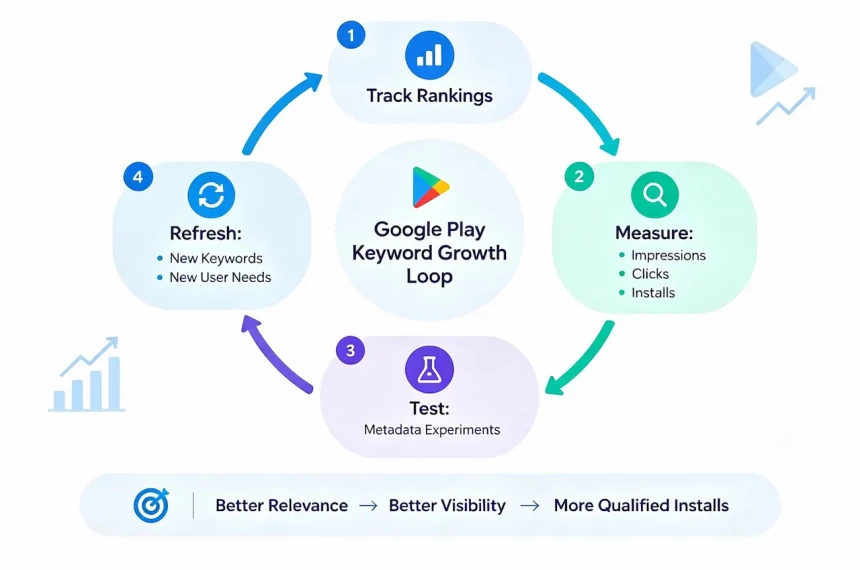
Keyword optimization doesn’t end when your listing is published. Search behavior changes, competitors improve their listings, and your app adds new features — each creating new keyword opportunities. Set a regular review schedule; for many apps, quarterly works well. During each review, repeat the research process:
- Check new autocomplete suggestions
- Analyze competitor listings
- Review recent user feedback
- Identify new features or use cases
- Reevaluate your keyword priorities
Watch for warning signs: if rankings decline while competitors improve, your listing may have fallen behind; if rankings stay stable but conversion drops, user expectations may have changed. Major product updates are also strong opportunities for fresh keyword research, since new features often create search opportunities that didn’t exist before.
The process is simple — Track → Measure → Test → Refresh. Keyword research is not something you finish once; it’s part of a continuous app growth strategy you maintain as your app, competitors, and users continue to change.
Common Google Play Keyword Research Mistakes That Hurt Your ASO Results
Even with a solid process, mistakes can quietly reduce visibility, weaken conversion, and waste optimization effort. More traffic doesn’t always mean more installs, and more keywords don’t always mean better ranking — the goal is finding searches that match your app and attract users who are likely to install.
Choosing Keywords Only Based on Search Volume
Chasing the biggest number is the most common — and most expensive — mistake in keyword research. Volume alone can bring low-quality traffic that expects something different from your app, limiting long-term growth. Relevance has to come first: a smaller keyword with strong intent can outperform a much larger one that attracts the wrong users.
Using Irrelevant Keywords to Chase Rankings
Targeting keywords with little connection to your app rarely creates sustainable growth — users who land on a mismatched listing leave quickly, weakening the performance signals Google Play uses to evaluate your app. Every keyword should represent a feature, problem, or use case your app genuinely supports; if it doesn’t, it isn’t an opportunity, it’s a distraction.
Keyword Stuffing Your App Description
Repeating the same keyword again and again doesn’t create better optimization — it makes the description harder to read and risks violating Google Play’s metadata policies against low-value, repetitive text. Expand your topic coverage naturally instead: a meditation app shouldn’t repeat “meditation” endlessly, it should cover related topics like sleep support, guided breathing, and stress management in useful context.
Copying Competitors Without Finding Opportunities
Competitor research is valuable; copying competitor keywords blindly is not. A competitor’s strongest keyword may not be your best opportunity, since their audience, brand strength, and app maturity may differ completely from yours — and copying their listing puts you in direct competition for the same terms without their authority behind you. Use competitors to understand the market and look for gaps: if every competitor ignores a relevant user need, that gap may be a better opportunity than anything they already rank for.
A few other pitfalls worth a quick gut-check: skipping long-tail keywords in favor of only head terms (you’ll miss users who are already close to deciding), translating keywords instead of researching them fresh for each market, and treating keyword research as a launch checklist item instead of an ongoing habit. Each of these is really a variation on the mistakes above — the fix in every case is the same discipline of relevance, evidence, and regular review covered throughout this guide.
The Work That Never Quite Finishes
Google Play never gives you a keyword field, a complete volume chart, or a finish line. The apps that grow over time aren’t the ones chasing the biggest keywords — they’re the ones that keep asking whether their keywords still match what users need and how they search.
Use this guide as a starting framework, not a fixed script. Build your keyword list, test it with autocomplete and reviews, validate it with Google Play Console, and repeat the process as your app evolves. That cycle of discovery, testing, and refinement is what creates sustainable ASO growth in 2026.