ASO keywords are the terms and phrases that help app stores understand an app’s relevance to user searches. They can come from user search queries, app metadata, and marketplace language patterns. They influence whether your app appears in relevant searches, but ranking for a keyword does not guarantee downloads. The best app store keywords balance relevance, demand, competition, and business value, rather than chasing the highest search volume.
Choosing them well is harder than it sounds. Keyword data is often estimated, and the two stores use different indexing systems and metadata fields, so a keyword that works in one may not work in the other.
This guide explains how to research, evaluate, place, and improve ASO keywords. For step-by-step execution, explore our guides on ASO keyword research, app store keyword search volume, and keyword optimization.

Key Takeaways
- Choosing keywords is a strategic decision, not simply a process of collecting high-volume terms.
- Prioritize keywords that match your app’s value proposition and user intent.
- Each store indexes different fields, so plan separately.
- Keyword scores are directional, not exact.
- Keyword results require patience and structured measurement.
What Are ASO Keywords?
ASO keywords are the search terms users enter when looking for apps on the App Store or Google Play. They connect user needs with app visibility by helping stores understand which apps are relevant to a search.
Keywords Represent User Intent, Not Just Traffic
Keyword value depends on what users want to achieve, not just how often they search. For example, “trip planner” may represent different goals, such as creating itineraries or finding flights. The keyword alone does not reveal the full user intent.
Effective ASO keywords should reflect what users are trying to achieve and what the app actually provides.
Keyword Types by Brand Relationship
Keywords can be grouped by their relationship with an app brand. Branded keywords (e.g., “Airbnb”) come from users searching for a specific app or company. Non-branded keywords (e.g., “travel app”) reach users who are still exploring a category or looking for a solution.
Competitor-branded keywords can help identify market demand and inform competitive research. However, avoid using competitor names or trademarks in ways that are misleading, irrelevant, or unauthorized. Apple and Google Play apply their own metadata and intellectual property policies, so review the current rules before including third-party brand terms in a listing. For paid campaigns, check the relevant advertising platform’s trademark and targeting policies separately.
Keyword Types by Search Need
Users search with different goals, so ASO keywords can be grouped by their primary intent. These categories often overlap rather than existing as strict labels. Category keywords (e.g., “travel planner app”) describe a broad app space. Feature keywords (e.g., “offline maps”) focus on a specific function, problem keywords (e.g., “flight delay help”) on a user’s challenge, and outcome keywords (e.g., “find cheap flights”) on the result users want.
Short-Tail vs. Long-Tail Keywords
Keyword length often reflects how specific the user’s intent is. Short-tail keywords (e.g., “travel planner app”) are broader, with higher demand but usually more competition and mixed intent. Long-tail keywords (e.g., “group trip itinerary planner”) are more specific, with lower search volume but clearer intent. These types overlap. “Offline maps,” for example, is a non-branded, feature-based, short-tail keyword.
Different keyword types serve different roles, but their value depends on how well they match user intent and how each app store indexes metadata. Because the App Store and Google Play use different indexing systems, effective ASO keyword research must account for each platform’s rules rather than simply copying keywords from other search channels.
Where ASO Keywords Live: App Store vs. Google Play
After understanding what ASO keywords represent, the next step is knowing where app stores read and interpret these signals. Apple’s App Store and Google Play both use app metadata to understand relevance, but they handle keyword information differently.
The App Store relies on a combination of visible fields and a dedicated hidden keyword field, while Google Play analyzes keyword relevance through visible metadata and natural language context. Because the two platforms use different approaches, keyword strategies should be customized for each store.
Apple App Store: Name, Subtitle, and Keyword Field
On the App Store, the main keyword-related fields are the App Name, Subtitle, and Keyword Field. Effective Apple App Store keyword research helps identify which terms deserve limited metadata space.
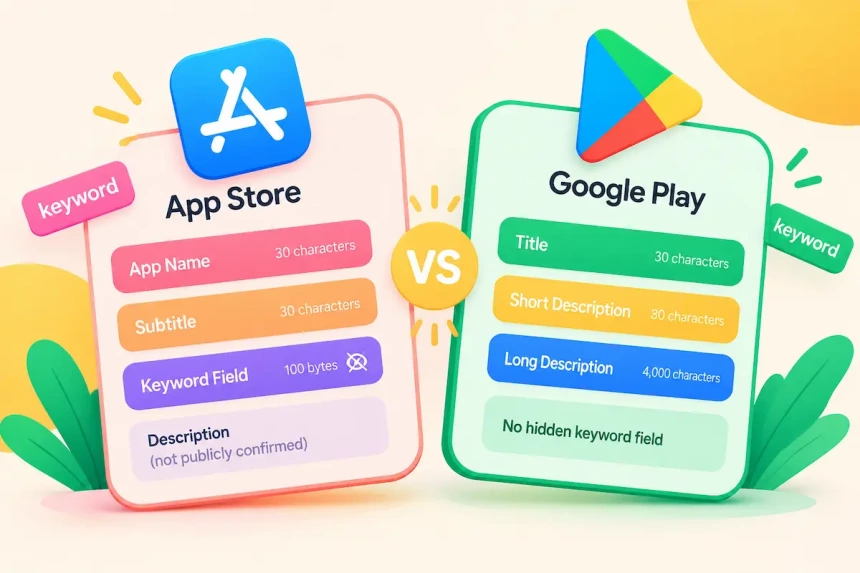
The App Name allows up to 30 characters and is one of the most important fields for communicating app relevance. The Subtitle also allows 30 characters and provides additional context about the app’s purpose.
Apple also provides a hidden Keyword Field with a 100-byte limit, according to Apple’s documentation. This field is not visible to users but helps provide additional keyword coverage. The number of terms that fit can vary by language and locale, so rely on the live counter in App Store Connect rather than calculating by hand.
The app description plays an important role in explaining features and improving conversion, but Apple has not publicly confirmed that description text is directly used as a keyword ranking signal.
Google Play: Title, Short Description, and Long Description
Google Play does not provide a separate hidden keyword field. Instead, it evaluates keyword relevance through visible metadata, including the Title, Short Description, and Long Description. Researching Google Play search keywords helps identify the terms that should be reflected naturally across these fields.
The Title is also limited to 30 characters and, like the App Name, is a key field for communicating relevance. The Short Description allows up to 80 characters and adds additional context. The Long Description can contain up to 4,000 characters and provides broader language context for understanding the app.
Because Google Play analyzes visible text, keywords should be integrated naturally into descriptions rather than inserted as isolated terms. Follow Google Play Store listing guidelines to avoid misleading metadata practices.
Side-by-Side: How the Two Stores Differ
The biggest difference between the two platforms is how keyword coverage is created.
| Factor | Apple App Store | Google Play |
| Title / Name | App Name: 30 characters | Title: 30 characters |
| Subtitle / Short Description | Subtitle: 30 characters | Short Description: 80 characters |
| Hidden keyword field | Yes (100 bytes) | No |
| Keyword source | Dedicated keyword field + visible metadata | Visible metadata and natural language context |
| Description role | Not publicly confirmed as a direct ranking signal | Key source of relevance context |
| Main optimization approach | Selecting and distributing keywords within limited fields | Building consistent keyword context across the listing |
Limits based on Apple App Store Connect and Google Play Console documentation.
In practice, iOS keyword optimization requires careful keyword selection within strict field limits, while Google Play optimization requires building consistent keyword context throughout the app listing.
With the metadata fields and their limits in mind, the next step is understanding how app stores decide which apps to show for a search.
What Makes an ASO Keyword Valuable?
A valuable ASO keyword is not simply the term with the highest search volume. It must first fit the app, and then offer enough demand, a realistic chance of ranking, and meaningful value to the business.
The strongest opportunities are usually not the broadest or most popular terms. They match what users are looking for, fit the app’s positioning, and give the app a realistic path to visibility.
Relevance: Does the Keyword Match the App?
Relevance comes first. A keyword should reflect both what users are searching for and what the app actually provides. A keyword with strong demand but weak relevance can bring impressions without installs. For example, an itinerary-planning app is a poor match for “hotel booking,” even though that term has high demand, because users expect to book rooms.
Demand: Is There Enough Search Interest?
Demand shows whether users actively search for a keyword. Higher-demand terms offer more potential visibility, but they also attract more competition and often broader intent. A moderate-demand keyword that closely matches the app can outperform a popular term that does not. Demand figures from Apple Ads or ASO tools are estimates, so use them to compare keywords rather than to predict traffic.
Competition: Can the App Realistically Compete?
Competition describes how hard it is to gain visibility for a keyword, and tools usually report it as a difficulty score. Highly competitive terms tend to be held by apps with stronger download momentum, ratings, and brand recognition. Lower-competition keywords can be more realistic for newer apps, but the goal is not to avoid competition entirely. It is to find terms where the app has a reasonable chance to rank while still reaching valuable users.
Business Value: Will This Keyword Attract Valuable Users?
Business value helps distinguish keywords that attract traffic from those that attract users who matter to the business. Depending on the app’s business model, valuable users may be more likely to subscribe, make a purchase, or remain engaged. Two keywords with similar demand and ranking difficulty can therefore deliver very different business outcomes. Consider this factor alongside relevance, demand, and competition when prioritizing keywords.
How Much Can You Trust ASO Keyword Data?
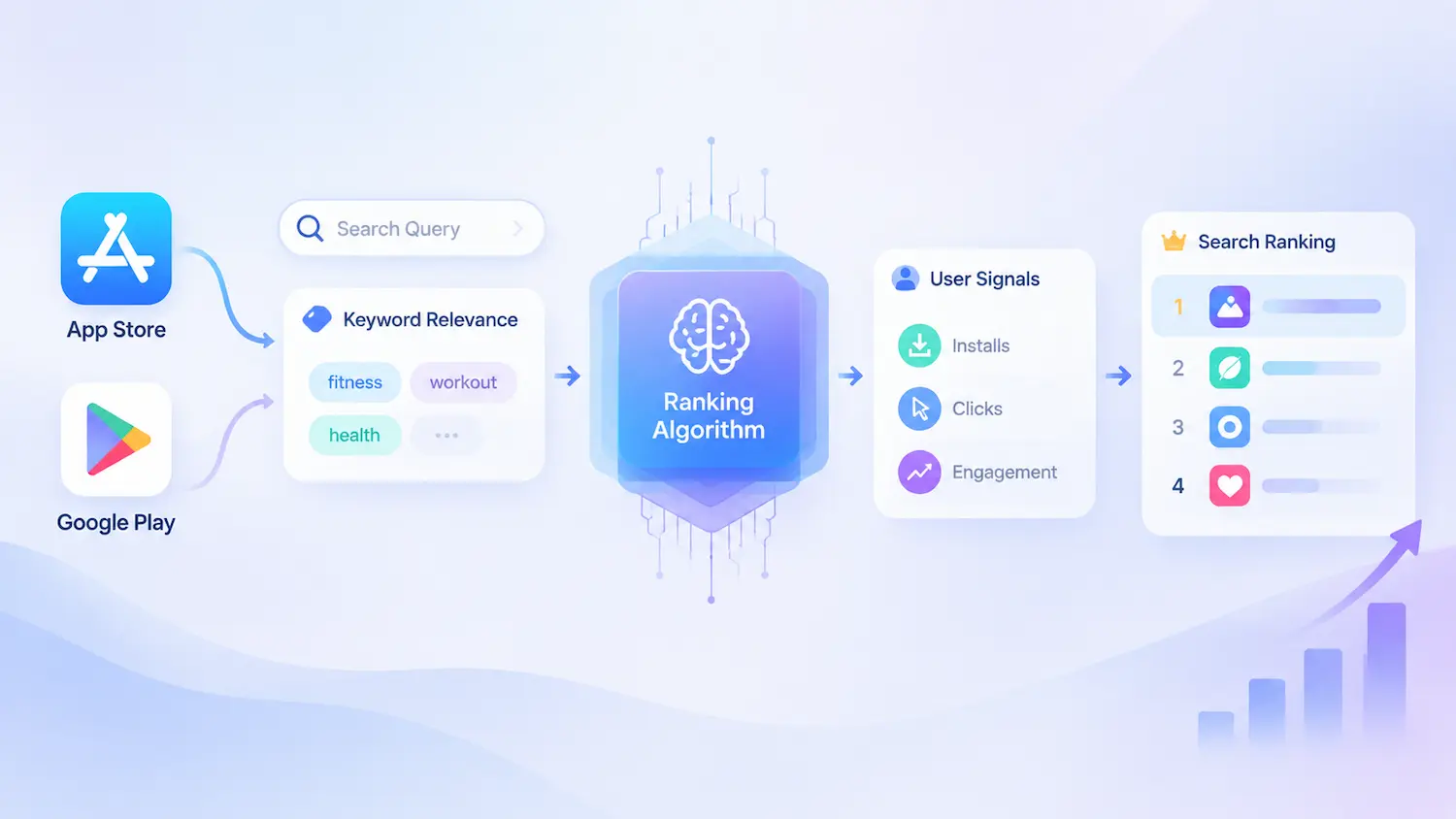
Ranking performance depends on both keyword relevance and broader app signals. This means keyword research is not simply a process of finding high-volume terms. Before building a keyword strategy, teams need to understand what different data sources measure and how much confidence they should place in those signals.
App stores generally do not publish exact keyword search volumes or competition scores. Understanding app store keyword volume helps ASO teams interpret demand signals correctly and avoid treating estimated metrics as exact search counts.
ASO keyword research combines platform signals, third-party estimates, and first-party performance data. Because these sources measure different aspects of search behavior, keyword metrics are best used to compare opportunities rather than predict exact search volumes, rankings, or installs.
Four Types of Keyword Data
Different data sources answer different questions. External signals help discover and compare opportunities, while first-party data helps validate actual performance.
| Data Type | Helps With | Cannot Do |
| Apple Ads keyword popularity | Understanding relative search interest | Convert popularity into exact search volume or installs |
| ASO tool estimates | Comparing keyword opportunities | Provide exact volume or ranking predictions |
| Google Play search signals | Identifying related terms and market trends | Provide official keyword volume data |
| First-party app data | Validating impressions, searches, and conversions | Predict untested keyword performance |
Apple Ads keyword popularity indicates relative search interest rather than exact search volume. Third-party ASO tools estimate keyword metrics using their own data and models, so results may vary across providers.
Google Play does not provide a public keyword popularity score. Teams often analyze autocomplete suggestions, competitor rankings, category trends, and listing language as market signals. This is separate from the first-party search performance data available in Google Play Console, which only reflects your own app.
First-party data is essential for evaluating whether ASO changes improve your app’s overall discovery, conversion, and acquisition performance. However, the level of keyword-level detail varies by platform, and organic installs cannot always be attributed to individual search terms. Use first-party metrics to evaluate overall results, and treat third-party keyword rankings and estimates as additional context rather than exact attribution.
Why Keyword Scores Are Directional, Not Exact
High-volume keywords may still perform poorly if they have weak relevance or low install intent. A lower-volume keyword may generate stronger results when it better matches the app’s value proposition.
For example, “flight deals” may attract many searches, while “flight price alerts” has fewer searches but matches the app’s feature more directly. ASO data helps teams prioritize what to test, but it does not guarantee which keywords will drive growth.
How to Decide With Imperfect Data
Because keyword data is incomplete, effective ASO requires testing and iteration. Start with potential keywords based on user needs, competitors, category language, and available data sources. Then evaluate relevance, search interest, competition, and user value before implementation.
After launch, use first-party data such as impressions, conversion rates, search performance, and acquisition sources to identify which keywords are creating meaningful results. Third-party rankings can provide additional context, but they should be evaluated alongside real app data.
ASO keyword research is not about finding perfect data. It is about making better decisions with imperfect information and improving through continuous testing. With these limits in mind, the next step is researching keyword opportunities and building a candidate list.
How to Research ASO Keywords: Sources and Judgment
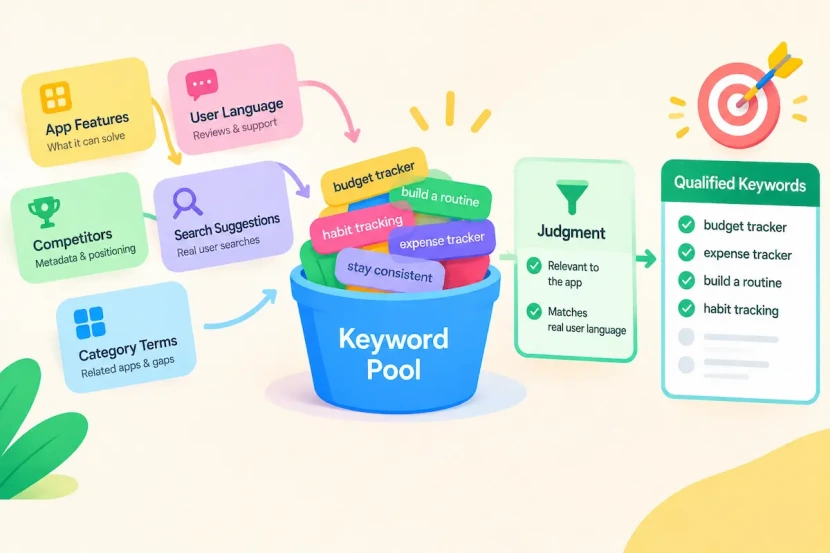
App store keyword research starts by building a candidate list from multiple sources, including app features, user language, competitor metadata, and store search suggestions. Because no single source captures every relevant search opportunity, combining sources helps uncover how users describe their needs.
Before scoring keywords, remove terms that clearly do not match the app’s features, target audience, or value proposition. This initial filtering keeps the candidate list focused while leaving demand, competition, and business value for the formal prioritization stage.
Where Keyword Ideas Come From
Keyword ideas can come from both market signals and user language. Common sources include:
| Source | What it reveals |
| App features and core use cases | What the app can solve |
| Reviews and support conversations | How users describe problems in their own words |
| Competitor metadata | Market positioning and category language |
| Store search suggestions | Terms users search in the marketplace |
| Category terminology and related apps | Adjacent opportunities |
Product features are often the starting point because they describe what an app can solve. However, users may search differently from how companies describe their products, which makes customer language equally important.
For example, an app may describe itself as a “journey management platform,” while users may search for terms such as “trip planner” or “travel itinerary.” Store search suggestions, including App Store and Google Play autocomplete, provide direct signals from real user searches and complement the sources above.
The best keyword opportunities often appear where product positioning and user language overlap.
How Large Should Your Initial Keyword Pool Be?
There is no universal required size for an ASO keyword pool. It should be large enough to cover different user intents, competitors, and category opportunities, but focused enough that each term can be reviewed for relevance.
In practice, many ASO teams start with several hundred candidates before narrowing the list through relevance and competition checks.
Mining Reviews and Support Tickets
User reviews, customer questions, and support tickets often reveal search language that marketing teams do not naturally use.
Users describe problems in their own words, including the features they need, frustrations they experience, and outcomes they want. These phrases can reveal keyword opportunities that may not appear in product descriptions or competitor listings. For example, an app team may focus on a feature such as “itinerary sync,” while users may describe the need as “keep bookings in one place” or “plan a trip with friends.”
Review language shows how users describe their needs, but it still needs to be checked against search data to confirm that people actually search that way. User language helps bridge the gap between how an app is built and how people search for solutions.
Using Competitor Research to Expand Your Keyword Pool
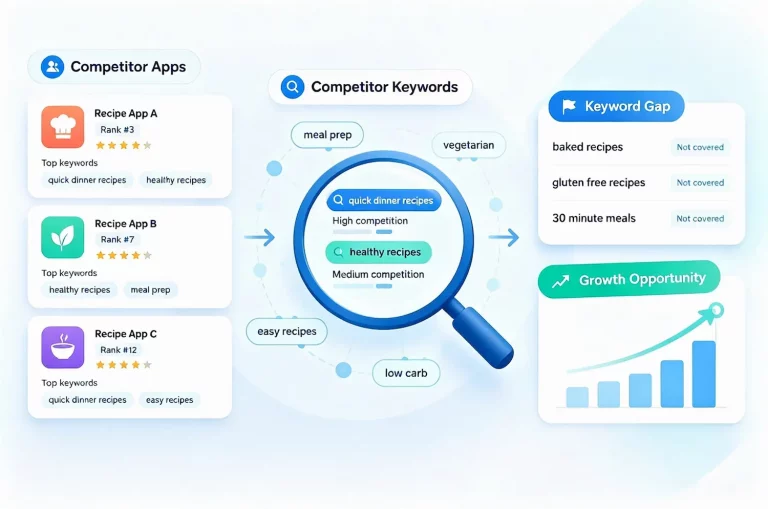
Competitor research helps expand your keyword pool beyond the terms you already know from your app’s features and customer feedback. Looking at both the broader category and individual competitors can reveal how the market describes user needs and where potential keyword opportunities exist.
At the category level, analyze several apps in the same category to identify common search terms, positioning patterns, and underserved needs.
At the individual competitor level, examine which keywords competing apps appear to target, how they perform in search results, and where their keyword coverage may leave gaps. A structured competitor keywords on the App Store analysis can help identify these gaps and prioritize opportunities based on relevance, competition, and ranking potential. The goal is not to copy competitor keywords. It is to understand the language of the market and identify opportunities where an app can compete more effectively.
Judgment: What Deserves a Place in Your Pool
Not every term from every source belongs in the keyword pool. A useful filter at this stage is simple: does the term describe something the app genuinely offers, and does it reflect how real users talk about the problem?
Terms that fail either test, such as popular but unrelated phrases or internal product language that users do not search for, are usually better left out. Detailed evaluation comes next, but this first pass keeps the pool relevant.
Building a keyword pool is the starting point of ASO keyword research, not the final goal. The next step is evaluating which keywords are relevant, achievable, and worth prioritizing.
How to Evaluate and Prioritize ASO Keywords
After building a keyword pool, the next challenge is deciding which keywords deserve attention. Keyword evaluation focuses on identifying opportunities where user intent, competition, and business value align.
Relevance Is a Gate, Not a Bonus
In scoring, relevance works as a gate rather than one factor among many: strong demand or low competition cannot compensate for a mismatch between user expectations and the app experience.
A practical approach is to score relevance on a 1-5 scale. For example: 5 means the keyword describes a core function, 3 means it relates to a secondary feature, and 1 means it is unrelated to what the app does. Keywords with a relevance score of 2 or below should usually be removed before further evaluation.
This prevents misleading results where popular but unrelated keywords receive a high opportunity score simply because they have strong traffic potential.
A Keyword Opportunity Score
After removing irrelevant terms, the remaining keywords can be compared using a structured scoring model. One possible framework is:
Score = (Relevance ÷ 5) × (Demand ÷ 5) × ((100 − Difficulty) ÷ 100) × (Business Value ÷ 5) × 100
This model evaluates four factors:
- Relevance (1-5): How closely the keyword matches the app’s purpose and user need.
- Demand (1-5): Estimated search interest or market interest.
- Difficulty (0-100): How difficult it may be to compete for the keyword.
- Business Value (1-5): The value of users who search this term, such as their likelihood to subscribe, make purchases, or stay engaged.
Difficulty is inverted in the formula because higher competition reduces opportunity. A keyword with strong demand but extremely high competition may be less valuable than a smaller opportunity with a realistic path to visibility.
Use consistent scoring methods when comparing keywords, since difficulty estimates vary across tools. Use one tool’s scale consistently, because difficulty scores are not comparable across tools. For apps already live in the store, existing rankings, impressions, and conversion data can help validate both inputs.
This scoring model is a practical framework, not an industry standard. Teams should adjust the factors and weights based on their own goals, category, and available data.
A weighted-sum model can allow strong metrics to hide weak relevance. For example, a high-demand keyword with low relevance may receive a high score because traffic potential compensates for poor app fit.
Multiplication-based models reduce this problem because a weak factor directly limits the final score. This better reflects ASO reality, where relevance is a requirement rather than a factor that can be offset by volume.
However, no formula can perfectly predict keyword success. Scoring models should be used to compare opportunities consistently, not replace strategic judgment.
Core, Growth, and Experimental Keywords
After scoring, keywords can be grouped into strategic tiers.
| Tier | Purpose |
| Core | High-confidence keywords that closely match the app and support primary growth |
| Growth | Relevant opportunities with expansion potential |
| Experimental | Keywords worth testing but with higher uncertainty |
These tiers should be based on keyword scores, app goals, and current market position rather than fixed industry thresholds. A new app may have fewer Core keywords and rely more on Growth opportunities, while an established app may invest more heavily in competitive, high-value terms.
Matching Keywords to Your App’s Current Position
Keyword selection should also reflect the app’s current position. New apps often benefit from targeting more achievable keywords with lower competition, allowing them to build visibility and collect performance signals. Established apps with stronger rankings, reviews, and conversion history may have more ability to compete for broader, higher-value keywords.
Worked Example: From Seed Term to Final Selection
| Keyword | Rel. | Demand | Diff. | Value | Score | Decision | Why |
| travel planner app | 5 | 3 | 50 | 5 | 30 | Core | Describes the main function with high user value |
| flight price alerts | 5 | 2 | 30 | 4 | 22 | Growth | Matches a core feature directly, with lower demand but achievable competition |
| offline maps | 3 | 3 | 35 | 4 | 19 | Growth | Relevant to a secondary feature, with manageable competition |
| flight deals | 3 | 4 | 70 | 4 | 12 | Experimental | Related to the app’s value but not a core feature, and highly competitive |
| hotel booking | 2 | 5 | 80 | 1 | Removed | Remove | Fails the relevance gate: the app does not provide hotel reservations |
The example uses illustrative scores for a travel planner app that also offers offline maps and flight price alerts. The numbers are not industry benchmarks but demonstrate how different factors influence prioritization.
Tier decisions combine the score with app goals and judgment, not a fixed cutoff. The example shows why relevance comes first. A broad keyword may have demand, but if it does not match the app’s actual value, it should not compete for optimization space.
Keyword prioritization turns a keyword list into a strategy. The next step is deciding how many of those keywords to target and track.
How Many ASO Keywords Should You Target?
After prioritizing keywords, the next question is how many terms should actually become part of your ASO strategy.
There is no universal number of keywords every app should target. The right number depends on how many keywords can be prioritized, tracked, and improved effectively. The goal is not to maximize the number of keywords. It is to build a focused keyword portfolio where each term has a clear role.
Think of Keywords as a Budget
A keyword strategy works best when treated as a limited resource:
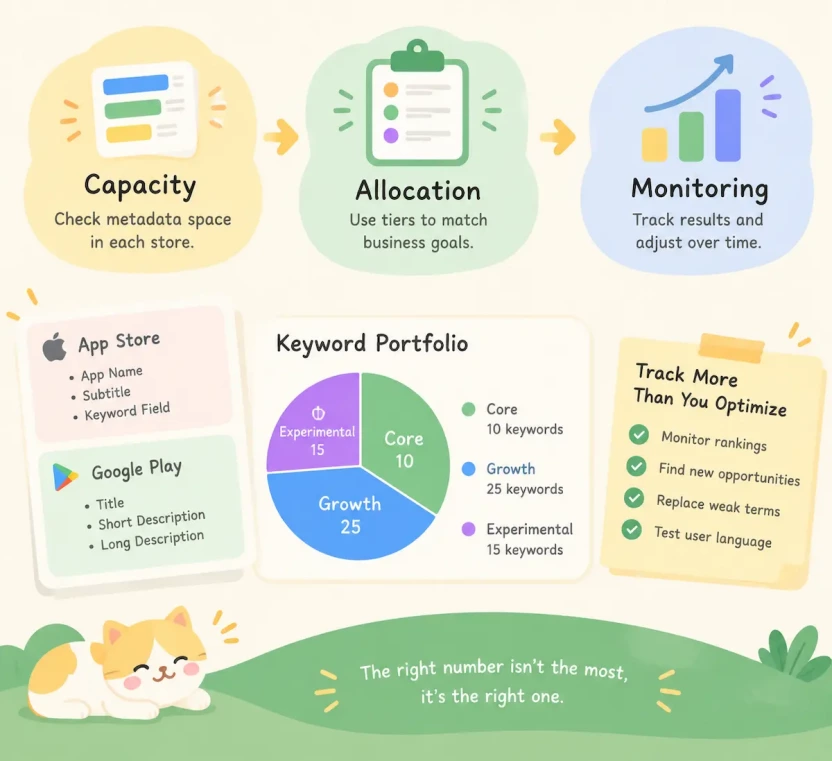
Capacity → Allocation → Monitoring
First, understand how many keywords the store metadata can realistically support. Then allocate them based on business goals, using the Core, Growth, and Experimental tiers defined earlier. After implementation, monitor results and replace weak performers with stronger opportunities.
The sections below follow this flow.
Work Backward From Metadata Capacity
Start by reviewing the metadata limits for each store, as explained in the earlier platform comparison. These limits define how much keyword coverage your listing can support, but they do not determine how many keywords your team should track.
On the App Store, keyword coverage depends on how terms are distributed across the App Name, Subtitle, and Keyword Field. The number of terms that fit varies with word length, language, and overlap across fields, so use your final keyword list to estimate practical capacity.
Google Play has no separate hidden keyword field. Instead, prioritize a focused set of terms and incorporate them naturally into the Title, Short Description, and Full Description.
In both stores, prioritize the keywords that best match your app and business goals rather than trying to fit as many terms as possible.
Keyword Portfolio Allocation
Once metadata capacity is clear, divide your tracked keyword portfolio into three tiers. Core keywords support the app’s main positioning, Growth keywords represent relevant expansion opportunities, and Experimental keywords help test uncertain or emerging demand. The allocation should reflect your app’s maturity, competitive position, and available resources rather than a fixed industry ratio:
| Tier | Role in the tracked portfolio | Illustrative allocation |
| Core | Primary growth keywords with strong relevance and value | 10 keywords |
| Growth | Expansion opportunities worth testing | 25 keywords |
| Experimental | Emerging or uncertain opportunities | 15 keywords |
This 50-keyword split is an illustrative example, not an official standard. Actual proportions depend on app maturity and category.
The tracked portfolio can be larger than the set of keywords actively used in metadata. Tracking additional terms helps teams monitor ranking changes, discover new opportunities, test emerging search language, and identify underperforming keywords. Review the portfolio after each observation window and reallocate effort based on observed performance.
Why More Keywords Is Not Always Better
A larger keyword portfolio is not automatically better. Tracking too many terms can dilute attention and increase monitoring costs, while a focused portfolio makes it easier to test, measure, and improve results. Review and adjust the portfolio as performance data and business priorities change.
The next step is turning selected keywords into metadata by placing them correctly across App Store and Google Play fields.
Where to Place Keywords in App Metadata
After selecting and prioritizing keywords, the next step is deciding where those terms should appear in your store listing. ASO keywords do not have equal value across every metadata field. Keyword placement should follow each platform’s metadata system. The goal is to use metadata space efficiently while keeping the listing clear and relevant. For the full field-by-field workflow on both stores, see how to optimize App Store and Google Play metadata.
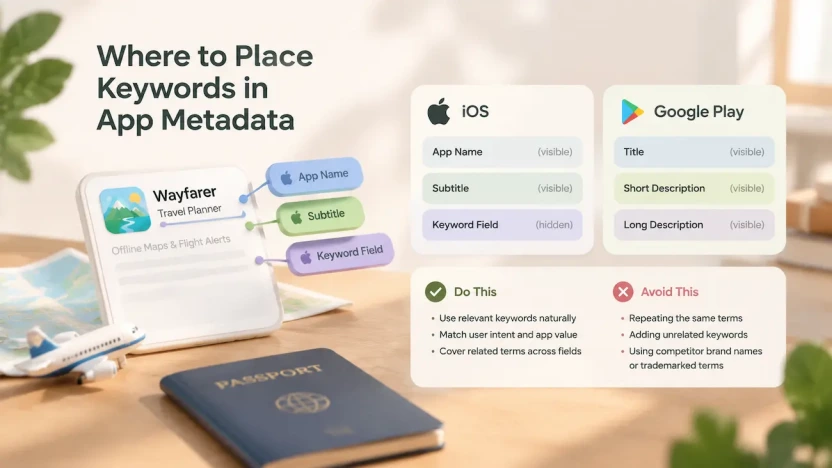
Allocating Keywords Across iOS Fields
On the App Store, keyword placement mainly happens across the App Name, Subtitle, and hidden Keyword Field.
Each field serves a different purpose. The App Name and Subtitle are visible to users, so they should first make it immediately clear what the app does. Keywords are a supplement to that clarity, not a replacement for it. The Keyword Field provides additional keyword coverage without appearing on the product page.
Many ASO practitioners avoid repeating terms already used in the App Name or Subtitle, since the space is limited and the Keyword Field is better used for additional coverage. A stronger approach is usually to cover related terms across different fields while keeping the visible listing clear and natural.
For example, a travel planner app might distribute its terms like this (illustrative only):
| Field | Example |
| App Name | Wayfarer: Travel Planner |
| Subtitle | Offline Maps & Flight Alerts |
| Keyword Field | itinerary,packing,list,group,trip |
Terms already used in the Name and Subtitle are left out of the Keyword Field. Check Apple’s current App Store Connect guidance for formatting requirements and naming rules before submitting.
Writing Google Play Metadata Naturally
Google Play does not provide a separate hidden keyword field. Instead, keyword relevance is built through visible metadata, including the Title, Short Description, and Long Description.
Because users read these fields directly, keyword placement should prioritize clarity and readability. Important terms should appear naturally within meaningful sentences rather than being inserted as isolated phrases.
For the same travel planner app, the Short Description could state the core function and benefit in one sentence, such as “Plan your trips, navigate with offline maps, and get flight price alerts,” rather than listing keywords. A strong Google Play listing explains what the app does, who it helps, and why users should install it, while naturally including relevant search terms.
ASO Keyword Optimization vs. Keyword Stuffing
Once keywords are selected, the next challenge is using them correctly in app metadata. Effective optimization improves relevance and clarity, while keyword stuffing focuses on repetition without considering user experience.
Keyword optimization focuses on selecting relevant search terms and placing them where they support app positioning and user understanding.
Keyword stuffing involves excessive repetition or the use of unrelated terms in an attempt to influence rankings. This approach can reduce user trust, hurt conversion, and violate store metadata policies. Both Apple and Google Play require accurate, relevant metadata. Review the App Store Review Guidelines and Google Play metadata guidelines to ensure your app listing uses keywords naturally and accurately.
For both platforms, better keyword usage comes from relevance and context rather than the number of times a keyword appears.
With keyword placement understood, the next step is adapting keywords for different languages and markets.
How to Localize ASO Keywords
Keyword strategies that work in one market do not always transfer directly to another. Users in different markets may describe the same problem differently, and the keywords that drive discovery can vary by market context, user behavior, and search habits.
ASO keyword localization requires understanding how users search in each market and adapting metadata accordingly.
Localization Is Not Translation
Direct translation is often the fastest way to create localized metadata, but it does not always reflect how users search. A keyword that performs well in one country may have low search interest or a different meaning in another, and even within the same language, word choice can differ by region.
This is why the unit of localization is a market and language combination, not language alone. Store listings are configured by storefront and locale, and each one may need its own keyword research. In some markets, users may also search with the original English term, so local research should confirm which form people really type.
The goal is to preserve the app’s value proposition while adapting to the keywords users actually use.
A Practical Localization Workflow
A repeatable process keeps localization focused and avoids literal translation errors:
- Choose the market and language based on opportunity.
- Research how local users search, using store autocomplete in that storefront, local competitors, and local reviews. Data for smaller markets may be sparse, so cross-check with your own performance data.
- Have a native speaker or local market expert review the candidate terms for meaning, tone, and natural usage.
- Place selected terms within local metadata limits and monitor performance.
Prioritize Markets by Opportunity, Not Population
A large population does not automatically mean a strong ASO opportunity. A smaller market with high category demand, lower competition, strong conversion potential, or better product-market fit may provide a more realistic growth opportunity.
When evaluating markets, consider factors such as:
- Existing downloads and revenue by region
- Search demand for relevant keywords
- Competitive intensity
- Localization effort required
- User willingness to install or pay
Keyword localization works best when it follows business priorities rather than expanding into every available language.
Count Bytes for Multi-Byte Languages
Apple’s documentation describes the Keyword Field limit as 100 bytes, and App Store Connect shows a live counter in each locale. Latin-script terms are compact, but Chinese, Japanese, Korean, and Arabic terms can behave differently, and terms in these languages are often shorter. The number of terms that fit therefore varies by language. Rely on the App Store Connect counter rather than calculating by hand, and prioritize the most valuable terms instead of translating every keyword.
Keyword localization expands ASO beyond a single language or region. The next step is measuring whether those keyword decisions are creating visibility and installs over time.
How to Measure, Diagnose, and Improve Keyword Performance
Keyword optimization requires ongoing measurement because search behavior, competitors, and app performance change over time.
The goal of tracking keywords is not only to monitor rankings, but to understand whether keyword choices improve visibility, attract relevant users, and contribute to organic growth.
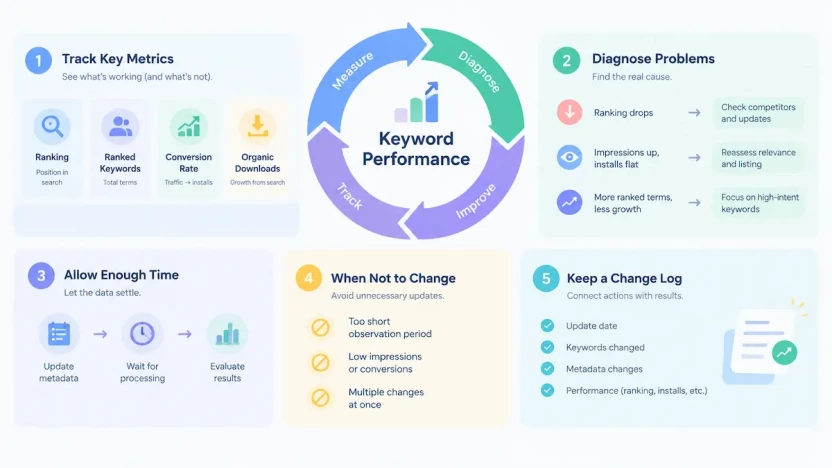
Four Metrics That Matter
No single metric can show whether a keyword strategy is working. Different metrics answer different questions.
| Metric | What It Shows | Typical Source |
| Keyword Ranking | Estimated position for target searches | Third-party tools (estimate) |
| Ranked Keywords (estimated) | Number of terms the app appears to rank for | Third-party tools (estimate) |
| Conversion Rate | Whether keyword traffic matches user intent | App Store Connect, Google Play Console |
| Organic Downloads | Whether search visibility contributes to growth | App Store Connect, Google Play Console |
Ranking and ranked-keyword data are usually third-party estimates, so they should be cross-checked with first-party performance data. Conversion and download data show whether visibility is translating into meaningful results. Developers can use App Store Connect Analytics to evaluate discovery, downloads, conversion, and user engagement after keyword changes.
Compare changes against a baseline period before attributing results to keywords, since performance can also shift due to seasonality, competitors, or advertising activity. Understanding the relationship between paid acquisition and organic visibility is also important when evaluating keyword growth.
Diagnose Keyword Performance Problems
Keyword changes should be diagnosed before making further updates.
| Symptom | Possible Cause | Action |
| Ranking drops | Competition changes, metadata updates, weaker signals, or tracking differences | Review competitors and recent ASO changes before replacing keywords |
| Impressions rise, but installs do not | Weak search intent match or poor listing conversion | Reevaluate relevance and improve the store page |
| Ranked terms increase, but growth stalls | Broader coverage includes low-value keywords | Focus on higher-intent opportunities |
Not every ranking change requires action. Marketplace changes, seasonality, and algorithm adjustments can affect results, so identify the cause before optimizing.
How Long to Wait Before Judging a Change
On iOS, changes to the App Name, Subtitle, and Keyword Field are submitted with an app version and go through review, so they only take effect after approval. Google Play listing changes follow a different update process. Start the observation window when the change goes live in the store, not when it was submitted.
Keyword updates need time before their impact can be evaluated. After metadata changes, stores need time to process updates and adjust search results. The right evaluation window depends on platform, category, competition, and traffic volume. As a starting point, many ASO teams wait several weeks, and longer for low-traffic keywords, before judging a change.
Avoid judging changes based on short-term fluctuations. A stable observation period helps separate real improvements from normal marketplace variation.
When Not to Change Your Keywords
Avoid changing keywords when:
- The observation period is too short
- The keyword has limited impressions or conversions
- Multiple variables changed at the same time, such as screenshots, pricing, or campaigns
Changing too many factors at once makes it difficult to understand what caused the result.
Keep a Keyword Change Log
A keyword change log helps connect ASO actions with outcomes. Track:
- Update date
- Keywords added or removed
- Metadata changes
- Ranking and conversion changes
- Organic installs and, where relevant, revenue
For larger ASO programs, changing one keyword group or metadata element at a time makes results easier to interpret.
Keyword optimization is a continuous cycle of testing, measuring, and refining. The goal is not maintaining a fixed keyword list, but building a process that adapts as users, competitors, and search systems evolve.
Common ASO Keyword Mistakes
Many ASO mistakes happen when teams focus on keyword rankings without considering user intent, platform differences, and long-term performance.
Choosing Keywords Based Only on Volume
High-volume keywords should still be evaluated against relevance and conversion potential.
Poor Keyword Placement and Over-Optimization
Keyword optimization is about placing relevant terms where they improve app clarity and search relevance.
Repeating the same terms across App Store fields wastes limited space, and over-repeating keywords on Google Play hurts readability. Natural language and clear positioning are more effective than keyword stuffing.
Ignoring Localization and Platform Differences
Keywords do not always transfer between markets or platforms. Direct translation may miss how users actually search in a specific region.
Keyword strategies also differ by store: the App Store has a hidden Keyword Field, while Google Play relies on visible metadata. Localization should consider local search behavior while respecting platform limits, such as the App Store’s 100-byte Keyword Field as shown in App Store Connect.
Changing Keywords Without Measuring Results
Keyword optimization requires testing and iteration. Changing keywords too frequently or modifying multiple variables at once makes it difficult to understand what caused performance changes.
Track keyword updates, allow enough time for evaluation, and compare results using rankings, conversion rates, and organic performance data.
Avoiding these mistakes does not guarantee higher rankings, but it helps build a stronger ASO process based on relevance, user intent, and continuous improvement.
FAQs
Does Apple provide exact keyword search volume?
No. Apple does not publish exact keyword search volume for the App Store. Apple Ads keyword popularity is a relative indicator of search interest, not a measurement of searches or expected downloads. Use it with other signals when evaluating keyword opportunities.
Is the iOS description used for keyword indexing?
Apple has not publicly confirmed that the app description is a direct keyword ranking signal. Its main role is to explain what the app does and build confidence after someone opens your product page, so write it to improve understanding and conversion rather than to repeat keywords.
How long does it take for keyword changes to work?
The timeline depends on the platform, category, competition, and traffic volume. Many ASO teams evaluate keyword changes after several weeks rather than reacting to short-term ranking movements. Set an observation window in advance and measure results using multiple signals.
Does ranking first for a keyword guarantee more downloads?
No. A top ranking position improves visibility, but downloads also depend on search intent, store conversion, reviews, pricing, and product quality. A highly ranked keyword with poor user fit may generate limited results.
From a Keyword List to a Keyword System
A keyword list is a snapshot of what you know today. A keyword system is what keeps that knowledge current.
The difference shows up in every stage covered in this guide. A list collects terms. A system asks where each term came from, whether it matches real user intent, how much to trust the data behind it, and where it belongs in each store’s metadata. It adapts keywords to each market, then measures what happened and feeds the results back into the next round of research.
No single ranking, score, or tool determines keyword success. Strong ASO programs combine structured research with ongoing validation.