Ratings and reviews are the first thing many users check before they download an app. A strong star score builds trust, while negative feedback quietly pushes people away. In a crowded App Store, this feedback alone can decide whether your app gets installed or skipped.
But ratings and reviews do far more than shape first impressions. They drive conversion, may support discovery, and give you a direct line to what users really think. Managed well, they become one of the most dependable growth levers in App Store optimization.
This guide shows you how to get iOS App Store ratings and reviews the right way. You’ll learn when to ask for a review, how to use Apple’s built-in tools, how to respond to feedback, and how to turn review themes into product improvements.
What Are iOS App Store Ratings and Reviews?
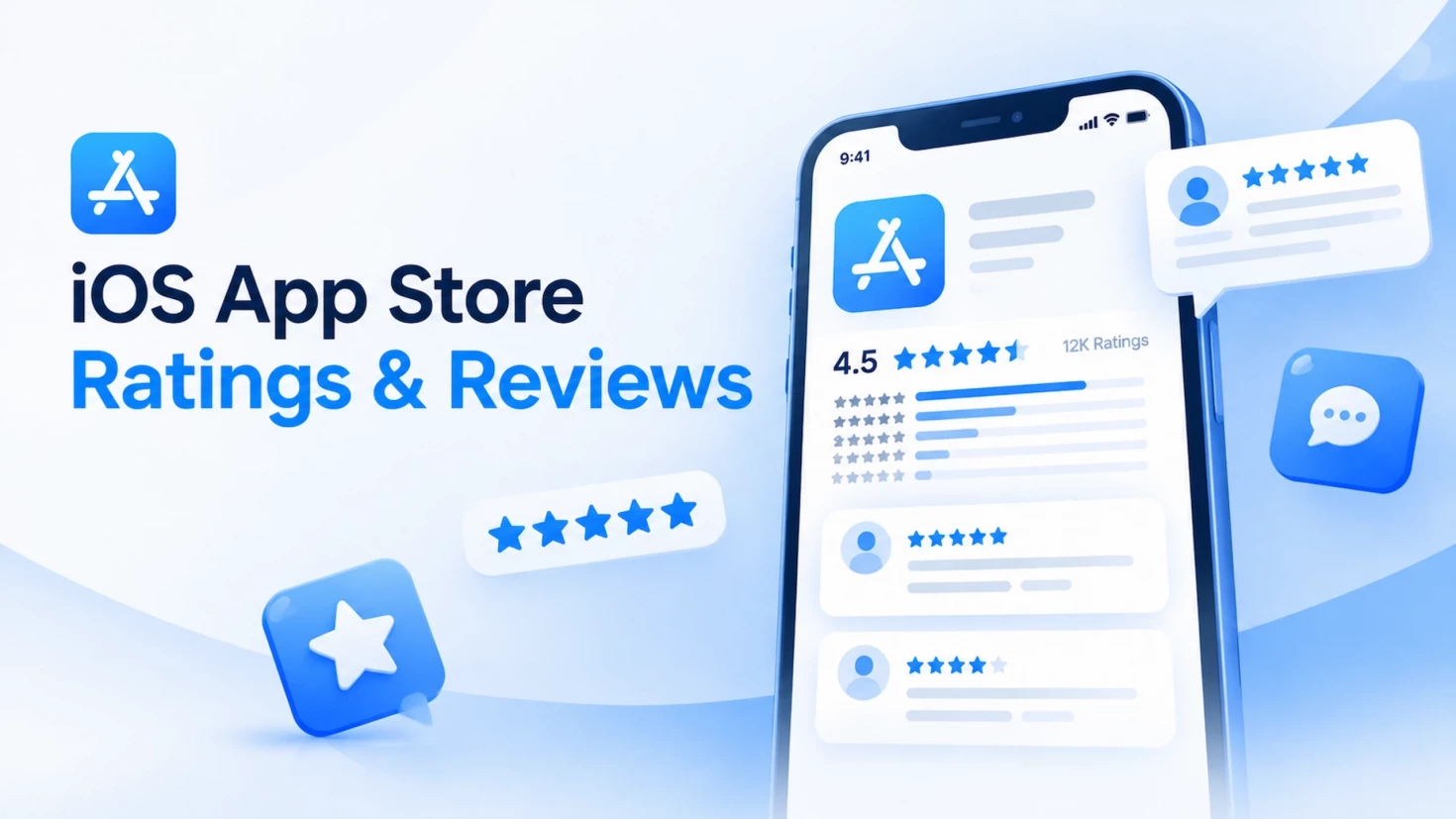
iOS App Store ratings and reviews are user feedback that helps people evaluate an app before downloading it. Ratings show a numerical score based on stars, while reviews provide written comments about users’ experiences.
Note that the iOS App Store has another type of “rating” called Age Rating, which indicates content suitability (such as 4+, 9+, or 17+). It is different from user ratings, which are star scores submitted by users.
iOS App Store ratings range from 1 to 5 stars and contribute to an app’s summary rating displayed on the product page. Apple calculates summary ratings separately for each iOS App Store territory, so an app may have different ratings across countries or regions. Developers can choose to reset the summary rating when releasing a new app version, but existing written reviews remain available.
iOS App Store reviews are public written feedback from users about their experience with an app. They help potential users understand an app’s strengths, problems, and overall quality. Developers cannot directly delete reviews, but they can report reviews that violate Apple’s guidelines. Apple also allows developers to respond to reviews with personalized replies to address user concerns and build trust.
In short, ratings show how users score an app, while reviews explain why they feel that way. Together, they influence how potential users perceive an app before installation.
iOS App Store Ratings vs. Reviews: What’s the difference
Although ratings and reviews both reflect user feedback, they serve different purposes. Ratings provide a quick numerical signal of user satisfaction, while reviews explain the reasons behind those scores.
| Ratings | Reviews | |
| Definition | A 1–5 star score users give to an app | Written feedback where users share their experience with an app |
| Display | Shown as the app’s summary rating on the product page and search results | Shown as public comments on the app’s product page |
| Calculation | Individual ratings are combined into a summary rating, which is calculated separately for each iOS App Store territory | Each review remains an individual piece of user feedback |
| Control | Developers can reset the summary rating when releasing a new version | Developers cannot directly delete reviews but can report reviews that violate Apple’s guidelines |
How do ratings and reviews work on the iOS App Store
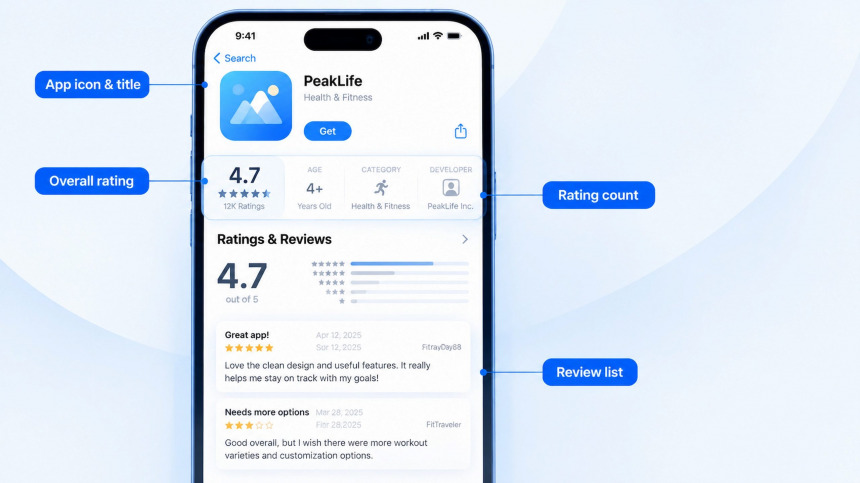
Users can rate apps on the iOS App Store using a 1–5 star scale. These individual ratings are combined into an app’s summary rating, which appears on the product page and in search results. The summary rating is calculated separately for each iOS App Store territory, so the same app may show different ratings in different countries or regions.
Written reviews allow users to share more detailed feedback about their experience with an app. Unlike ratings, reviews are displayed as individual comments rather than being converted into a score. Users can submit ratings and reviews from the app’s product page, depending on the platform. iOS, iPadOS, macOS, and visionOS apps support both ratings and reviews, while tvOS apps support ratings only. watchOS apps receive ratings through the paired iPhone.
From a user’s perspective, leaving feedback is simple: users can select a star rating and write a review directly from the iOS App Store product page. Only users who download an app through the iOS App Store can submit ratings and reviews, helping keep feedback tied to real app usage.
Starting with iOS 18.4 and iPadOS 18.4, iOS App Store pages may also show AI-generated review summaries that highlight common feedback from users. This feature uses large language models to summarize reviews and is designed to help users understand an app’s overall sentiment more quickly.
How are iOS App Store ratings calculated
Apple calculates an app’s summary rating based on individual user ratings submitted on the iOS App Store. On iOS 11 or later, the overview rating displayed on the iOS App Store is based on all ratings received since September 19, 2017.
The summary rating reflects the average score of an app’s individual ratings. iOS App Store ratings are displayed separately for each country or region, allowing users to see the rating relevant to their storefront. Google Play is not the same: a play store rating leans on recent ratings rather than a lifetime average.
Why Ratings and Reviews Matter for Your App’s Success
Ratings and reviews are more than just user feedback on the iOS App Store. They influence how users perceive an app’s quality, whether they trust it enough to download, and how effectively an app competes in the marketplace.
For app developers, managing apple app ratings and reviews is an important part of iOS App Store optimization. Strong ratings and positive reviews can support discoverability, build user confidence, and improve the chances of turning store visitors into downloads.
How ratings and reviews affect ASO and featuring
Ratings and reviews influence how users discover and evaluate an app on the iOS App Store. Apple displays an app’s rating on its product page and in search results, helping users understand overall app quality before downloading.
Ratings and reviews can support iOS App Store optimization by influencing user decisions and engagement. A strong rating and positive feedback can help build user confidence, while negative reviews may affect users’ download decisions.
Beyond search visibility, apps selected for featuring are reviewed by Apple’s Editorial team based on factors such as design quality, user experience, innovation, localization, and product page quality. Ratings and reviews also provide valuable signals about user satisfaction, helping demonstrate the app’s overall quality and real-world experience.
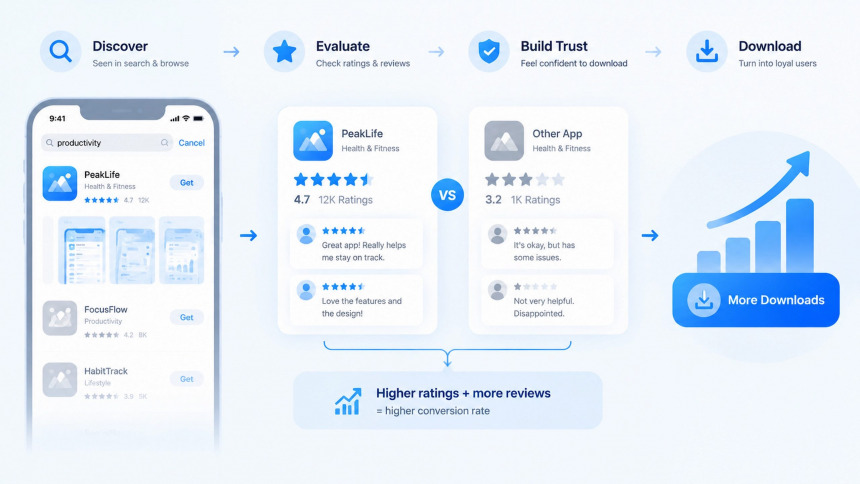
How apple store ratings and reviews influence downloads and conversion
Ratings and reviews are important trust signals on an iOS App Store product page. Before downloading an app, users often look at the star rating and user feedback to evaluate whether the app is worth trying.
Both rating quality and rating volume can shape user perception. A high average rating shows overall satisfaction, while a larger number of ratings provides more confidence that the score reflects real user experiences. A strong rating supported by sufficient user feedback can make an app more appealing to potential users.
Because ratings and reviews appear directly on the product page, they can influence download decisions and improve conversion when users compare different apps. Apple also highlights that ratings and reviews help users decide which apps they would like to try.
How to Ask for Apple App Store Ratings and Reviews the Right Way
Getting more ratings and reviews is not only about asking users more often. The way and timing of a review request can directly influence how users respond.
A well-designed review strategy respects the user experience, reaches users at the right moments, and gives them appropriate channels to share feedback. From timing prompts to using Apple’s review tools, each step affects the quality of user feedback.
Ask for reviews after a completed action
The timing of a review request can directly affect response rates and user sentiment. Apple recommends asking users after they complete a meaningful action, such as finishing a task, reaching a milestone, or completing a level.
These moments interrupt no one, so the request reaches users while the experience is still fresh.
Avoid showing rating prompts during negative experiences, such as after an app crash, an error message, or a failed action. Asking for reviews at the wrong time can frustrate users and may lead to negative ratings.
A well-timed prompt not only increases the chance of receiving ratings but also helps maintain a healthier iOS App Store reputation over time.
Use Apple’s system review prompt correctly
Apple provides a standardized system prompt for requesting ratings: RequestReviewAction in SwiftUI and AppStore.requestReview(in:) in UIKit. The older SKStoreReviewController is deprecated as of iOS 18, though it still runs on earlier systems.
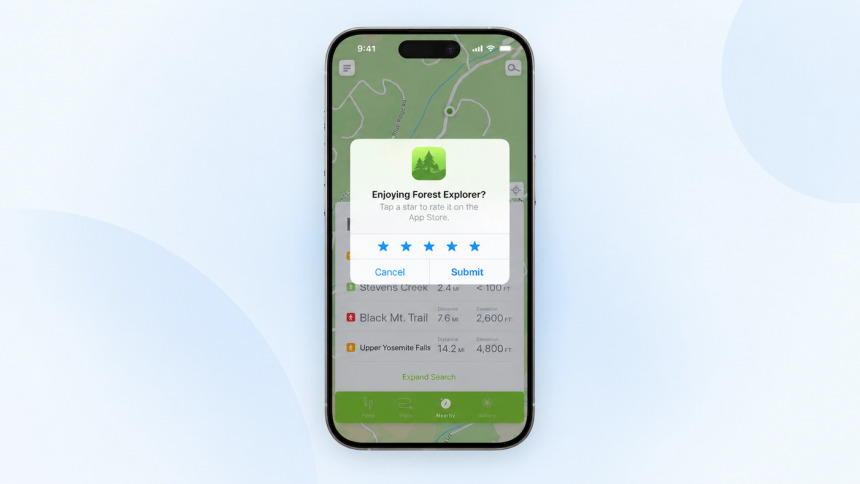
(Image credit: Apple)
Developers should follow two key rules and system behaviors:
- Request reviews no more than three times within a 365-day period. The system controls whether the prompt appears, so calling the API does not guarantee that users will see it.
- Allow users to rate and review without leaving the app. The standardized prompt lets users submit ratings and write reviews directly within the app experience.
Since developers cannot control the exact display of the prompt, timing is critical. Requests should be triggered after meaningful user actions or moments of satisfaction instead of interrupting users during their workflow.
Rating requests should also work together with customer support. Apple recommends making support contact information easy to find in the app and on the iOS App Store product page, giving users a way to get help when they encounter issues.
Give users an in-app feedback escape hatch
Not every user issue needs to become an iOS App Store review. Some users may have questions, encounter bugs, or want to request features that are better handled through direct support.
Consider adding an in-app feedback option that allows users to share their concerns with your team. A clear support channel helps you understand user needs, resolve issues, and improve the overall app experience.
A compliant feedback flow should focus on making support accessible while using Apple’s built-in rating tools appropriately:
- Provide an easy-to-find feedback or support option inside the app.
- Encourage users to share feedback through available support channels when they need help.
- Use Apple’s native rating prompt at appropriate moments, such as after users complete a meaningful action.
This approach creates a better feedback experience without restricting who can leave a review. It also aligns with Apple’s recommendation to make support contact information easy to find, allowing users to get assistance when they encounter difficulties.
How to Manage Apple App Store Ratings and Reviews
Getting ratings and reviews is only the first step. Once app reviews start coming in, effective management becomes the real work. It helps teams respond properly, solve user issues, handle problematic reviews, and keep app review reputation management consistent across the iOS App Store.
Who can view and respond to apple app store ratings and views
iOS App Store ratings and reviews can be managed through App Store Connect. Users with roles such as Admin or Customer Support can view, sort, and respond to customer reviews.
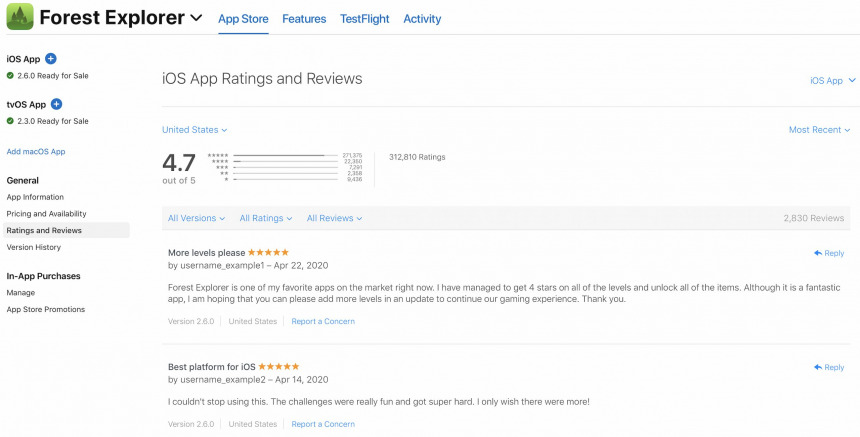
Teams can use App Store Connect to review feedback, filter reviews by criteria such as rating or app version, and identify common user issues. For apps with a large volume of reviews, the App Store Connect API can help retrieve customer reviews and manage responses more efficiently.
Apple’s rules for replying to reviews
When responding to iOS App Store reviews, keep replies concise, respectful, and focused on the user’s feedback. Apple recommends avoiding personal information, marketing language, and spam. Replies should address the customer’s concerns directly and use a friendly, personalized tone instead of generic responses.
After you respond, the reviewer receives a notification and can update their rating and written review. This creates an opportunity to continue the conversation and improve the user experience.
If you fix an issue mentioned in an older review, Apple recommends letting affected users know about the update through a reply when appropriate. This helps reconnect with users who previously had a negative experience.
Prioritizing low ratings and technical issues
When managing a large number of reviews, prioritize feedback that has the biggest impact on user experience. Apple recommends focusing on low-star reviews and reviews that mention technical issues with the current version of the app. These reviews often highlight problems that may prevent users from having a positive experience.
After fixing reported issues, include the changes in your release notes and consider replying to relevant reviewers to let them know about the update. This helps reconnect with users who previously reported problems and shows that their feedback was addressed.
Teams can enable App Store Connect email alerts to track when users update reviews they previously responded to. This allows developers to continue the conversation after an issue has been resolved.
How to handle fake, spam, and offensive reviews
If a review contains offensive content, spam, or violates Apple’s terms and conditions, use the Report a Concern option in App Store Connect instead of replying to the review. The reviewer will not be notified when a concern is reported.
Fake or manipulated reviews may show signs such as irrelevant content, suspicious patterns, or attempts to mislead users. When these issues occur, developers should report the review through Apple’s official channels rather than attempting to remove it themselves.
For issues related to downloads or billing, direct users to Apple Support, as these problems may involve the iOS App Store or user accounts rather than the app itself.
When to reset your app’s rating — and when not to
Resetting your app’s rating is a strategic decision, not a way to remove negative feedback. When releasing a new version, you can reset the app’s overview rating so it reflects feedback from the latest version. Resetting removes the previous rating from your summary score, shows a “recently reset” message, and keeps existing written reviews unchanged.
Consider resetting your rating only when a major update has fixed significant user experience issues and you are confident that the new version can deliver better results. Apple recommends using this feature sparingly, as having fewer ratings may affect how users evaluate the app.
For long-term performance tracking, mark the reset date in your reporting dashboard. A reset creates a break in rating trends, so separating pre-reset and post-reset data helps maintain accurate analysis.
How to Analyze iOS App Store Rating Analytics and Reviews
Reviewing and replying to feedback is something you do every day, but analysis works on a different schedule. This part of the process happens weekly or monthly, not daily.
Replying fixes one issue at a time for one user, while analysis looks for patterns across many reviews. It helps you find trends and decide what to fix first.
Monitor ratings and reviews in App Store Connect
App Store Connect provides tools to view and manage user ratings and reviews. In App Store Connect → Apps → select an app → Ratings and Reviews, you can filter reviews by region, app version, star rating, and reply status. This helps you quickly find specific feedback and track user opinions across different markets and releases.
For broader performance analysis, use App Store Connect → Analytics → Analytics Dashboard. It allows you to compare app performance over time across different versions, devices, platforms, and regions. By reviewing changes in ratings, downloads, and other metrics, you can better understand how updates affect user experience.
When analyzing rating trends, remember that iOS App Store data is limited to the available time range after September 19, 2017. Also, resetting your app rating creates a break in rating history, which should be considered when comparing results before and after a reset.
Track ratings volume and sentiment over time
Ratings analysis should consider both rating scores and review volume. When the number of ratings is low, the average score can be easily affected by a few extreme reviews. As rating volume becomes more stable, the average score becomes more useful for evaluating user satisfaction.
In App Store Connect → Analytics → Analytics Dashboard, you can track changes in rating volume and average rating over time. However, App Store Connect does not automatically analyze review sentiment or classify positive and negative feedback. To understand user sentiment, compare the share of 1–2 star and 4–5 star ratings, then review low-rated comments to identify common issues, such as feature problems, user experience issues, or support concerns.
Avoid making major product decisions or changing rating strategies before rating data becomes stable. First, collect enough feedback samples to identify reliable trends, then use rating insights to guide product improvements and review request decisions.
Turn review themes into product decisions
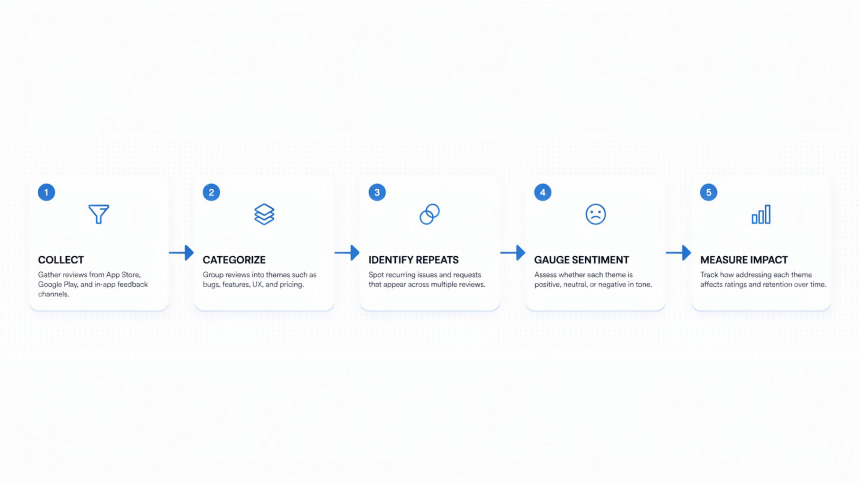
Review analysis is only valuable when it leads to product improvements. A simple five-step process can help turn user feedback into clear actions.
1. Collect relevant reviews
Filter reviews by country, app version, and star rating in App Store Connect. Then organize the selected reviews into a list for further analysis.
2. Group reviews by themes
Create your own category labels, such as crashes, performance, UI issues, missing features, or customer support. Read reviews manually and assign each one to the right category.
3. Identify repeated feedback
Look for common phrases, problems, and user scenarios that appear across multiple reviews. These patterns can reveal issues that affect many users.
4. Understand user sentiment
Check the star ratings within each category. A topic with mostly low ratings may have a stronger impact on user experience, while mixed ratings may need deeper analysis.
5. Measure the impact of product changes
After a new version is released, compare review themes, frequency, and ratings. This helps you understand whether updates actually solve user problems.
When prioritizing improvements, consider three factors: frequency, severity, and business impact. The most common issues are not always the most important, so combine user feedback with product goals before making decisions.
Key KPIs for rating and review health
Tracking rating health requires focusing on a few key metrics that show changes in user feedback over time.
1. Average rating trend
Monitor how your app’s average rating changes over time in App Store Connect → Analytics → Analytics Dashboard. A sudden increase or drop may indicate changes in user satisfaction after updates.
2. Star rating distribution
Look beyond the average score by checking the share of low and high ratings. Comparing 1–2 star ratings with 4–5 star ratings helps you understand whether user feedback is becoming more positive or negative.
3. Performance by version, device, and region
Compare ratings and reviews across different app versions, devices, and regions. This helps identify whether problems are related to a specific update, platform, or market.
Together, these metrics provide a clearer view of rating health and help teams find problems, measure improvements, and make better product decisions.
Conclusion
iOS app store ratings and reviews are more than user feedback. They are a continuous growth signal that helps teams understand users and improve the app experience.
A successful review strategy creates a complete feedback loop: collect feedback, respond to users, analyze trends, and improve the product. Reviews reveal user needs, responses build trust, and recurring feedback helps prioritize product improvements. Apple also recommends actively engaging with reviews, as thoughtful responses can improve user relationships and ratings.
With Apple’s AI-powered review summaries, this feedback loop becomes even more important. By highlighting common themes from user reviews, AI summaries can shape the first impression users have before downloading an app. Teams should regularly check the overall sentiment and recurring issues shown in these summaries.
To maintain healthy review performance, enable App Store Connect email alerts and run regular ratings and reviews analytics checks. Turning user feedback into product improvements is the key to building stronger ratings, trust, and long-term app growth.