What happens after a user leaves a one-star review? Does the conversation end there, or can a thoughtful reply change how that review is perceived? App reviews are more than individual feedback. They are part of your store listing and can influence how potential users evaluate your app. A clear and helpful response gives your team a chance to address concerns, explain improvements, and show that user feedback is taken seriously.
Knowing how to respond to app store reviews is not just about writing a polite message. It requires knowing which reviews to prioritize, how platform rules differ between the App Store and Google Play, and what makes a reply helpful instead of generic.
This guide explains how to respond to app store reviews step by step, including whether you can reply to reviews, which reviews to prioritize, how App Store and Google Play reply rules differ, how to write effective responses, and which mistakes to avoid.
Key Takeaways
- You can reply to reviews on both the App Store and Google Play, and every reply is public.
- A reply does not change your average rating, but the reviewer can update their rating after reading it.
- Start with 1–2 star reviews that name a specific problem, and reply within 24–48 hours.
- Name the problem, state the fix, and offer one clear next step.
- Keep replies to two or three sentences. Google Play caps them at about 350 characters.
- Skip generic apologies and copy-paste replies, and thank thoughtful reviewers too.
- After you ship a fix, tell the reviewer, so they can update their rating.
Can You Respond to App Store Reviews?
App owners can respond to app store reviews on both the App Store and Google Play. Public replies allow developers to address user feedback, explain solutions, and maintain communication with users after a review is submitted.
A response itself does not directly change an app’s average rating. However, when a reviewer updates their star rating after receiving a response, the new rating can affect the displayed score.
Can app owners reply to reviews on the App Store?
Apple provides developers with a direct way to continue conversations after users leave feedback. Through App Store Connect, authorized team members can select reviews, write responses, and publish them publicly on the app’s product page.
The App Store response system is closely connected with the review update process. When developers reply to a review, the reviewer receives a notification and has the option to update their rating or written feedback. This makes responses especially useful for addressing issues that have already been fixed.
Can app owners reply to reviews on Google Play?
Google Play allows developers to manage user feedback through Play Console and respond to reviews directly. Instead of treating replies as a one-time reaction, developers can use them as part of ongoing review management.
Because Google Play reviews are visible to potential users researching an app, responses can provide additional context around complaints, explain product decisions, and show that the team actively monitors user feedback. For apps with a large review volume, consistent replies can also help teams identify recurring concerns across users.
Why Responding to App Reviews Matters
Responding to app reviews is not just about answering users. It helps teams rebuild trust, understand user needs, and improve the app experience. While replies do not directly affect rankings or ratings, they can create long-term value for both users and app teams. Below are the main benefits of responding to app reviews.
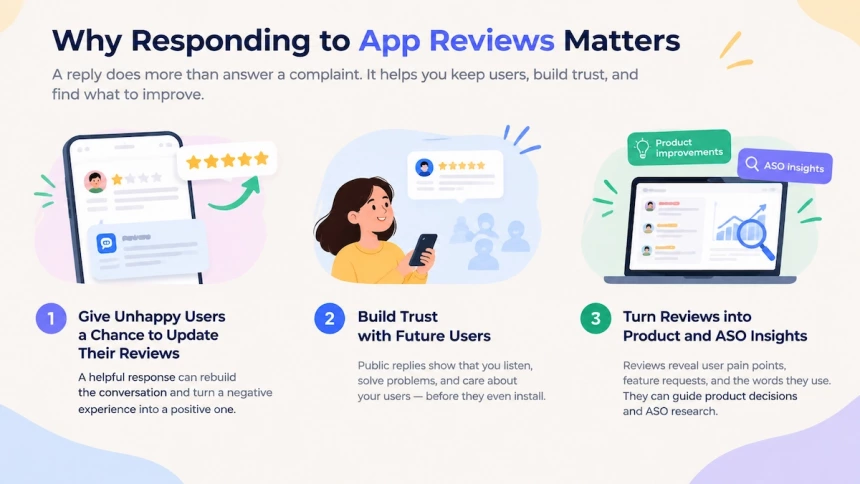
It gives unhappy users a chance to update their reviews
A negative review does not always represent the final user experience. When developers respond with a helpful explanation or solution, they create an opportunity to rebuild the conversation with an unhappy customer.
On the App Store, users receive a notification when a developer replies to their review, giving them a chance to update their rating and written feedback. A thoughtful response should acknowledge the issue, explain what actions are being taken, and show that the team values user concerns.
In some reported cases, users have updated their ratings after receiving a meaningful response and resolution from an app team. While replies cannot guarantee a rating change, they can help turn a negative interaction into a more positive experience.
It builds trust with future users
App store review replies are public, so their impact extends beyond the original reviewer. Potential users often read reviews before installing an app, and developer responses can influence how they view the product and the team behind it. Thoughtful replies can also help increase app rating, since users whose concerns are addressed are more likely to update their feedback.
A response that addresses concerns openly shows that the company listens to feedback instead of ignoring problems. Research also suggests that reviews play an important role in consumer decisions. One PowerReviews survey found that 96% of consumers consider reviews important when making purchases, while 46% pay attention to how brands respond to reviews.
For app teams, review replies are therefore not only a customer support channel but also a way to shape the public perception of the app.
It turns reviews into product and ASO insights
Reviews are also a valuable source of information for improving the app experience. Repeated complaints can reveal usability problems, missing features, or areas where users expect a better experience.
Beyond product improvements, reviews show the words users naturally use when describing features, problems, and benefits. These insights can support product decisions and ASO research, although reviews themselves are not a guaranteed ranking factor. The same reading turns app store optimization negative reviews into keyword research.
As review volume grows, teams should focus on identifying recurring patterns and prioritizing meaningful feedback. Not every review requires a response. Spam, irrelevant comments, or reviews that only require reporting usually do not create opportunities for useful interaction.
Which App Store Reviews Should You Reply To?
Not every App Store review needs the same level of attention. The goal is not to reply to every user, but to find the reviews where a response can make the biggest difference.
A good reply strategy balances three goals: protecting your rating, understanding product issues, and showing users that their feedback matters. The table below shows which reviews deserve a response first and what action to take.
| Review type | Suggested action | Why |
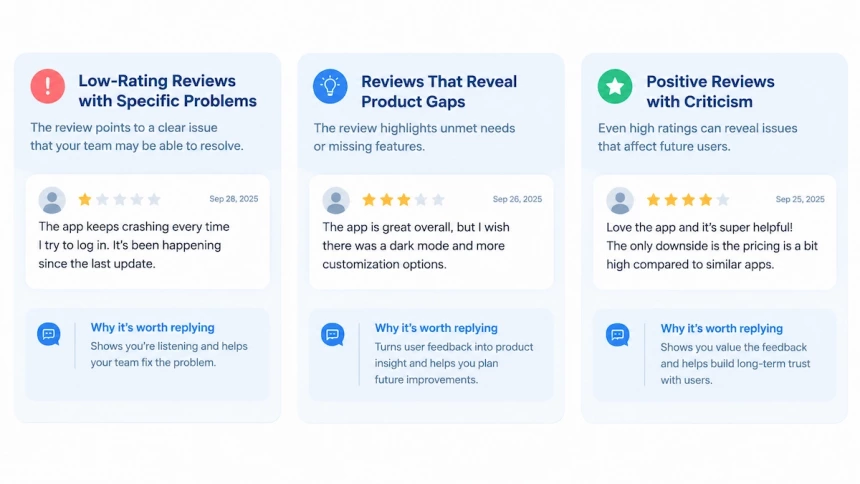
| 1–2 star review with a specific problem (crash, billing, sign-in) | Reply within 24 hours | The review points to a clear issue that your team may be able to resolve |
| 1–2 star review with no details | Acknowledge the feedback and ask for more information | Shows that you are listening and creates a chance to understand the problem |
| 3 star review | Reply and ask what could be improved | These users often see value in the app but still have concerns |
| 4–5 star review with criticism | Address the criticism directly | Positive ratings can still reveal problems that affect future users |
| 4–5 star review with praise only | Send a short thank-you or skip the reply | The user has already expressed satisfaction, so the value of a longer reply is limited |
| Feature request | Acknowledge the request and share that feedback with the team | Turns a review into product insight without making promises |
| Spam, ads, or unrelated content | Do not reply; report it | A public reply can increase visibility without adding value |
The 24-hour target in the table is a team practice, not a platform requirement. Neither Apple nor Google Play sets a required reply deadline. The right response time depends on your team size, support process, and the type of issue reported.
Platform guidance also supports prioritizing certain reviews. Apple recommends paying attention to lower-rated reviews and feedback that reports issues with the current version. Google Play has reported that replies to negative reviews can improve user ratings, making thoughtful responses a useful part of review management.
Three groups deserve extra attention: low-rating reviews with specific problems, reviews that reveal product gaps, and positive reviews that include criticism. Each one provides a different opportunity to improve user trust and app quality.
How to Reply to App Reviews on iOS and Google Play
An app replies to reviews in one of two places: the developer console, or an API. An app store reply to reviews follows the rules Apple and Google each set for steps, permissions, and reply limits.
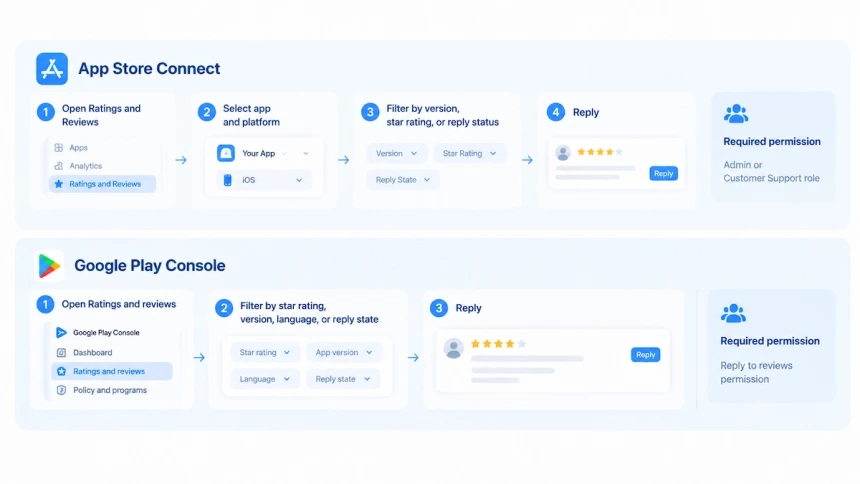
Reply to Reviews in App Store Connect
Replying to reviews in App Store Connect starts under Ratings and Reviews in the sidebar. Open your app, pick the platform, then narrow the list by version, star rating, or reply state. Posting a reply needs an Admin or Customer Support role.
You can respond to app store reviews no matter how long ago they were written. When you respond, the reviewer is notified and can update their review. Only one response per review appears on your product page, and you can edit or delete it at any time. The response also stays public if the reviewer later rewrites their review.
Reviews arrive from every storefront, so triage by lowest rating first. Turn on email alerts for reviews you have already answered to learn when a reviewer edits one. If a review breaks the rules, use Report a Concern instead of replying. Apple never tells the reviewer that you reported it.
Reply to Reviews in the Google Play Console
Open Play Console and go to Ratings and reviews > Reviews. Your account needs the Reply to reviews permission, which account owners hold by default. Before you write, filter by star rating, app version, language, or reply state. Each review takes one public reply, and you can edit that reply whenever you like.
The first reply sends the reviewer a push notification and an email. That email carries your app name, the review, your response, and a link to contact you. Editing a reply later sends no second notification.
Google’s Reply to Reviews documentation caps reply text at roughly 350 characters, and HTML tags do not count toward it. The cap forces one shape: name the problem, state the fix, offer one next step. Play Console can also draft a suggested reply in English, which is a starting point rather than a final answer.
Reply Through APIs
Both stores let you reply to app reviews through code, which is how large teams keep pace. The App Store Connect API lists reviews per app and per app version. One endpoint creates a response, and the same call overwrites an existing one. A separate endpoint deletes it. Responses do not appear on the App Store instantly.
Google’s Android Publisher API follows a similar pattern. One call sends a package name, a review ID, and the reply text. The reviewer is notified only on your first reply to a new or edited review. Default quotas allow 200 reads an hour and 2,000 replies a day, per app.
Automated and AI-Assisted Replies
An auto reply to app store reviews works only as a first pass. Play Console can draft a suggested reply, and the API can post at scale, but neither reads tone. The main benefit of AI-powered review management for app feedback is sorting, not writing. Use an AI reply to app store reviews to sort the queue, then answer the important ones by hand.
Reply Rules and Limits at a Glance
The two stores agree on the shape of a reply, but not on the details. Below, each rule sits next to the App Store setting and the Google Play setting.
| Rule | App Store | Google Play |
| Character limit | No published limit | About 350 characters |
| Responses per review | One, editable or deletable | One, editable at any time |
| Reviewer notified | Yes; can update their review | Yes; push notification and email |
| Permission needed | Admin or Customer Support role | Reply to reviews permission |
| Broken review | Report a Concern | Flag for policy review |
These rules shape app store reviews management at scale. By understanding the limits and available actions on each platform, teams can create a more effective response process without relying on trial and error.
How to Write a Reply That Actually Works
A review reply has two audiences. One is the reviewer, who gets notified and can update their rating. The other is every future visitor who reads your product page before installing. Write for both: be specific enough to help the first, and short and calm enough to reassure the second.
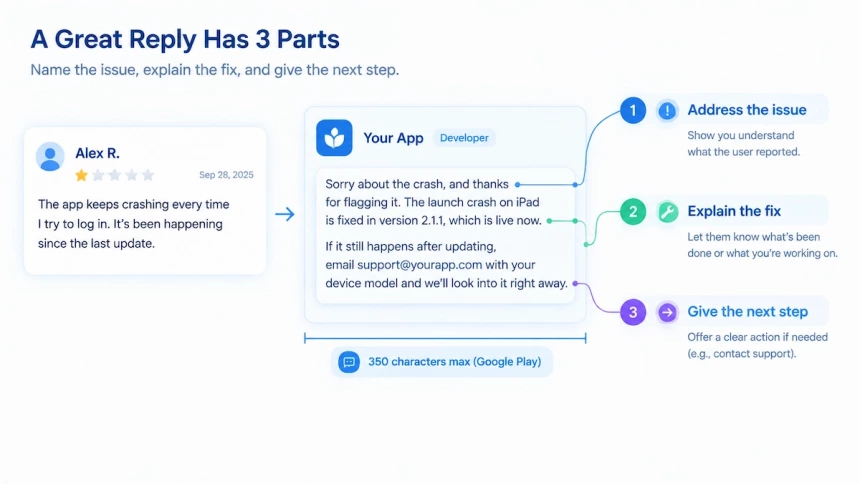
Answer the Actual Complaint
Open with the problem the user described, not a generic apology. “Sorry for the inconvenience” tells them nothing, while “the crash on iPad launch is fixed in version 2.1.1” gives them a reason to reinstall. If you don’t have a fix yet, say what you know and what happens next. Don’t guess at the cause, and don’t promise a release date you can’t guarantee. Overpromising and underdelivering damages trust more than saying nothing. Once the fix actually ships, come back and say so.
Keep It Short and Human
Two or three sentences is usually enough. Google Play enforces a hard limit of 350 characters, and a long reply on either store reads like a corporate script. Use the reviewer’s name if it’s shown, mention one detail from their review, and sign off in your brand’s normal voice. Templates save time, but always tweak the wording before you send, because users spot copy-paste replies immediately. If the reviewer writes in another language, reply in that language.
Move Complex Issues to Private Support Channels
A public reply can’t collect device details, logs or account information. Give users one clear next step, such as a support email or in-app chat. Ask only for what you need, like the app version and device model. Never ask for passwords or other sensitive data in a reply. Apple’s guideline 5.6.1 also asks that replies stay free of personal information, spam and marketing. Stick to a support address and avoid linking to external pages.
Stay Calm, Even When the Review Is Wrong
Don’t argue, blame the user or get defensive. If a review contains a factual mistake, correct it once, politely, and stop there. Other users read the thread, and a public argument costs you more than one unfair review does. If a review is abusive, spam or violates store rules, don’t reply. Use the store’s report option instead.
Prioritize Fast, Then Everything Else
Reply to one- and two-star reviews first. Knowing how to respond to a one-star app rating matters more than any other single reply. Aim for 24–48 hours in general, and within a few hours for bugs and critical issues. Fast replies make users more likely to share the details you need. Old reviews stay open too, because Apple lets you reply to a review of any age. Don’t ignore the other ratings:
- 3 to 5 stars with a complaint: answer the criticism, even though the rating is high.
- Detailed praise: a short, sincere thank-you keeps the good feeling going. A one-word reply to a long, thoughtful review can feel dismissive.
Close the Loop After You Ship a Fix
If a review reported a bug you’ve since fixed, go back and say so. Apple notifies the reviewer when you respond, and they can then change their review. A short “fixed in version X” note gives them an easy reason to revise it. This is the single most effective way to turn a bad review into a better one.
Reply Examples You Can Adapt
Each of these fits within Google Play’s 350-character limit.
Bug report (1 star): Sorry about the crash, and thanks for flagging it. The launch crash on iPad is fixed in version 2.1.1, which is live now. If it still happens after updating, email [email protected] with your device model and we’ll look into it right away.
Feature request (4 stars): Thanks for the kind words! Widgets are on our list, though we haven’t set a date yet. We’ll mention it in the release notes as soon as that changes.
User confusion (2 stars): Sorry for the confusion. Daily reminders are included on every plan and can be turned on under Settings > Notifications. If you can’t find the option, write to [email protected] and we’ll sort it out.
Detailed praise (5 stars): Thank you for such a thoughtful review! We’re glad the reminders feel helpful instead of pushy, since that was exactly what we were aiming for. More improvements are on the way.
Make Review Replies Part of Your Routine
A reply will not fix every complaint, and it will not raise your average rating on its own. What it does is public. Every visitor who opens your product page next can see whether you showed up.
Start this week with your lowest-rated reviews, and answer two or three of them properly. Then return to the users whose bugs you have already fixed, and tell them what changed. Repeat that each week and the effect compounds: unhappy users get a second chance, and future visitors see a team that answers. Some of them will update their rating, most will not, and that is fine. The next person reading your reviews is deciding right now, and a reply is the only part you control.
FAQs
Can I remove a review I do not like?
No. Neither console deletes a review on request, but you can report one that breaks the store’s rules, and the store decides what happens next.
How do I know whether my replies are working?
Track rating updates, not reply volume. Both stores notify the reviewer when you respond, so how many of them change their rating afterwards is the signal that matters. Recurring complaints in new reviews tell you whether the fix landed, not the reply.
Should I ask the reviewer to update their rating?
No. Google’s policy for replies says to keep the reply focused on the issue raised and not ask for a higher rating. Fix it, say what changed, and leave the rating to the reviewer.
Can I use AI to write these replies?
Use it to sort the queue and draft the wording, then let a person send. Google’s developer posting policy asks for replies that clearly address the user’s comment, and a copied line fails that test.
Does replying to reviews improve your ranking?
Not directly. A reply does not enter your average score, and reviews are not a guaranteed ranking factor. What moves is the rating a user updates afterwards, and how the thread reads to the next installer.