Your App Store rating can fall after a four-star review. That sounds backwards, but the star average explains why. Many teams still try to improve App Store ratings with more prompts. The numbers don’t always work in their favor.
Get the order wrong and the work backfires. Extra prompts on a weak product collect more bad ratings. Buying reviews or filtering users risks your app’s standing. The safer path is slower, but it compounds.
The guide follows one idea from start to finish. Ratings rarely move because you ask more often; they move when the experience improves and the ask lands at the right moment. Run that as a loop, stay inside the platform rules, and the score catches up.
Key Takeaways
- A rating is a plain average of stars; written reviews never change it. Above 4.1, even a four-star rating pulls the score down.
- Most low ratings are symptoms. Diagnose first: check crashes and broken flows, read the distribution, and find when the score moved.
- Only three levers move the average: volume, mix, and time. Mix moves fastest in a large pool.
- Apple caps the system prompt at three per user per 365 days, and SKStoreReviewController is deprecated as of iOS 18. Ask once per version, after a completed action.
- Policy bans the shortcuts: forced ratings, paid or fake reviews, review gating, and deleting reviews.
- Volume grows from a bigger user pool, natural milestones, and prompts, links, and external channels.
- Recovery runs in order: fix the release, reply to reviewers, then re-prompt on the fixed version. Track by release cycle, not day to day.
Why Your App Store Rating Is Hard to Move
The App Store rating beside your icon is a plain average of star values. App Store ratings shape trust, tap-through, and conversion, so teams treat them as a growth lever. Third-party research puts the share of users who check app ratings and reviews before downloading at about 79%.
The number is stubborn for a reason most teams misread. In App Store optimization, high ratings reinforce the rest of the work, but the order matters. It is rarely that too few people rate. A low App Store app rating is usually a symptom, not the disease.
A rating can stay stuck for several reasons. In most cases, the problem comes down to three factors: review volume, star mix, and timing. There is also a less obvious case: the 4-star trap, where a positive review can still lower your average.
What You Can Change: Volume, Mix, and Time
An App Store rating is shaped by three factors: volume, mix, and time. The average is mainly shaped by three factors:
- Volume: The total number of ratings.
- Mix: The balance of different star ratings in your review pool.
- Time: How recent your ratings are, since older ratings still count.
The app store rating calculation answers how many new ratings you need for a visible change; it is arithmetic, not guesswork. If you want to increase app ratings in a large pool, mix usually moves faster than volume. Trying to increase app rating by prompting more often returns less than most teams expect. The largest app rating boost comes from users who never saw a prompt at all.
The 4-Star Trap: When a Good Review Lowers Your Average
The 4-star trap comes from a simple calculation. If your App Store rating is already 4.1, a new 4-star rating is below your current average, so it pulls the score down.
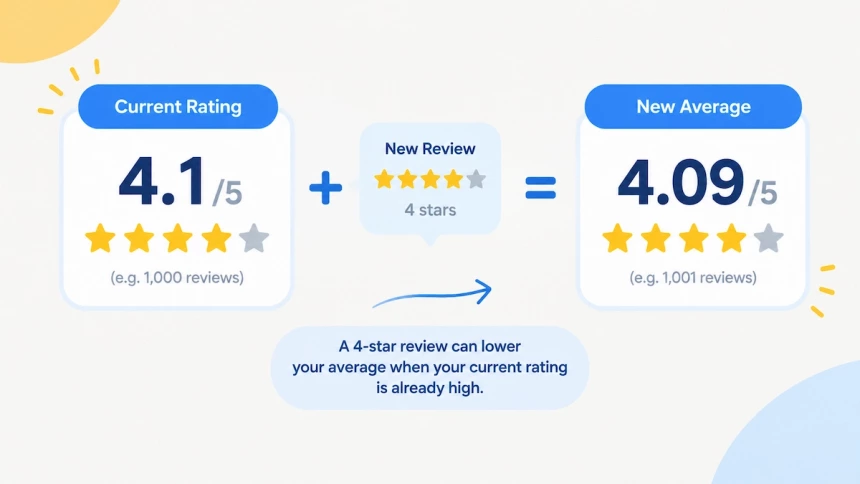
This surprises many teams because a four-star review is still a positive signal from a user. The problem is not the review itself. It is the gap between the user’s intention and the way an average score works.
Some developers argue that the five-star system creates pressure to treat anything below five stars as negative. However, Apple has not publicly stated that four stars should be considered a negative rating.
This debate is not unique to the App Store. Some platforms have moved away from star ratings toward simpler feedback systems. Netflix switched from stars to thumbs in 2017, and YouTube introduced its like/dislike system in 2009. Apple has not announced a similar change.
For App Store optimization, the key point remains simple: a positive review does not always increase your average rating. When your existing score is high, even a four-star rating can lower the number users see.
Diagnose a Low Rating Before You Fix It
A rating that will not move is usually a symptom, not the cause. Teams often reach for the prompt first because it is the easiest lever to pull. Before changing your review strategy, find whether the problem comes from the product, the rating pattern, the release timeline, or the users you are reaching.
Start with four checks:
• Separate product failures from prompt failures.
• Read the distribution, not only the average.
• Find when the rating changed.
• Find the users who never rate.
Separate Product Failures From Prompt Failures
How to improve app ratings starts with the product, not the prompt. Crashes, freezes, failed logins, and broken flows create negative experiences before a review request ever appears.
Check technical issues in Play Vitals and App Store Connect first. If users cannot complete core actions, increasing prompt volume will only collect more negative feedback.
A review prompt cannot fix a broken experience.
Read the Distribution, Not the Average
The average rating hides the pattern behind the number. The pattern tells you what needs attention.
A 4.5 rating can represent very different situations. It may come from a balanced mix of four- and five-star ratings, or from a large group of satisfied users pulled down by a smaller group of one-star ratings.
Read these groups separately. One-star users often explain what failed, while many five-star users leave no written feedback. Look at each market individually because every App Store storefront has its own rating.
The score shows the result. The distribution shows the reason.
Find When the Rating Changed
A distribution shows what happened. The timeline shows when it started.
Compare rating changes with release dates, major updates, pricing changes, and new features. A sudden drop after an update points to a different problem than a slow decline over several months.
App Store Connect ratings over time and Play Console trends both show when a drop started. Looking at the timeline helps separate a single incident from a broader product issue.
Find the Users Who Never Rate
The first three checks focus on ratings you already have. The final check looks at the users missing from your data.
Many active users never leave a rating, which means your current score represents only a small part of the overall experience. Understanding who rates, who stays silent, and when users interact with your app reveals where future rating improvements can come from.
The diagnosis ends here. The next step is fixing the problems behind the rating.
How to Improve App Store Ratings With Better Prompting
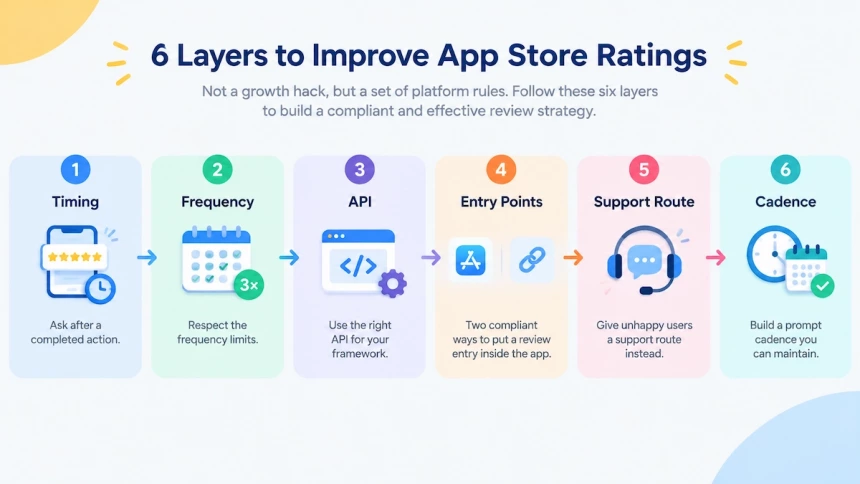
The review prompt is the lever you control most directly. Six layers decide how to improve app store ratings, and each one is a platform rule rather than a growth hack. They run from timing and frequency limits to the current API, two compliant entry points, a support route, and a cadence you can keep.
Ask After a Completed Action
Timing is where how to improve app store rating stops being a matter of taste. A review request only works when the user has enough context to judge the app.
The two platforms handle this differently. Apple rules out three moments to request a review: mid-task, at launch, and in response to a user action. Google is softer: wait until users have had enough experience to provide useful feedback. In short, Apple names the moments to avoid, while Google leaves you to find a meaningful one.
Some developers still argue for earlier prompts to build review volume, but that conflicts with Apple’s guidance, and a completed action remains the moment that holds up on both platforms.
But timing only decides whether users are ready to rate. The next challenge is making sure the request does not become repetitive.
Respect the Frequency Limits
Even a perfect moment repeats into nagging. The review prompt may appear at most three times per user in any 365-day period, and people can disable it entirely. A user who has already rated the app sits in a different branch. The prompt returns only when the app version is new and more than 365 days have passed since their last review. Development builds always show the prompt, so testing tells you nothing about quota use.
Google Play enforces a quota on how often the review flow can appear. The exact number is an implementation detail, and it can change without notice.
How to increase app store ratings, then, is a budgeting question. Teams that try to increase app ratings on every screen burn the quota on version one, while a single well-placed prompt per version lasts.
Trigger the Review Request Through the Right API
The API you call has changed, and many codebases have not caught up. The implementation matters because the review request is no longer a single API question. The correct method depends on the framework your app uses.
The old SKStoreReviewController API is deprecated as of iOS 18.0. Its no-argument version was retired earlier, back in iOS 14.0. Deprecated is not the same as removed, though: the old call still runs on systems older than iOS 18.
In SwiftUI projects, the RequestReviewAction structure arrives through the requestReview environment value. In UIKit, the AppStore class offers requestReview(in: scene), and it has been available since iOS 16. If you still support devices below iOS 16, keep the older approach behind a version check.
Regardless of framework, the principle stays the same: the API only sends a request. The system decides whether the user sees anything. Because the system controls whether a prompt appears, developers also need a permanent path for users who actively want to leave feedback.
Two Compliant Ways to Put a Review Entry Inside the App
The review prompt is not the only compliant door. Apple also allows a persistent link: the product page URL with action=write-review appended, placed in settings or the about page. The user has to tap it, which keeps the action voluntary.
Both platforms treat a button as the wrong trigger for the in-app review flow. Google’s guidance says not to connect the review flow directly to a button, since the quota may suppress the prompt and the tap can feel broken. Apple’s rule follows the same principle: the request may show nothing, so it should not be presented as the result of a user action. Google’s alternative is to send users to the Play Store listing instead.
Neither entry point will automatically create more app reviews. They only keep the path available for users who already want to share feedback. The bigger challenge is handling users who are unhappy before they reach that point.
Give Unhappy Users a Support Route Instead
A prompt cadence cannot fix a bad user experience. Common routes include a help center, a support link on the order or account page, and a short issue picker. The picker sends the report to the team that can investigate and respond.
The goal is not to hide negative feedback. It is to give frustrated users a place to explain the problem before they leave a permanent store review. One compliance boundary matters here: the support route must never filter who reaches the rating entry. Sending only happy users to the store and unhappy users to support is the pattern that creates risk, not the support route itself.
Used correctly, support becomes another way to improve app ratings by solving problems before they turn into negative reviews. With timing, frequency, implementation, and support paths in place, the final step is turning these rules into a repeatable system.
A Prompt Cadence You Can Maintain
Apple’s own sample code behaves like a checklist, and three habits are worth borrowing. The app never prompts twice for the same version. It waits until the core action has been completed several times. It delays the prompt for a few seconds so it never interrupts a task. Apple’s design guidance also suggests allowing at least a week or two between requests.
Pair those habits with the quota math. Give every new version at most one prompt, and store the last prompted version on the device; Apple’s sample uses AppStorage for this purpose. The cadence question is therefore not about asking more often. It is about protecting each opportunity. One well-timed prompt per version, spaced out over months, creates the kind of review strategy that can last.
What You Cannot Do to Improve App Store Ratings
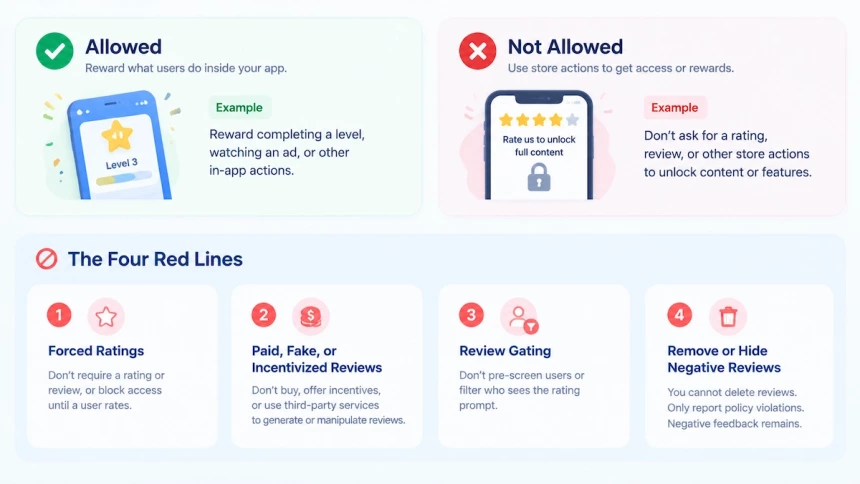
App Store rating rules leave less room for experimentation than many growth tactics suggest. Some violations can affect app availability, developer status, or App Store trust signals. Developers who ask how to remove an App Store review learn the same answer: ratings and reviews are not theirs to delete. The four limits shaping how to improve app store ratings are forced ratings, paid or fake reviews, review gating, and review removal.
Force Ratings or Unlock Content for Reviews
The rule fits in one sentence, and it covers more ground than it first appears. Guideline 3.2.2(x) prohibits a trade: access to the app in exchange for a store action. Apps “must not force users to rate the app, review the app, download other apps, or other store-related actions.”
The same rule also covers cases where access to functionality, content, or app usage depends on completing a store action. The line runs between two types of actions. You may reward what a user does inside the app, because the clause allows incentives for activities such as “completing a level, watching an ad.” You may not tie rewards or access to actions that take place on the App Store, such as leaving a rating or review.
Two patterns get caught most often: a rating screen before a level unlocks, and a prompt that keeps the app locked until a user rates it. Both are forced rating flows, and polite wording does not make them compliant. The compliant version is a reorder: unlock the value first, then ask for feedback.
Paid, Fake, and Incentivized Reviews
Buying ratings may increase numbers temporarily, but it creates a serious risk to an app’s App Store standing. Apple warns against attempts to manipulate ratings, reviews, or App Store discovery signals. These violations can lead to removal of the app and other developer account consequences.
Apple’s guidelines prohibit developers from using paid, incentivized, or fake reviews to influence ratings. They also prohibit working with third-party services that generate or manipulate reviews on a developer’s behalf. A separate rule also prohibits manipulating elements of the App Store customer experience, including charts, search, reviews, or referrals.
So a vendor promising an instant app rating boost is creating a compliance risk, not a sustainable growth channel. The same applies to paid reviews, fake reviews, and shortcuts designed to bypass genuine feedback. What developers can still do is slower but safer: use the platform review API correctly, respond to reviews, and improve the issues users mention.
Filter Reviews Before Submission
Review gating can look like good customer experience design, but it creates a risk of manipulating feedback. The pattern is a pre-screen: satisfied users are sent to the store, while unhappy users receive a private feedback form.
Google restricts questions or flows designed to influence the rating outcome before showing the rating card. Prompts that ask users to predict or choose a rating before the review request appears can interfere with the intended review process.
Apple addresses the same concern differently. Developers are expected to use the provided rating API rather than creating custom prompts that imitate the system review request. A satisfaction screen placed before the official rating request can become a form of review filtering.
The problem is not only compliance. Filtered users still have complaints, but those insights never reach the public review channel. The users you screen out are often the source of the product feedback you need most. Ratings should be collected through the platform-approved flow, not through a selective path that only sends positive users to the store.
Remove or Hide Negative Reviews
Developers asking how to remove an App Store review get the same answer from both stores: they cannot delete reviews themselves. There is no app store remove review option; a developer cannot delete a rating or a written review simply because it is negative.
What exists is a reporting path for reviews that violate platform policies. In App Store Connect ratings and reviews, developers can report concerns about reviews, and Apple can review whether the content violates its guidelines. Reporting is not a tool for removing opinions a developer dislikes.
Google Play follows the same principle. Reviews can be flagged under the Google Play comment posting policy when they violate rules, but genuine negative feedback remains. A rude but honest one-star review is still part of the public rating history.
Responding to negative reviews is the lever that remains. A thoughtful reply can show future users that problems are being addressed, while the feedback itself provides guidance for improving the app experience.
How to Get More App Store Reviews: 5 Ways to Increase Review Volume
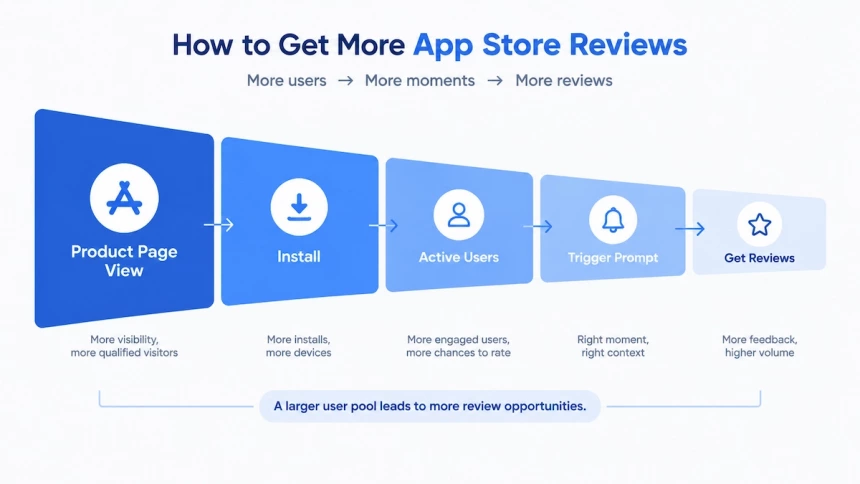
Review volume starts with the number of real users who have a chance to leave feedback. A prompt alone cannot solve a limited user pool, so how to increase app reviews requires a complete process from acquisition to feedback requests. The five methods covered here are expanding your user pool, creating natural review moments, using in-app prompts and review links, building more review opportunities through external channels, and recovering stalled growth by fixing product issues.
Expand Your User Pool to Increase Review Volume
Most users do not leave a review unless there is a clear opportunity to do so. Expanding the number of users who reach that opportunity is the first step to increasing review volume. A prompt only reaches people who are already inside the app, so you have to drive app installs before the ask can work.
The pool grows through acquisition first, and then through installed users who have never been asked. More qualified visitors on the product page mean more installs, and more installs mean more devices that can rate. That raises the ceiling on how many app reviews and ratings it can collect. Third-party guidance on app rating improvement puts visibility and acquisition at the start, ahead of prompting. That order matters. The listing decides how many people install, and the installs decide how many can rate.
A larger pool also makes the average steadier. When only a handful of ratings exist, one bad day moves the summary score visibly. At a healthy volume, the same single review barely registers. The App Store rating calculation answers how many new ratings a visible change requires.
Nothing in this step depends on sorting users by mood. Every user who installs the app gets the same chance to rate it.
Create Natural Review Moments After User Milestones
A star rating takes one tap. A written review needs a subject.
Milestones supply that subject: an order delivered, a problem solved, a goal reached. Order confirmation and completion screens are the natural place for the ask. Launch screens are the wrong place, because the user has nothing yet worth describing. Third-party guidance on collecting mobile app reviews points to purchases and resolved issues for the same reason.
Keep the two outputs apart. The system prompt asks for a star score and an optional written review. You control neither the wording nor the outcome. Written feedback comes from users who have something specific to say, so give them a moment where they can say it. A request that goes out by email faces the same platform rules.
Use In-App Prompts and Review Links to Collect More Reviews
The moment decides when to ask. The route decides how many times the system will show it. On iOS, developers who ask how to get more app reviews have two compliant paths. One is a timely in-app prompt, and the other is a persistent review link.
Apple’s guidance on requesting App Store reviews asks for the prompt at the end of a sequence the user completed. It also warns against showing the prompt at launch, or as a direct result of a tap. The cap counts system prompts, not links, so the two paths are not interchangeable. The prompt reaches users at a moment you pick, if the system decides to show it. The link works whenever a user goes looking for the page.
In SwiftUI projects the prompt comes from RequestReviewAction. The second path needs no framework support at all. It is a link to the product page with action=write-review appended to the URL. Put it where users already look: a support screen, a settings row, or an email footer.
Use External Channels to Create More Review Opportunities
Email, order confirmations, social posts, and website testimonials all sit outside the app. Email and order confirmations can carry a link to the product page. Social posts can remind users to share what they think. Website testimonials are a different thing: they live on your site, not on the App Store.
Sentiment work comes first. Third-party guidance on improving app ratings and reviews suggests NPS and CSAT surveys to read how users feel before touching the rating.
These methods increase app reviews by creating more opportunities for real users to leave feedback. They also carry a boundary. External channels can remind users to share feedback, but they must not become a filter that sends only satisfied users to the store. Apple treats filtered feedback as review manipulation.
Recover Review Growth by Fixing Product Issues
A stall has a cause you can name. A release broke something, a prompt stopped firing, or a market never had reach. Whatever the cause, the order of work stays the same.
Regular updates create new opportunities to improve the user experience and trigger review requests at appropriate moments. Apple has not publicly disclosed a rule that ties a version release to extra prompt appearances. Treat cadence as a chance to ask, not a guarantee.
Fix the problem before sending anyone to the store. A request that lands on a broken version spends a prompt and invites a one-star rating.
Third-party guidance on rating recovery follows the same sequence: repair the release, then ask again.
Do not buy the count back. A third-party blog suggests running a contest to collect reviews. Apple treats incentivized feedback as manipulation, and the platform rules section explains why.
Recover App Store Ratings After a Bad Release
Recovery is not about pushing the number back up overnight. It is about how to increase app store ratings for real: stop what caused the drop, then rebuild the conditions for better ones. Three steps carry it: fix the issue, answer the reviews that point at it, and reach users again once the fix ships.
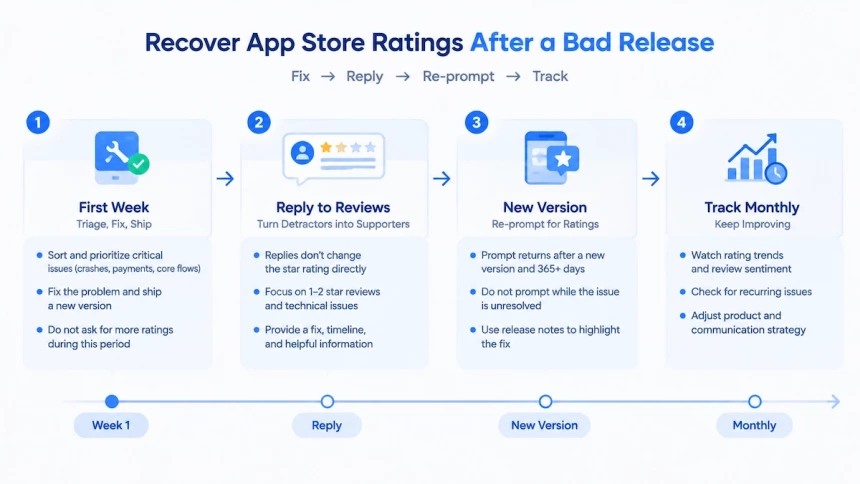
The First Week: Triage, Fix, Ship
Only one kind of drop belongs in this week. An incident has a release date you can name, and its first priority is a hotfix rather than a reply. Third-party testing guidance lands on the same priority: fix bugs as quickly as possible. A reply cannot undo what the build does, so the fix leads and the wording follows.
Sort the complaints before you answer any of them. Crashes, failed payments, and broken core flows are the ones that cost ratings, because they block the task the user came for. Treat those as release blockers, not as feedback to acknowledge later. Published third-party recovery advice follows the same order: repair what the reviews describe, then give affected users a timeline.
One habit wastes the first week: asking more people for a rating. Nothing in those seven days increases app store ratings directly, and the extra prompts only collect more one-star ratings. Hold the extra ask until the fixed version is live.
Reply to Reviews That Signal a Recoverable Problem
A reply does not change the star rating directly. Only star values affect the average, so no answer you post moves the number. Written replies sit beside the score as a display layer, so how to improve app reviews rarely starts in the reply box.
What a reply can change is a person. Apple notifies the reviewer when you respond, and they then have the option to update their rating or review. The larger audience never wrote anything. Potential users read the reply, and it shapes whether they install. That indirect effect is the only way a reply can improve app ratings and reviews.
Two groups come first. Apple suggests prioritizing the lowest star ratings, and reviews naming technical issues in the current version. Both are cases where a fix, not a paragraph, decides the outcome. The framework for how to respond to negative app reviews covers wording and tone for the slower cases.
Request Ratings Again After Shipping the Fix
The system gives recovery one built-in window, and people who already rated are not locked out. The prompt returns when the app version is new, and more than 365 days have passed since their last review. That branch is the lever here, because the fix and the ask arrive in the same release. To increase app ratings after a bad release, re-prompt the fixed version.
Anyone asking how do I increase my app store rating after a bad release needs one rule. Do not send a prompt while users are still living with the unresolved problem. The system decides whether the prompt appears, and a request on a broken build only invites a one-star rating. On the fixed version, Apple’s sample code prompts at most once per app version, and never twice for the same bundle version.
Reconnect with affected users outside the prompt as well. Release notes are the place to name the fix, because that text sits where the complaint was filed. A short line about the repair does more than an apology.
A reset is not a repair tool, and it is not a substitute for fixing the experience. It clears the star average across every region at once, and the previous rating cannot be restored. It also leaves a thinner pool, and few ratings discourage downloads. The App Store rating calculation covers what the reset removes and what stays.
Track App Store Ratings Over Time, Not Day to Day
App Store ratings are a lagging indicator, especially for apps with a large rating pool. Daily changes usually reflect normal fluctuation rather than a meaningful shift. A large number of existing ratings makes the average more stable, so evaluate rating trends by release cycle or monthly movement instead of judging a change from the last few days.
Ratings should also be read with context. iOS app store ratings are calculated separately by storefront, and different markets can move in opposite directions after the same update. Version changes, review sentiment, and rating resets can all affect the number differently. Always record the storefront and app version when comparing rating changes.
A simple monthly snapshot is enough to track progress. Keep the same market, date, and metrics each time, including average rating, total rating count, new ratings, and reply activity. Consistent tracking helps separate real product improvements from short-term noise.
Improving App Ratings and Reviews Is a Loop, Not a Campaign
Improving app ratings and reviews is not a one-time campaign. It is a continuous cycle: understand where ratings come from, fix the problems behind negative feedback, and create better moments for users to share their experience.
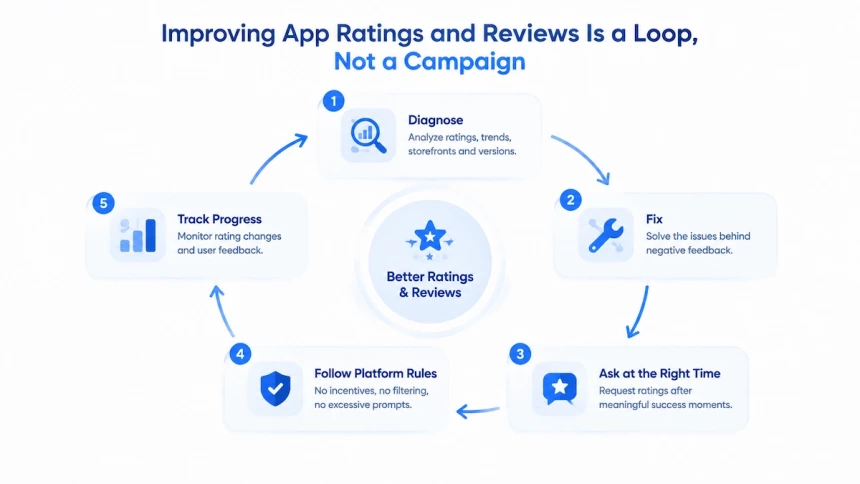
Start with diagnosis. Review your rating distribution, recent changes, storefront differences, and version impact before deciding what to improve. A lower rating is often a signal of a specific user experience issue, not just a number to increase.
Then improve your app store review management system. Fix the problems users mention, respond when a reply can rebuild trust, and request ratings only after users have reached a meaningful success moment. More prompts do not create better ratings if the experience behind them has not improved.
Finally, keep the process within platform rules. Avoid shortcuts such as incentivized reviews, filtered feedback, or excessive prompts. Sustainable rating growth comes from making it easier for satisfied users to share genuine feedback.
A practical next step is simple: review your current rating request flow, identify engaged users who have not provided feedback, and track rating changes consistently over time. Build a repeatable improvement cycle instead of chasing a single score target.
A higher rating is not created by a single campaign. It is the result of better experiences, repeated improvements, and a system that turns user feedback into action.
FAQs
How Do I Improve My App Rating, and How Long Does It Take?
How do I improve my app rating, and how long does it take, come down to how many ratings you already have. A large pool absorbs new stars slowly, so the timeline is arithmetic, not a promise. Work out how many new ratings a visible change needs from your own average; that number sets the timeline.
Can I Show the Rating Prompt Only to Happy Users?
You cannot show the rating prompt only to happy users; that filter is review gating, and the compliance section explains why it backfires. Apple allows only the system prompt, not a custom screen that copies it. Google’s in-app review guidance restricts any question that shapes the rating before the card appears.
Do Ratings and Reviews Affect App Store Ranking?
Ratings and reviews affect App Store ranking, but neither platform has published a weight. Google counts them among the signals it uses when it scores app quality. The App Review Guidelines police the obvious shortcut: manipulating ratings, reviews, charts, search, or referrals.
Can I Delete a Bad Review From My App Page?
You cannot delete a bad review from your app page. Reporting a policy violation is the only route, and the compliance section walks through the entry points. A public reply is the only other lever, and it changes what the next reader decides.