The app store rating calculation looks like a plain average of your star ratings. It is not a lifetime score, and it is not a single number. Four rules decide which ratings it counts: storefront, cutoff date, resets, and one rating per user.
Apple builds the displayed rating by combining individual star ratings, and its Ratings, reviews, and responses page documents that step. That number is calculated per country or region, not once for the whole store. Apple has not publicly disclosed any weighting formula for it. Territory and time set the limits: one pool per storefront, and nothing older than the 2017-09-19 cutoff.
This article works through three things: the rules Apple applies, the arithmetic behind a rating change, and the data you can check against.
Key Takeaways
- Only star values enter the average; written reviews are a display layer and add nothing to the sum.
- Every average belongs to one storefront, and a rating joins the country where the customer first bought the app.
- On iOS 11 and later, the pool starts on September 19, 2017, so an older device may show a different number.
- The displayed rating is a summary, not a formula — Apple has published no weighting, time window, or decay curve.
- A version reset clears the pool across all regions at once, and the previous rating cannot be restored.
- The Lookup API returns one storefront’s reading at one moment, and the Connect API returns reviews rather than the full rating pool.
- Apple’s review summary is written from review text and does not feed the star average.
What Enters the App Store Rating Calculation
Your average is built from fewer inputs than the product page suggests. Star values enter the sum and written reviews do not, while a customer’s newest rating stands in for anything they submitted earlier. Three rules below settle what counts, which submission wins, and when a score appears at all.
Only Star Ratings Enter the Average
A rating is a number from one to five stars. A written review is text. Only the number enters your summary rating, which Apple displays on the product page and in search results. The written half of that pair is a display layer. It gives customers somewhere to explain their score, and Apple shows that text beside it.
That split decides your denominator. Every rating adds one value to the average. A review adds none, no matter how long or how many. Apple’s documentation treats reviews as a way to share detail, not as an input to the summary rating.
You can prove the separation yourself: resetting the summary rating leaves your written reviews in place, because Apple tracks the two separately.
The Latest Customer Rating Replaces Previous Submissions
When a customer edits their rating, only the most recent change is displayed on the App Store product page. A new rating replaces the one they submitted earlier, so your pool holds one value per customer.
When Apple Shows an Average Rating
Apple displays an overview rating on the App Store product page when enough customer ratings are available. Apple does not publish the exact threshold required. After you reset your overview rating, the previous rating is no longer shown. A new overview rating appears after enough customers rate the new version.
The App Store Rating Calculation: Four Rules That Define the Pool
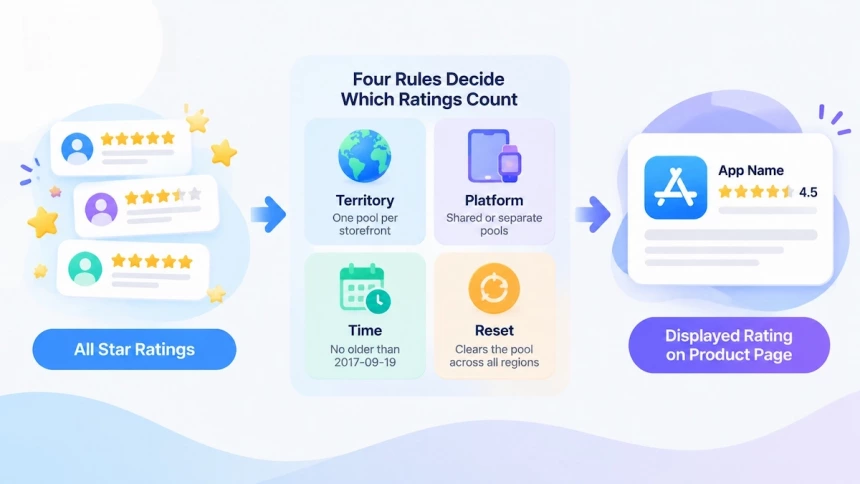
The rating pool is the set of ratings Apple counts toward the displayed average. Four rules decide what enters it: territory, platform, time, and resets. Each one changes which ratings your average is built from.
Territory: Ratings Are Calculated Per Storefront
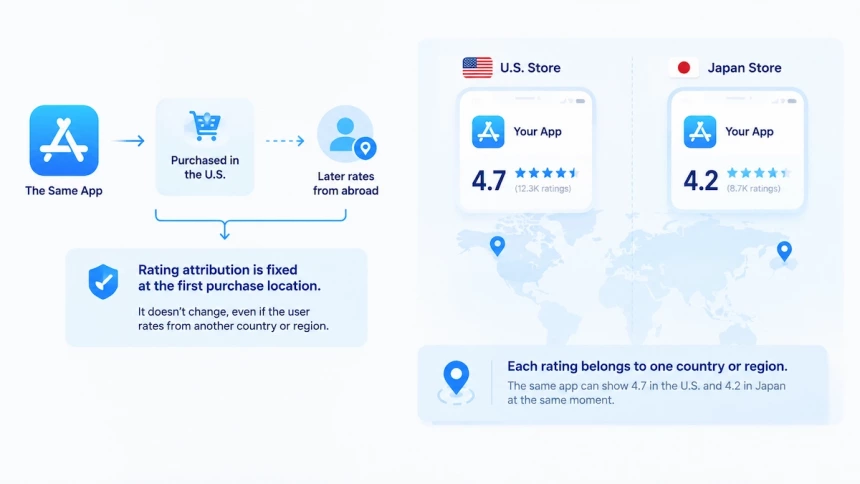
The number you quote is always scoped. Every rating Apple displays belongs to one country or region of the App Store, never to the store as a whole. The same app can show 4.7 in the United States and 4.2 in Japan at the same moment. Those are two separate readings, not two slices of a global average.
Which pool a rating joins is settled at purchase, not at review. Apple states that the country or region associated with a rating reflects the location where the customer initially purchased the app. A customer who bought the app at home and rates it years later from abroad still adds to the home pool. The storefront they rate from gains nothing from it. Attribution is fixed at that first purchase, and no later setting moves a rating between storefronts.
Two consequences follow. Each pool holds only the customers who bought in that market, so two storefronts can drift apart in the same week. A rating figure is also incomplete without a market name attached, because 4.5 means little until you say 4.5 where. Apple documents the per-storefront view only, so any worldwide average is your own arithmetic. Read storefronts one at a time, and treat a blended figure as a construct you built, not a number Apple publishes.
Platform: Shared Ratings and Separate Resets
Platform splits the pool in one direction only. A WatchKit or Messages app shares one rating across the App Store for iPhone, iPad, Apple Watch, and iMessage. Four surfaces, one number, and no separate pools to reconcile.
The split sits on the reset side instead. For a universal app, a reset clears only the platform version you reset it for. The iPhone score can stay where it is while the iPad version starts over. App bundles sit outside this tool entirely, because you can’t reset the rating of an app bundle.
Time: Why Older Ratings May Not Count
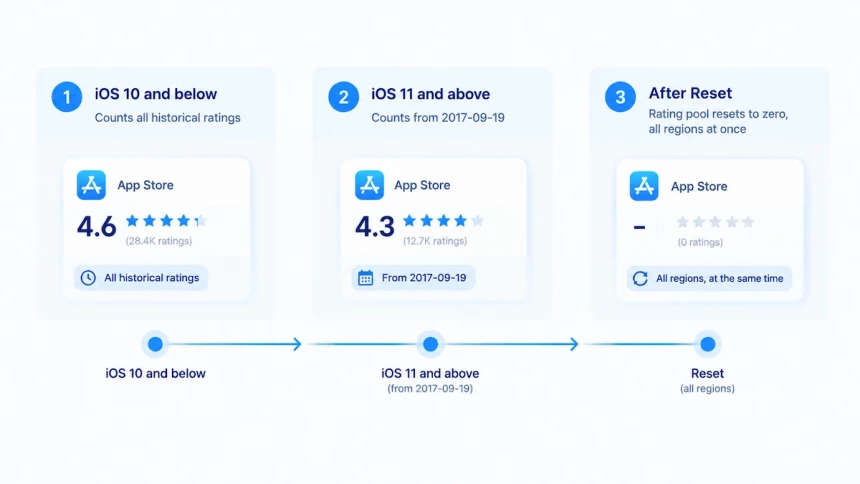
Older ratings may not count at all, and the device decides. On iOS 11 or later, the pool begins on September 19, 2017. Ratings submitted before that date never entered it.
On iOS 10 or earlier, the same app shows a rating built from every rating it has ever received. Two devices, two definitions of the pool, two numbers.
That gap is the usual reason a rating looks different on an older handset. It comes from the rules, not from a sync delay.
Reset: How Apple Clears the Rating Pool
A reset is a developer action rather than a system event. Apple gives you the option to reset the overview rating when you release a new version. When it runs, every previous rating value leaves the summary and the denominator returns to zero. The product page then carries no score until enough new ratings arrive.
Three limits travel with it. One reset affects all regions or countries at the same time, not just the market you were looking at. Once you release the version, the previous rating cannot be restored. And the tool works on a platform version, needs an Admin or App Manager role, and skips app bundles.
Whether to use the Reset Overview Rating option is a separate decision, with its own trade-offs.
What the App Store Average Rating Shows and Hides
An average rating looks like a number you could rebuild from the ratings on your product page. It is not. Three things decide what it tells you: the summary itself, its place beside ranking factors, and the distributions a single figure hides.
The Average Is a Summary, Not a Formula
The app store rating calculation produces a single number, but that number is a summary rather than a published formula. Apple describes it as individual ratings combined into a summary rating, the first number most store visitors read, and stops there.
What sits underneath stays undisclosed. Apple has not publicly disclosed a weighting formula, a time window, or a decay curve. On the public record, a rating from three years ago counts in the average as much as one submitted this morning.
Two things are on the record, though. The only pool-refresh switch Apple puts in a developer’s hands is the rating reset. And the September 19, 2017 cutoff is fixed to that date, not a rolling window.
Rating Average Does Not Reveal Ranking Factors
The average does not explain how ratings feed App Store rankings. Apple documents how search results are ranked, and it names the inputs rather than the weights. Text relevance and user behavior are those inputs. Ratings can influence how your app ranks in App Store search, but no weighting formula has been published.
Ratings carry that much weight, so Apple polices them. Its 2025 fraud report processed over 1.3 billion ratings and reviews, and blocked close to 195 million fraudulent ones before they ever appeared. That is roughly one submission in seven.
One Number Can Hide Different Rating Distributions
A 4.5 can be most customers landing on four and a half stars, or five-star piles dragged down by one-star piles. The people who rate are few, and they sit at both emotional extremes. No public figure pins down how few, so keep this qualitative. An average describes the customers who speak, not the typical customer. Those reviewers are also the ones you can answer directly, so responding to negative app reviews deserves its own routine.
App Store Rating Calculation: The Arithmetic Behind Rating Changes
A rating change is easier to predict once you see the arithmetic behind it. This section works through a simple-average model, since Apple has not publicly disclosed its exact method. It starts with worked examples, then gives a formula for the five-star ratings you need. A calculator and a list of its limits close the section.
How Apple Rating Changes Work With Examples
Apple has not publicly disclosed how individual ratings combine into the summary rating. The examples below assume a simple average, so treat them as a model, not an Apple rule.
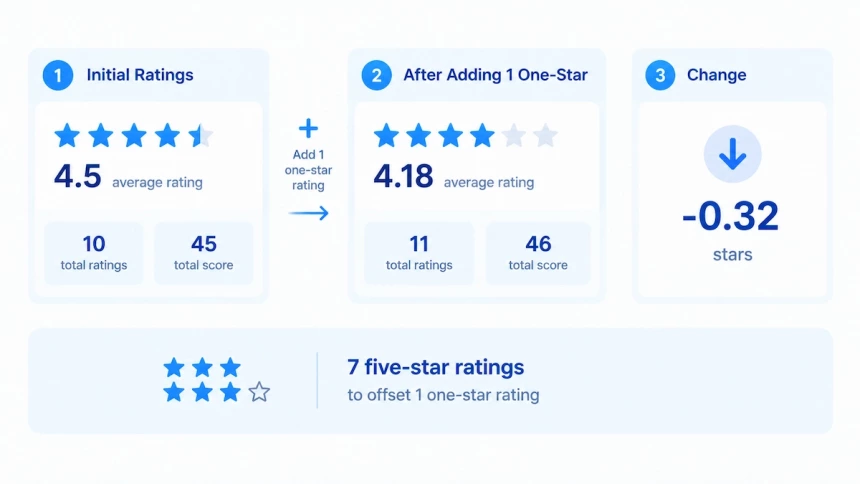
Under a simple average, the app store rating calculation moves with the totals. Start with ten ratings at an average of 4.5, a total of 45. One more one-star rating makes the total 46 across 11 ratings, an average of 4.18. The drop is 0.32 stars.
How Many Five-Star Ratings Do You Need?
At a 4.5 average, seven five-star ratings offset one one-star rating. That ratio depends on your average, not on your rating count.
k = N(T − A) / (5 − T)
N is your rating count, A is your current average, and T is the average you want. The result, k, is the number of five-star ratings you need.
Round k up to a whole number, since you cannot receive a fraction of a rating. The formula only works when T is above A and below 5. To get to 4.5 from a lower average, set T to 4.5.
Offsetting one one-star rating simplifies the math to (A − 1) / (5 − A). At 4.5 that is 7, whether you have 20 ratings or 20,000. What the rating count changes is the size of the drop. One one-star rating against 1,000 ratings at 4.5 leaves an average of 4.497.
That is the whole calculation, as long as you assume a simple average. The simulator below runs it for any count. Raising the number itself is a mobile app marketing job, not an arithmetic one.
The product page usually shows one decimal place, and Apple has not publicly disclosed its rounding rules.
App Store Rating Simulator
Calculator Limitations
The calculator runs the arithmetic above and nothing else. It assumes a simple average, which Apple has not confirmed.
It does not model version resets, since a reset clears the pool it applies to. Resets apply worldwide and leave written reviews in place. After a reset, the summary rating returns only once enough new ratings arrive, so small pools are hard to predict.
A simple model may treat every rating as one pool, but Apple shows a separate summary rating for each country or region. Written reviews are not part of the calculation because only star values contribute to the total. It also misses an important rule: a customer's latest rating replaces their previous rating.
Treat the output as a projection, not an Apple figure.
How to Verify Your App Store Rating Data
You can check Apple's number, but you cannot rebuild it. Two public endpoints get you close: a lookup for one storefront's rating and count, and a reviews resource for the text customers wrote. The sections below cover what each returns, why your own math still won't match the product page, and what is worth tracking instead.
Lookup API: Checking Ratings by Country
Name the country, because Apple lists it as a required parameter. The request then returns the storefront you asked for, not a worldwide figure. Skip that parameter and you may read a number that disagrees with the product page.
The lookup endpoint runs under Apple's Search API limits. It caps the limit parameter at 200, allows roughly 20 calls per minute, and asks large sites to cache responses.
How Apple derives those fields has not been disclosed. Read them as one storefront's reading at one moment.
App Store Connect API: Reviews Are Not the Full Rating Pool
The customer Reviews resource returns reviews, and a review is a written submission. Each item carries a rating value and a text body.
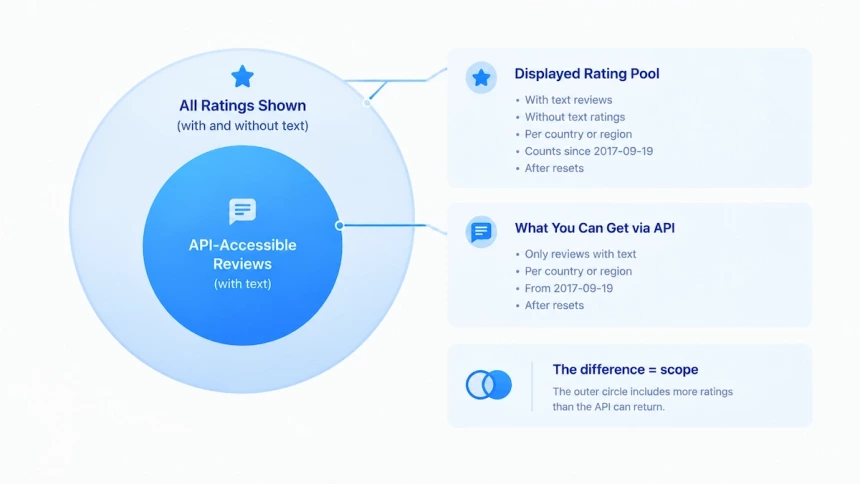
Apple keeps the two actions apart: users rate an app from 1 to 5 stars, and may submit written text separately. A rating left without text never reaches this endpoint. That difference fixes the size of your data set: it is always smaller than the pool behind the displayed average. You can narrow the list by territory or by rating. Sorting covers dates and scores, and results arrive in pages of up to 200.
Why Your Calculation May Not Match Apple's Displayed Rating
The number you can rebuild is an average of the reviews you pulled. It is not the overview rating on the product page. Apple displays a single overview rating for each country or region, and that figure counts star ratings submitted without text. Those ratings sit outside your data set by definition.
The overview also follows the pool rules covered above: initial purchase storefront, the 2017-09-19 start line, and every reset. A gap between the two numbers is a scope difference. You cannot trace that gap to one region or one version.
Building a Rating History Snapshot
Build your own series rather than trusting one reading. Once a month, run one lookup with the same country value. Record the raw values the response returns for the rating and the rating count, and change nothing. Apple has not publicly disclosed how those two fields are defined. That limit shapes what the series is good for: watching your own movement over time. Comparing the numbers across different apps is not a valid reading.
2026 Update: Review Summaries
A review summary is now part of the product page, and it is a separate system from the rating. The two draw on different inputs.
What Changed on Product Pages
Apple's review summary is generated with large language models (LLMs). Each one compiles highlights and key information from individual user reviews into a short paragraph. It shows on devices running iOS 18.4 or later. Apple adds that summaries are regularly refreshed on an ongoing basis, so the paragraph follows the latest reviews.
Why Review Summaries Do Not Affect Rating Calculation
The rating counts star values, and a summary draws on written text. Apple states that individual ratings feed the rating shown on the product page and in search results. It also states that resetting that rating leaves written reviews in place. Nothing published links a summary refresh to the average. Treat the summary as a display layer, not an input.
Conclusion
The average looks like something you could rebuild yourself. It is not. What you can rely on is the shape of the pool: star values in, written reviews out, the newest rating replacing an earlier one, and a separate rating for each storefront. What you cannot rely on is the arithmetic Apple runs on top. No weighting, no window, no decay curve has ever been published. Any figure you calculate is your own model.
So stop chasing an exact match and start tracking a trend. Pull the same country every month, record what the API returns, and answer the reviews that move. Your average will always be Apple's summary. The direction it moves is yours to read.