Introduction
Google has published the number most app teams overlook: replying to a negative review raises that review’s rating by an average of +0.7 stars. Yet roughly three in four app reviews never get a reply at all.
That gap creates an opportunity. Review responses are one of the most cost-effective growth levers available after launch. A thoughtful reply can improve the rating users see, recover potential installs lost to negative feedback, and provide valuable product insights at no extra cost. Yet many competitors still leave this channel underused.
The same one-star review can end two ways. Reply well and the reviewer often edits it upward. After a developer response, 38.7% of users change their rating. The median increase is a full star. Reply badly, or not at all, and it stays at one star, in public, on the page where people decide whether to install you.
This playbook covers the full loop. It explains how reviews move ranking and conversion. It gives you a repeatable 4-step reply framework with templates by complaint type. It also shows how to turn user feedback into ASO insights, fake-review handling, and prevention.
Why Negative App Reviews Matter for App Store Optimization and Conversion
In app store optimization, negative reviews work against you twice: they drag down conversion and signal quality problems to the ranking system.
App store optimization negative reviews are not a side issue. One unanswered one-star review pulls down the average score users see. It also shapes the review themes that feed your listing’s relevance.
App negative reviews are one of the few free levers that sustainably affect ASO after launch. Your listing copy, screenshots, and pricing are largely fixed once you ship. Review replies are not.
The next three sections walk through that lever in order. First, how ratings and reviews feed App Store and Google Play ranking. Then, how bad reviews cost you trust, retention, and installs. Finally, what peer-reviewed research says about whether replying works.
The Link Between Reviews, Ratings, and App Store Rankings
Apple makes one thing clear in its developer documentation: ratings and reviews form a visible part of your App Store presence. Your app’s summary rating appears both on your product page and within search results. Apple also notes that requesting ratings and replying to reviews can boost discoverability.
Still, Apple never reveals exactly how ratings and reviews affect search rankings. It has never published its ranking algorithm or the weight of each ranking signal.
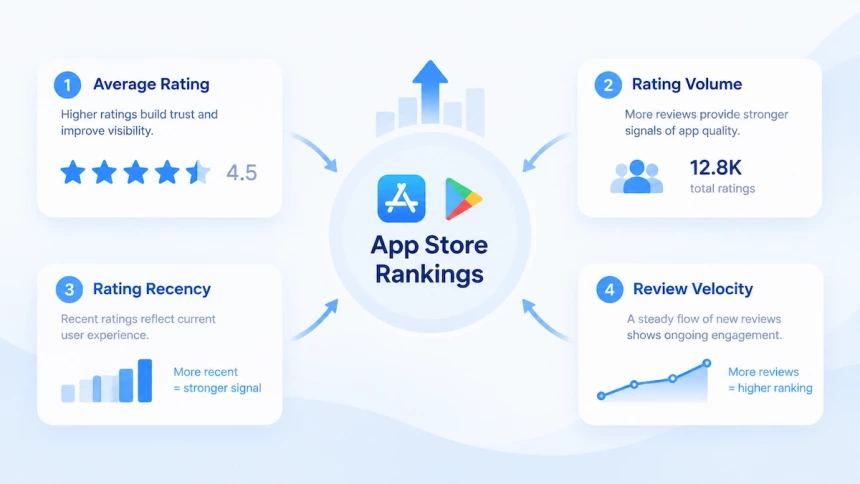
Most ASO insights therefore stem from platform analysis and industry testing rather than officially confirmed Apple ranking factors. These observations should be regarded as proven patterns instead of guaranteed rules. Four review-related metrics consistently surface across ASO research: average star rating, rating volume, rating recency, and review velocity.
Recency is often misunderstood. Apple’s version-level rating reset is merely a product feature, not a verified ranking signal. By contrast, Google Play has stated since 2019 that recent ratings carry more weight when calculating an app’s overall score.
Rankings are only half the story. Reviews directly shape users’ final install decisions. Low ratings quickly erode user confidence, especially in saturated app categories. Apps with fewer stars push users to compare alternatives and read reviews before downloading, while apps sitting around 2 stars face severe conversion barriers as many users will not even consider installing them.
Negative reviews hurt growth in two ways: they impact visibility via rating signals and user perception, and they cut conversion rates when visitors browse your app page.
Responding to reviews is one of the few ASO tactics that tackles both issues at once. It helps restore user trust and gathers actionable feedback to improve your app.
How Negative Reviews Reduce Trust and Installs
Negative reviews influence more than your app’s reputation. They affect the moment users decide whether your app is worth installing.
App reviews and ratings are visible trust signals on your store page. When users see repeated complaints about bugs, crashes, or poor experiences, they may hesitate to download or choose another app instead.
The impact continues after installation. Mobile apps lose a large share of users during the first month. Industry benchmarks show average retention drops from around 25–26% on Day 1 to about 6–7% by Day 30. This creates a growth cycle: poor experiences lead to negative reviews, negative reviews reduce user confidence, and lower confidence makes acquisition more difficult.
Managing reviews is not only about protecting your rating. It is about improving user trust before and after installation.
Why Review Responses Are a Growth Opportunity
App reviews are more than user opinions. They are a key feedback channel that helps developers understand user needs, improve app experiences, and build trust with potential users.
Both Apple and Google provide tools for developers to manage user feedback. Apple allows developers to respond to iOS app store reviews directly through App Store Connect, while Google Play provides review management tools and highlights that responding to negative reviews can increase those ratings by an average of +0.7 stars.
Review responses also show users that an app is actively maintained. A thoughtful reply can acknowledge issues, explain improvements, and tell users when a problem is resolved, so they can decide whether to update their ratings. Beyond individual reviews, feedback patterns help developers identify recurring problems and prioritize product improvements.
For ASO, app reviews management supports conversion rather than keyword rankings directly. While responses do not directly improve search rankings, a healthier review profile and visible developer engagement can strengthen user trust and influence download decisions.
Before You Reply to Negative App Reviews: Build a Review Response Process
App negative reviews rarely come out of nowhere — most trace back to a bug, a billing issue, or a broken promise. Negative reviews often contain frustration, but the response should never be written emotionally. A clear review response process helps teams provide consistent, helpful, and brand-aligned replies across different situations.
Investigate the Root Cause
A single vague complaint is not evidence. Before you write a reply, confirm what actually happened: reproduce the bug on the build the reviewer is on, check whether the same complaint is clustering around one device model or one iOS version, and pull the log before you commit to a cause.
Apple’s guidance on crash reports and diagnostic logs covers the Crashes organizer and how to ask a customer to email the log from their own device — exactly the evidence a one-star line like “it keeps crashing” is missing.
If the trail goes cold, say so plainly and ask for the device and app version instead of arguing about whether the bug is real.
Create Reply Guidelines and SOPs
A consistent response process helps teams handle negative app reviews more efficiently. Before replying, define the brand voice, such as formal, friendly, or conversational. Make sure all team members follow the same communication style.
Teams should also create a simple review workflow: receive the review, classify the issue, investigate when needed, and send an approved response. Preparing a set of pre-approved phrases for common situations can save time while keeping replies consistent and professional.
Understand Apple App Store vs Google Play Rules
Google Play caps developer replies at 350 characters. You can edit a reply at any time after it goes live. Apple App Store publishes no official character limit. You can edit your response at any time as well; only the latest version is shown.
Both stores notify the reviewer when you reply. On Google Play, the notification invites the user to re-rate. On Apple App Store, the reviewer is notified and can update their rating and written review. Where the rating itself is concerned — how it is averaged, weighted, or reset — that is a store algorithm question, not a reply setting.
How to Respond to Negative App Reviews: A 4-Step Framework
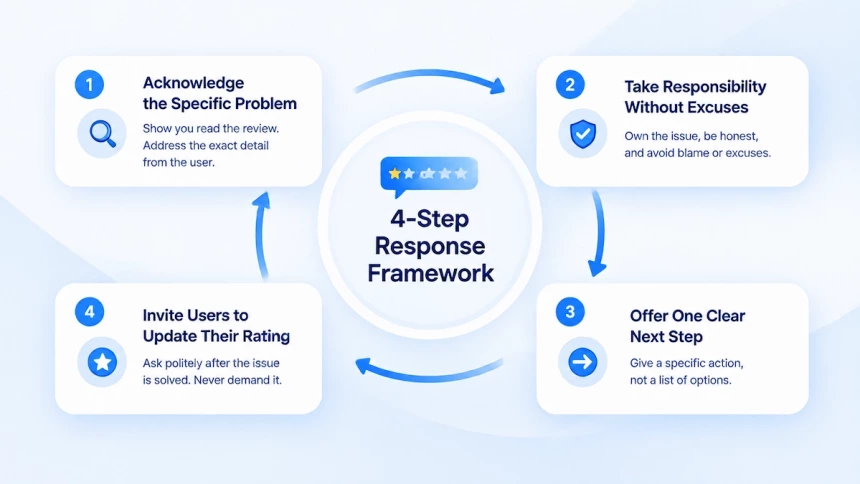
A good response can turn an angry reviewer into a retained user, but only if it follows a structure. The framework below covers four steps. First, acknowledge the specific problem. Then take responsibility without excuses and offer one clear next step. Finally, tell the user what changed and leave the rating to them. Use it as a checklist before you hit send.
Step 1: Acknowledge the Specific Problem
Start by proving you read the review. Repeat the exact detail the user gave: device model, app version, the feature that failed. “Sorry for the bad experience” fits every review ever written, so it proves nothing. Specific wording fits exactly one review, and users can tell the difference.
The research backs this up. Srisopha and colleagues tracked 228,274 one- to four-star reviews across 1,600 top free apps for a 2021 EASE paper. They modeled which developer responses ended with a higher star rating. Two signals predicted success best: length match and content match. Length match means your reply is roughly as long as the complaint.
Content match means your reply addresses the actual problem. Both outranked timeliness and politeness. Fast and friendly is not decisive. Accurate is.
Match the length to the complaint. A one-line rant deserves a one-line answer. A detailed bug report deserves a structured reply that answers each point. A short reply to a serious review reads as dismissive. A long reply to a throwaway complaint reads as defensive. Both extremes cost you the same trust.
Step 2: Take Responsibility Without Making Excuses
Taking responsibility is not the same as admitting every claim. You are acknowledging that the experience fell short of what the user expected. That alone defuses most of the anger.
If your investigation confirms a real defect, say so plainly and skip the long explanation. “This is on us. We shipped a regression bug.” That sounds far more professional than a phrase about a small number of edge cases. Corporate hedging reads like blame-shifting.
Some phrases should never appear in a public reply. Never write “we have never seen this issue.” Never write “you may have done something wrong.” Both push the blame onto the user and invite a fight. Even when a review exaggerates or misreads the situation, do not argue the facts in public.
Sometimes the fault is not entirely yours. You can still apologize for the bad experience. Then state the objective reason honestly: a device incompatibility, a third-party outage, a billing delay from the carrier. Honest context beats silence and beats a defensive rebuttal. Readers can tell an explanation from an excuse.
Step 3: Offer One Clear Next Step
End every reply with exactly one action the user can take right now. Give a version number, a support email, a beta link, or a single workaround. Do not hand over a menu of options. A vague closing line is exactly why one-star reviews stay where they are. One clear next step is what earns the updated rating.
Move the conversation to email or direct message in specific cases. Those include personal data, security reports, billing disputes, and legal threats. Reply publicly with one short, firm sentence, then redirect. The public reply exists to show future users that you take responsibility. The troubleshooting details stay private.
Character limits force discipline here. Google Play rejects replies longer than roughly 350 characters, according to Google’s own API documentation. That limit pushes you toward one structure: name the problem, accept responsibility, give one action. Anything longer risks truncation or rejection.
Apple publishes no official limit for App Store replies. Community testing suggests a rough range of 5,970 to 10,240 characters, with no confirmed number. Some sources state 10,240 as the exact figure. Apple has never documented it, so treat that as an estimate rather than a rule. Write to the Play standard and you are safe on both stores.
Step 4: Tell Users What Changed
Once the problem is genuinely solved, say so and name the version where the fix shipped. Do not ask for a higher rating, because Google’s reply guidance advises against it. Never demand a change and never tie it to a reward.
A clear update is worth sending. A helpful response does more than resolve one complaint. It can show potential users that the app team actively listens, improves the product, and values user feedback.
The two platforms differ in ways that shape your wording. On Google Play, users can edit their reviews at any time, so a reply that includes a clear solution gives them an easy reason to revisit it. On the App Store, developers can edit their responses at any time, with only the latest version displayed. Users are also notified when a developer replies and can update their rating and written review afterward.
On iOS, focus your wording on rebuilding trust and showing progress, such as: “We hope our next release addresses your concerns.” On Google Play, you can be more direct about the fix, such as: “This is fixed in version 3.2.”
State the outcome, not a request. Something like “This is fixed in version 3.2, and we are sorry for the trouble” works well. Never ask for five stars or a higher rating. Both stores prohibit review manipulation and incentivized ratings, so keep the reply focused on the issue.
Negative App Review Response Templates
Templates make “how to respond to negative app reviews”repeatable, but only if you fill in real details. Treat each template as scaffolding, not a script.
Bug and Crash Reports
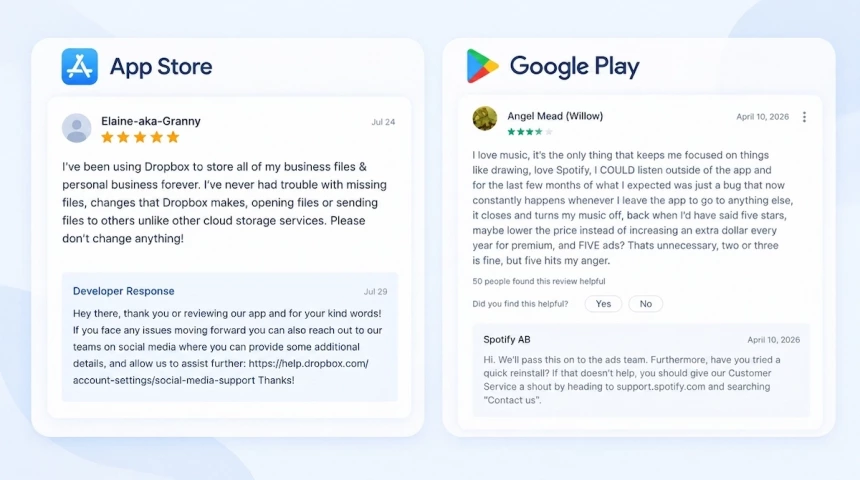
A user reports that the app crashes on iPhone 17 right after updating to iOS 26.7. The checkout screen freezes and the app closes. This report deserves a specific reply, not a generic apology.
Hi [Name], you’re right — the checkout flow should not freeze on iPhone 17 under iOS 26.7. We reproduced the crash, and a fix is coming in version 2.8.1 this week. Please update once 2.8.1 is available and let us know if you still experience the issue.
Keep the technical details short. Users do not need a root-cause essay; they need a version number and a path forward. If the fix only works after an update, say that clearly.
Billing Complaint
A long-time user sees the subscription price go up without any prior notice. They leave a two-star review calling the change unfair. This is different from a billing error; the anger is about communication, not math.
Hi [Name], a price change landing with no warning is a bad experience. We raised it to fund cloud sync and priority support, but blindsiding you was our mistake. We’d like to make this right by applying the loyalty rate to your account. Please let us know if you’d like us to help with this.
Do not defend the business model in public. Potential customers do not want a pricing whitepaper; they want a concrete action. A one-line value statement plus a real compensation path is enough.
Feature Request
A user gives two stars because the app still lacks Dark Mode. They say the bright screen is unusable at night. This is a feature gap, not a bug, so the reply should be honest about timing.
Hi [Name], no Dark Mode in 2026 is a fair thing to dock us for. It is the top request in our tracker and is in active development for the next major release. We’ll share an update once the beta goes live.
Even a simple feature suggestion deserves a warm reply. Thank the user, say the idea is logged, and avoid promising a date you cannot keep. Encouraging feedback is more valuable than a vague “coming soon”.
Angry or Vague Review
Some reviews give no useful detail. A one-star comment like “App is trash” tells you the user is frustrated but not why. Your first move is to validate the feeling and ask for specifics.
Hi [Name], sounds like the app let you down, and I don’t blame you for the rating. I want to fix the actual issue — could you tell us what happened here? We’ll do our best to make it right.
When a review includes insults but also a real issue, respond only to the issue. Ignore the emotional language and keep your reply short and professional. If the review is pure abuse or spam, report it instead of replying.
Phrases to Avoid
Never tell a reviewer they misunderstood or that the problem is not yours. Phrases like “you read it wrong” or “we have never seen this” push the blame onto the user. Even if the review is unfair, a public rebuttal makes your team look worse.
The five escalation traps are arguing over bugs in public, pasting identical replies, and redirecting without first acknowledging the issue. They also include promising a ship date you might miss and defending pricing with a business-model speech. All five share the same mistake: they treat the reply as a debate instead of a repair.
How to Turn Negative Reviews Into App Store Optimization Insights
Negative reviews are free user research, not just reputation damage. Clutch’s 2026 survey found that 96% of consumers check reviews before buying a product or service they have not tried. The flow below is simple: identify the issue, extract the language, then optimize conversion. Treat every low rating as a signal before you treat it as a problem. For the bigger picture on app store optimization user reviews, including the positive ones, see our full ratings and reviews guide.
Identify Product Issues
Start with reviews that mention crashes, freezes, or broken flows. These are informal bug reports and should be your top priority. In May 2024, Sonos shipped a rebuilt app. Its Google Play rating fell to 1.3 stars, and the fallout cost far more than a score. (The Verge) Technical failures in reviews are often the fastest path to a rating recovery.
Backlash from a feature removal or price hike usually clusters around one version. Filter reviews by app version and date to isolate the trigger. The spike is sharp and emotional, not a slow drift. Fixing the underlying decision is harder than fixing a bug, but the timeline makes the cause obvious.
Not every negative wave comes from real users. Fake reviews often repeat the same text, overuse punctuation, drop suspicious links, or wander off-topic. If you see those patterns, report the reviews instead of replying. Both stores let you flag concerns from App Store Connect or the Play Console.
A slow, steady rating slide points to accumulated usability issues. Users rarely leave one big complaint; they quietly churn instead. A 2025 AppsFlyer report shows that on average, 46.1% of installed apps are uninstalled within 30 days. For categories like gaming and dating, the rate climbs above 50%. (the data covers Android only, since iOS 15 limits uninstall tracking).
That makes early intervention urgent, because uninstalls are silent one-star reviews.
Extract User Language for Keyword Research
On Google Play, review text is indexed and can influence keyword ranking. Developer responses are also indexed, so keyword-aware replies matter. Mine the recurring phrases in negative reviews and mirror them in your listing. Real user vocabulary often outperforms the keywords you guessed in a spreadsheet.
On the App Store, review text does not appear to be indexed for ranking. The value is conversion: use the exact words users say in your title, subtitle, and screenshot captions. This makes your metadata feel like it answers their question before they install.
Improve Conversion Messaging
Turn recurring complaints into title and subtitle keywords because they match real search intent. If reviews say “scanning receipts is confusing,” test “Receipt Scanner” in the subtitle. You are not keyword stuffing; you are matching real search intent. Let review language validate your metadata instead of guessing.
Use the same objections as proactive selling points in your description and screenshots. If users write “I cannot find Dark Mode,” a screenshot caption can read “One-tap Dark Mode.” This answers the doubt before the user downloads, which lifts conversion. Conversion copy works best when it reflects the words users already use.
Starting in iOS 18.4, Apple displays AI-generated review summaries on product pages. Apple’s own documentation says these summaries compile highlights from individual reviews. A cluster of negative themes can now appear above the full review list. That raises the stakes for keeping your review quality high.
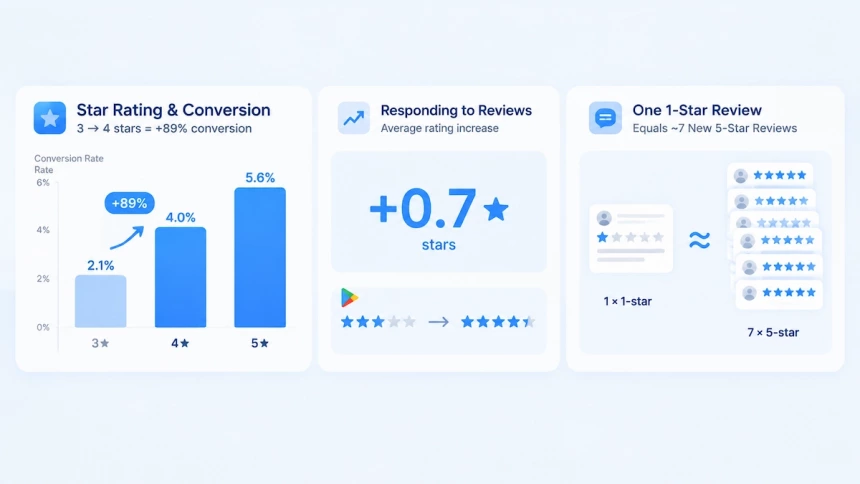
Star rating directly shapes conversion. Apptentive data shows that moving from 3 to 4 stars lifts conversion by about 89%. The jump from three to four stars is the most important threshold for installs. Small rating improvements compound quickly into organic growth.
Google Play’s official guidance says developer replies raise a reviewed comment’s rating by an average of +0.7 stars. That makes responding one of the cheapest levers you have. Even a small uplift matters because ratings sit next to your icon in search results.
At a 4.5-star average, one 1-star review costs roughly seven new 5-star reviews just to stay flat. The math favors fixing the issue and earning the update, not chasing new ratings alone.
How to Handle Fake Reviews on App Stores
Fake reviews rarely look like sabotage at first glance. They look like a cluster of one-star ratings, a burst of “scam” comments, or a polite-sounding review that has nothing to do with your app. Left alone, they pull down your average rating, bury your listing in search results, and push undecided users toward a competitor.
Clearing them out takes two steps: recognize the pattern, reply where a reply is worth it, and report what breaks the store’s rules.
Identify Suspicious Reviews
Most fake reviews are produced in bulk, and bulk leaves fingerprints. Five signals are worth watching:
- Repetitive text. Identical or lightly reworded comments, often posted from different accounts. Keep a list of recurring phrases so you can search for them next time.
- Damaging keywords and links. Extreme terms such as “scam” or “fake app,” plus links that redirect users to another product or a harmful site.
- Excessive special characters. Walls of exclamation marks or unusual symbols. Filtering for punctuation-heavy reviews surfaces these quickly.
- Suspicious accounts. One account posting near-identical reviews across many apps is almost always a spammer — and the same comment repeated from several accounts is the same red flag.
- Offensive or off-topic content. Slurs and inappropriate language that slipped past the store’s filters, or complaints that have nothing to do with your app. An airline app collecting complaints about delayed flights is the classic example.
Log what you find. A running list of trigger phrases turns “we think something looks off” into a filter you can run every week.
Report Fake Reviews on Google Play and App Store
When a reply does not resolve it, report the review. Both stores assess your report and decide whether the review violates their policies. If you want to remove fake reviews on Android, the only path is reporting — neither Google Play nor the App Store lets developers delete reviews directly.
Google Play Console. Open Play Console and go to Monitor and improve > Ratings and reviews > Reviews. Find the review, select the flag icon, and choose Report. A specialist reviews your report within a few business days, and the review is removed if it breaks the Comment Posting Policy. One caveat: a rejected report cannot be submitted again for that review, so flag clear violations only.
App Store Connect. In Apps, select your app, then click Ratings and Reviews in the sidebar. Find the review and click Report a Concern, choose the concern that fits, add a short description, and click Submit. Apple reviews the request, and the reviewer is not notified.
If you are seeing dozens of fake reviews rather than a handful, flagging them one by one will not keep up. A review management platform lets you filter by rating, keyword, or country, then tag and report in bulk — and set an automation rule so the same pattern gets caught next time.
How to Avoid Future Negative Reviews on App Stores
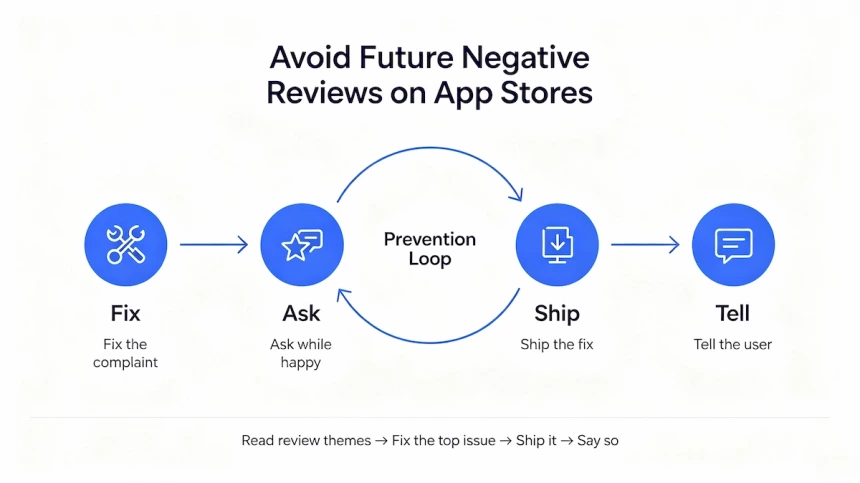
Reacting to a bad review is damage control. The cheapest way to avoid negative reviews on the App Store is to fix problems before they turn into 1-star ratings. Unlike fake reviews, this one is largely under your control. Three moves do most of the work.
First, fix the experience that generates the complaints. Then ask for an in-app rating after a moment of success. Finally, prove that you shipped the fix. Apple now generates an LLM-written summary of review themes on your product page. A complaint that keeps repeating becomes a paragraph users read before your description.
Improve UX and Onboarding
Reviews are usually a symptom, not the disease. Three sources account for most preventable negative reviews:
- Confusing UX. When navigation is unclear or the path to the core value is long, users blame the app. An e-commerce app with a great catalogue but a five-step checkout collects reviews about the checkout. Shorten the path to the first successful action.
- Poor performance. Slow loads, crashes, and battery drain are the most common technical triggers of angry reviews. Watch crash logs and response-time metrics. Clear bottlenecks before they reach a large share of your install base.
- Weak onboarding. A first session that explains too much, too slowly, ends in abandonment. It often ends in a review on the way out. Apple’s guidance is to keep onboarding fast, fun, and optional. Teach by letting people do the thing, not by reading slides. Offer context-specific tips instead of one long walkthrough. Let users skip the tutorial, and never show it again. Postpone non-essential setup with sensible defaults.
Optimize Review Prompt Timing
In-app rating prompts convert best when they fire after a success moment — a completed order, not a crashed screen. A badly timed in-app rating prompt creates negative reviews all by itself. It interrupts people at their most frustrated moment and invites a one-star rating.
Ask right after a completed task, order, or level, while the experience is still fresh. Apple advises asking when users are most likely to feel satisfied, and never interrupting what they are doing.
Close Feedback Loops With Updates
Shipping fast is a strong signal you can send. Successful apps continue to improve through frequent updates. 42matters data on the top 1,000 Google Play apps shows that 39% release an update at least weekly, while 75% release an update at least once a month.
Frequency alone doesn’t close the loop, though. Users have to know what changed. Write release notes that name the fix in plain language. “Fixed the crash when saving a draft” beats “bug fixes and performance improvements”. Apple recommends exactly this approach. When an update fixes issues raised in older reviews, say so in the release notes. Then reply to those reviews to tell the users about the fix. A reply notifies the reviewer, who can then update their rating. That is how a one-star review becomes a corrected one.
Make support easy to find in the app and on your product page. Users who can reach you complain to you instead of reviewing you.
Prevention works as a loop. Read the themes in your reviews, fix the top one, ship it, and say so. Apps that run that loop stop treating reviews as a scoreboard. They start treating them as a backlog.
Start With Your Last 10 Negative Reviews
Open App Store Connect right now and pull up your last ten negative reviews — tonight, not next week. Sort them into three piles: bugs, billing, and feature requests. Reply to three using the 4-step framework above. Then file one product insight and slot it into your next update notes. Ten minutes is all it takes. Every reply you send today protects tomorrow’s installs. Your competitors are still ignoring their reviews. Don’t be one of them.