A one-star review takes a user ten seconds to write. Then it sits on your product page for months, and no developer can delete it.
What you can control is how you respond, and what you learn. That is where app reviews and ratings management starts. It runs as a loop. Collect reviews within store rules, and organize them into one queue. Prioritize by impact, reply where a reply can change the outcome, and feed recurring themes back to the product. App store review management is not just damage control. It is how user feedback becomes product decisions, and app review reputation management is what those decisions quietly build.
This guide walks that loop end to end. You will see how Apple and Google calculate ratings, and whether replies truly raise the score. You will learn which three metrics to track, how AI-powered review management fits without breaking store policy, and how to write the process down. One idea holds throughout: your rating is a result, and the work behind it is the process you control.
Key Takeaways
- Review management is a loop, not damage control. Collect, organize, prioritize, reply, and feed recurring themes back to product. Your rating is a result; the process is what you control.
- Apple and Google calculate ratings differently. Apple counts stars only and allows resets; Google Play weights recent ratings and has no reset.
- Replies work through the reviewer. A reply does not change your average by itself, but the reviewer can update their rating. Google reports an average +0.7-star lift on replied negative reviews, and fast, specific replies work best.
- Triage by impact. Reply first to the lowest ratings and to reviews naming technical problems in your current version. Report fake or abusive ones instead.
- Ask for ratings at success moments. Never screen users first, and remember iOS limits prompts to three per user per year.
- Track three metrics weekly: reply rate, median response time, and theme hits per tag.
- AI speeds up the work but can’t replace judgment. Replies go out under your name, so keep a human in the loop.
- Four tactics are off-limits: paid, fake, and incentivized reviews, and screening users before they reach the store.
- Write the process down. Set rules for coverage, speed, and escalation, and bring review themes into the monthly growth meeting.
- Choose tools by volume and gaps. Consoles suffice under about 50 reviews a month; buy software only to close a gap you can name.
What Is App Store Review Management?
App Store review management is the process of managing user ratings, reviews, and the public reputation of an app across app stores. It helps teams understand user feedback, maintain communication with users, and turn reviews into insights that support product improvement. Review management connects customer communication with product decisions. It allows teams to understand not only what users say about an app, but also why they feel that way and what actions may improve their experience.
Many teams see review management as simply replying to negative comments. However, responses are only one part of the work. A complete approach includes collecting feedback, identifying patterns, coordinating with internal teams, and improving the overall user experience.
What a Rating Is and What a Review Is
Ratings provide a quick view of overall user satisfaction. They are often the first signal potential users notice on an app store page, but they do not explain the reasons behind the score.
Reviews add context by showing specific user experiences. They reveal common problems, feature requests, and moments that influence user satisfaction. Recent and detailed reviews can strongly affect how potential users evaluate an app before installation.
A review is tied to a specific app version, device, and OS. That version tag is why a written complaint is actionable in a way a star score never is.
What App Review Management Includes
App review management includes several connected responsibilities that go beyond answering individual comments. Teams need to collect feedback from different app stores, regions, and languages. They then organize reviews to identify recurring themes, common issues, and important user concerns. The next step is understanding which feedback requires attention. Some reviews highlight critical problems, while others provide suggestions or general opinions. Prioritizing these signals helps teams focus on issues that have the greatest impact. Responding to users is another important part of review management. Public replies can address concerns and show future users that the team values feedback. However, the goal is not only to reply, but also to use reviews as input for product improvements.
App Review Reputation Management vs. Review Management
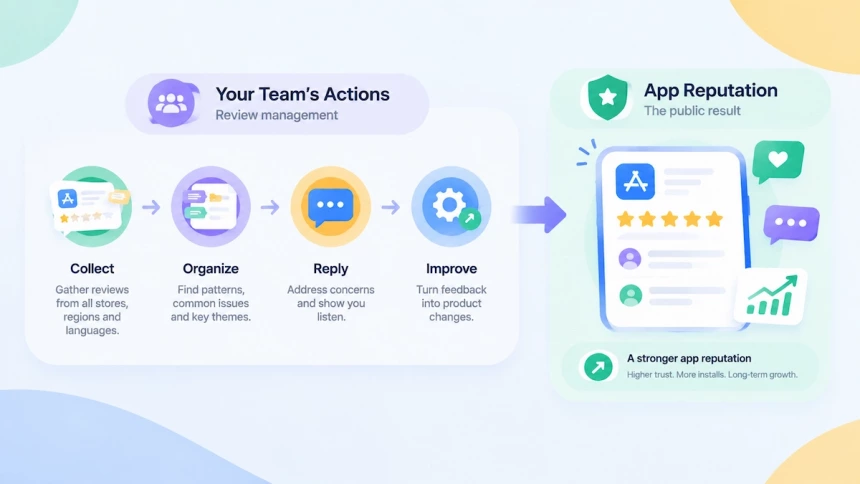
Review management and app review reputation management are closely connected, but they are not the same thing. Review management focuses on the actions a team takes behind user feedback. It includes collecting reviews, organizing feedback, prioritizing issues, responding to users, and turning recurring comments into product improvements.
App reputation management describes the broader impression users develop from those efforts. Reputation is shaped by ratings, review content, developer responses, and visible product changes over time. A strong app reputation is not built through ratings alone. It comes from how consistently a team listens to users and responds to their needs.
In short, app review reputation management is not a separate process. It is the public result of effective review management across the app lifecycle.
Who Manages App Store Reviews?
App Store review management is usually a cross-functional responsibility. Different teams contribute based on their role in the user feedback cycle. Together, these teams turn app reviews from simple comments into valuable information that helps improve both the product and the user experience.
Customer support teams usually handle daily review responses and direct communication with users. Product teams analyze reviews to identify user needs and recurring feedback patterns. ASO and marketing teams manage apple app store ratings and monitor the public impression of the app. Engineering teams address technical issues reflected in reviews, such as crashes, payment problems, or performance concerns.
Why App Review Management Matters for ASO and Growth
App review management plays a role at several stages of app growth. Ratings and reviews can support an app’s visibility and featuring potential, shape user decisions on the product page, and provide feedback that helps teams improve the product. Managing them consistently allows marketers and product teams to build trust while making better use of user feedback.
Ratings Influence App Store Visibility and Featuring Opportunities
Ratings and reviews can affect how often an app gets discovered through store surfaces. While Apple and Google do not state that ratings directly determine rankings, both platforms consider quality signals when deciding featuring and placement opportunities. Maintaining strong ratings and a healthy review profile helps apps improve their chances of appearing in more visible positions and reaching relevant users.
Ratings and Reviews Influence App Store Conversion
Ratings and reviews are among the first trust signals users see after opening an app product page. Before reading the description or exploring screenshots, many users check whether other people had a positive experience. Positive reviews can reduce uncertainty and encourage downloads, while negative reviews left unanswered may create doubts for potential users. Managing iOS app ratings and reviews effectively helps turn more product page visitors into installs.
Reviews Shape App Reputation and Product Improvements
Reviews create the public reputation an app builds over time. Recent feedback often reflects the current user experience more accurately than lifetime averages, making ongoing review monitoring important. Consistent monitoring also helps teams get app ratings that reflect real user satisfaction. Beyond reputation, reviews also provide direct product insights.
Repeated complaints can reveal bugs, missing features, or usability issues that deserve attention. When teams analyze and act on this feedback, reviews become a source of continuous product improvement rather than just user comments.
Before You Manage: How Ratings Work on Apple and Google Play
You cannot manage a number you do not understand. The score on your product page is not a plain average of everything users have ever said. Apple and Google calculate it differently, and that difference decides where your effort goes.
Apple App Store Rating Basics
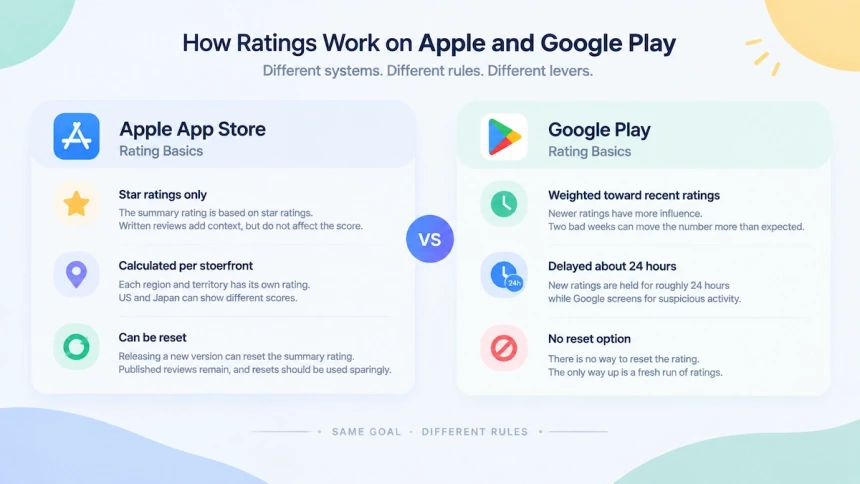
Apple’s summary rating counts star ratings only. Written reviews explain a score, but they do not move it. The rating is calculated per storefront, so your US and Japan numbers can differ. Releasing a new version lets you reset the summary rating. That clears the rating pool, but published reviews stay in place. Apple’s own guidance says to use that reset sparingly. The number is not fixed. Territory, platform, and version resets all feed into the app store rating calculation, so the same product can show two different scores.
Google Play Rating Basics
Google Play shows a rating that is weighted toward recent ratings, not a lifetime average. Two bad weeks can move the number more than the arithmetic suggests. New ratings do not appear right away either: Google holds them for about 24 hours while it screens for suspicious activity. There is also no reset switch on Play. The only way back up is a fresh run of ratings. Google has never published the weighting or the formula. The score can move faster than the product does. Rebuilding from a recent window is what makes the Google Play rating calculation responsive, and also what makes it jumpy.
What Actually Changes Your Rating
A rating does not move on its own. It moves when more people rate, when the mix of good and bad shifts, or when fresh ratings replace old ones. So when your score drops, the fix is never the score. It is one of those three things.
Neither store has said how much ratings matter for search or featuring, so no one can promise a shortcut. What is documented is simpler: ask at the right moment within the prompt limits, ship releases people want to praise, and reply within the rules. Teams that improve app store ratings work through exactly these habits.
Do Replies Actually Improve App Ratings?
Short answer: indirectly, yes. A reply does not change your average by itself, but it gives the reviewer a reason to update their rating. Long answer: the effect is an average, not a guarantee, and it depends on how you reply.Here is what the evidence says, and what separates a reply that helps from one that only takes up space.
What the Data Shows
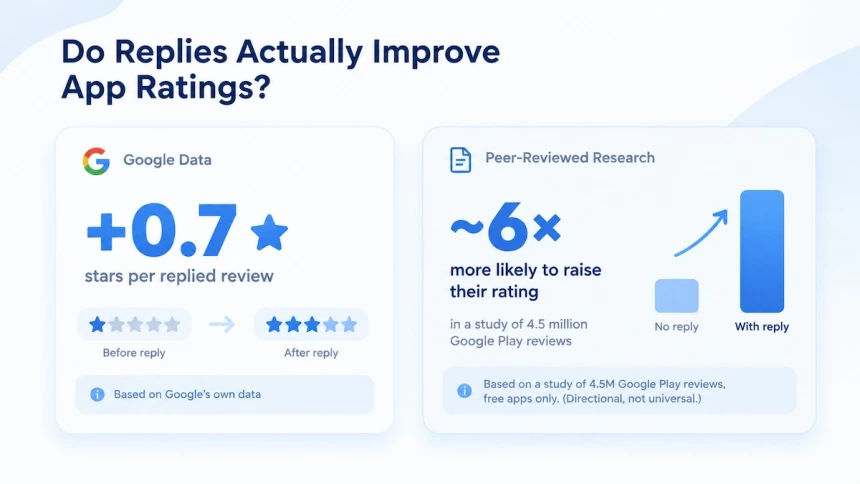
Google’s own numbers are the clearest. Responding to a negative review can raise that rating by an average of +0.7 stars, according to Google. That is one user’s rating, not your whole score. Multiplied across hundreds of reviews, though, the shift becomes visible.
Peer-reviewed research points the same way. In a study of 4.5 million Google Play reviews, users were about six times more likely to raise their rating after a developer replied than when no reply came. Rating drops barely moved. The study covered free apps on Google Play, so read the exact numbers as directional, not universal.
What Separates a Reply That Moves the Score
Speed is the first divider. A reply that lands while the complaint is still fresh reads as care. The same reply two weeks later reads as box-ticking.
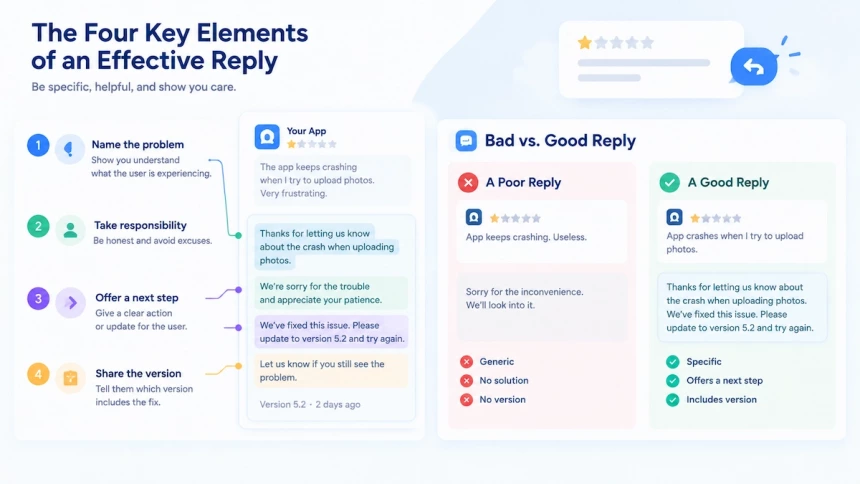
Specificity is the second. Name the app version, say whether the fix shipped, and give the user a next step. “Sorry for the inconvenience” changes nothing, because it tells the user nothing.
The App Review Management Workflow
A review management workflow is not a checklist you finish once. It is a loop you run every day, and each step feeds the next. The Analytics section below shows how to check whether the loop is actually working.
Where the Work Happens: App Store Connect vs. Play Console
Both App Store Connect and Play Console let you read reviews, reply, and edit your replies. Apple limits this to the Admin and Customer Support roles. This is where most teams manage reviews at first.
At scale, the consoles fall short in three ways. They have no unified inbox across stores, no sentiment analysis, and no task routing or SLA tracking. Whether those gaps justify paying for a tool is covered in “Building a Review Management Process.”
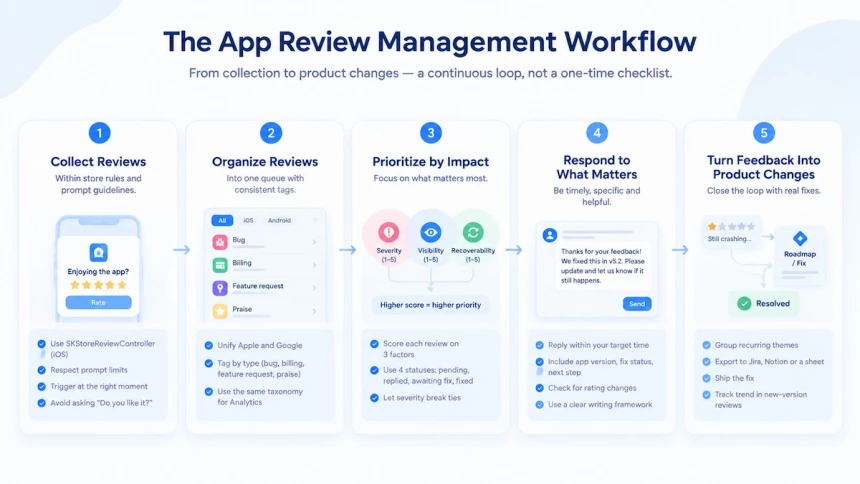
Step 1 — Collect Reviews Within Store Rules and Prompt Guidelines
On iOS, apps can request ratings and reviews using Apple’s built-in review prompt. Each user sees a maximum of three prompts within a 365-day period, and that limit is per app and per user. Teams that trigger prompts on every release often use up those chances within one or two versions. Asking less often, and at better moments, is how teams get more app reviews out of the prompts they have.
Tie the prompt to a moment of success instead, such as a finished task or a saved project. On Android, the In-App Review API has its own quota. A call does not guarantee the dialog appears, so do not assume it shows every time. The right timing does more than lift response rates; it is also one of the simplest ways to reduce negative app reviews on both stores. Do not ask users whether they like the app before showing the system prompt, because both stores treat that as gating.
Step 2 — Organize Reviews Into One Queue
If you check Apple and Google in separate tabs, reviews will slip through. A Google Play complaint can sit unanswered for days while the team works in App Store Connect. Pulling both stores into one queue is the foundation of app reviews management.
Then tag each review by type: bug, billing, feature request, or praise. Use the same tags in the Analytics section. Keeping one taxonomy means your reply data and your trend data can be compared.
Step 3 — Prioritize by Impact
Answer reviews by impact, not by date. A new one-star review matters more than a three-week-old five-star. A billing complaint matters more than a general gripe.
Score each review on three factors. Severity is how badly the issue hurts users. Visibility is how many people will read it. Recoverability is whether a reply or a fix can change the outcome. When two reviews score close, let severity break the tie, since a two-star billing bug can do more damage than a one-star complaint about color.
Every review that needs action should have a status and an owner. Use four statuses: pending, replied, awaiting fix, and fixed. This tracks single reviews. Step 5 tracks themes at the roadmap level.
Step 4 — Respond to What Matters
This step covers only the basics: send the reply within your defined response, and do not let fear of getting it wrong delay it.
After replying, check whether that review’s rating changes. A change is a good sign, but it is not guaranteed. Either way, future users read your reply. Priorities, character limits, and writing frameworks are covered in the response section.
Step 5 — Turn Feedback Into Product Changes
When the same theme keeps coming back, turn it into a roadmap item. Export it to Jira, Notion, or a spreadsheet with a title, a count, and a priority. Then ship the fix.
After release, count how often that theme appears in the next wave of reviews. Filter by the new version tag first, because users on older versions will repeat the same complaint. A drop among new-version reviews means the loop worked. If the count stays flat, check whether those complaints come from the old version before you blame the fix. This is the only step in the loop you can verify with data, which is why the Analytics section exists.
How to Respond to App Reviews Effectively
Two things decide whether a reply works: which review you pick, and which rules you reply under. Most teams get the second one wrong, because the two stores set very different limits. Fix the priority first, then learn the limits.
Prioritize Reviews That Need a Response
Apple’s own guidance is blunt. When you cannot answer everything, triage. Reply first to the lowest star ratings, and to reviews that name a technical problem in your current version. Those two groups are where a response can still change the outcome. Replies can prompt reviewers to raise their ratings, so the real question is which ones to answer first.
Follow the Rules for Each App Store
Each store caps replies differently, so the same reply can pass on one and fail on the other. On Google Play, a reply tops out around 350 characters. Longer ones are rejected, and HTML tags are stripped. Each review shows one reply, but you can edit it whenever you like. If the reviewer edits their review, you can reply again.
Apple publishes no character limit. Replies are editable there as well, and only the latest version shows. The reviewer is notified and may update the review as a result. Apple also bans personal information, marketing language, and spam, which rules out closing with a discount code.
Structure Every Reply Around the User’s Problem
Length matters less than structure. A reply that works does four things in order. It names the specific problem, takes responsibility without excuses, offers one clear next step, and states the version where the fix shipped.
Google’s reply guidance says not to ask for a higher rating. Once the issue is resolved, say what changed and leave the rating to the reviewer. Under a live complaint, any mention of the score reads as tone-deaf. Keep the whole reply under 350 characters so it also fits Google Play. Structure is the easy part; phrasing is where replies fail. Learning how to respond to app store reviews means writing so the same fix does not read like a template.
Know When to Reply or Report Negative Reviews
Not every low rating deserves a reply. Answer the ones that describe a real experience, even a harsh one. Report the ones that are fake, spam, or abusive instead. Apple does not tell the reviewer when you report, so the report stays quiet.
Replying to a genuine complaint is mostly a writing problem. Reply templates by complaint type cover the common cases, so the first draft is never blank.
App Store Reviews Analytics: Turning Feedback Into Insights
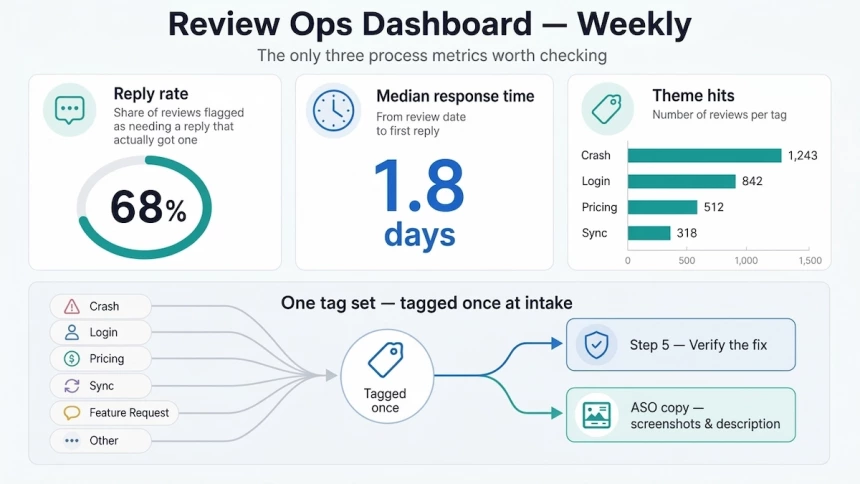
A rating tells you what users think, but not whether your team is acting on it. Three process metrics answer that question, and they are the only ones worth checking every week.
Three Process Metrics to Track
- Reply rate: the share of reviews that needed an answer and actually got one. Count only the reviews your triage rules flag as needing a reply.
- Median response time: the time from the review date to your first reply.
- Theme hits: the number of reviews carrying each tag from Step 2.
Theme hits are the same count Step 5 uses to verify a fix, so a single set of tags can serve both purposes. A second taxonomy adds nothing, because dashboards with different labels cannot be compared. Tag each review once at intake, then use that tag twice.
Google Play also reports reply impact, comparing rating changes on answered and unanswered reviews. It is the cheapest number to start with, and Apple publishes no equivalent. Since neither console shows the other store’s data, the only way to view both side by side is to export monthly into a single sheet.
Turning User Reviews Into ASO Insights
Review text contains the words users actually search with. Collect the phrases that recur under each tag, then reuse them in your screenshot captions and store description. Because tagging happens only once, the same data feeds both the roadmap and the listing copy. Finally, check conversion after the copy changes, so the loop ends with a measurable result.
AI-Powered Review Management
AI does not read reviews for you. What it does is sort them faster than any team can, and that matters once volume passes the point where manual triage stops working.
Benefits of AI-Powered Review Management for App Feedback
The first benefit is compression. Two hundred reviews a week become a single ranked theme list, so your team reads themes instead of rows. The second is translation: complaints written in German or Japanese land in the same queue as English ones, which removes a common bottleneck.
Manual screening stops scaling at a few hundred reviews a month. Past that point, the benefits become clear: less manual triage, shorter response times, and earlier visibility into recurring themes. For app development, these benefits all come from the same output, since a clustered theme is already a roadmap input.
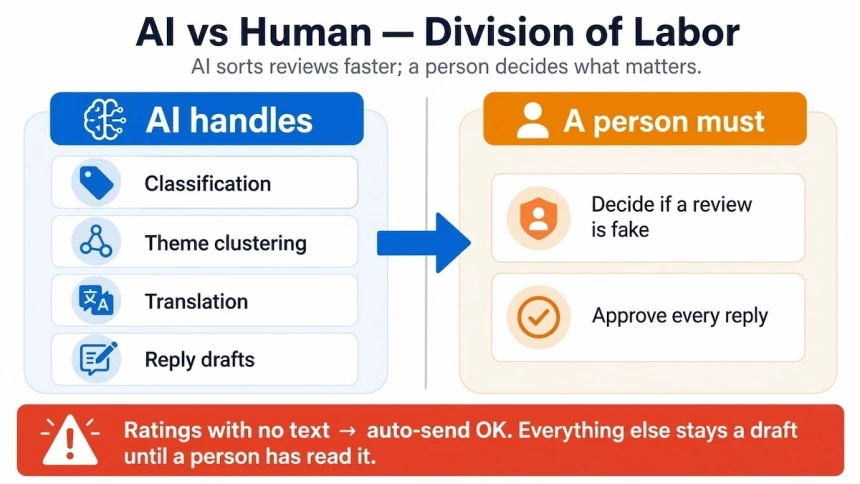
The parts of the workflow that can be automated are classification, theme clustering, sentiment judgment at scale, translation, and reply drafts. A caution on vendor claims: accuracy figures usually come from models tested on the vendor’s own review corpus, so treat them as vendor statements rather than independent findings.
Store-side AI changes how reviews are displayed, not how ratings are calculated. Some App Store product pages now show a generated review summary above the reviews, but the rating calculation itself is untouched.
AI-Assisted Replies Carry Your Name
A store treats a developer reply as developer content, so if an AI draft breaks the rules, the violation is yours. That risk sets a clear boundary: automatic sending should be limited to narrow buckets, such as ratings with no text. Everything else stays a draft until a person has read it.
AI Risks and Policy Limits
Localization is the most visible risk. An English reply under a German complaint, or an obviously machine-translated one, reads as automated. Users rarely raise a rating over a reply that sounds like a robot, so replying in the user’s own language is not just politeness; it is what makes the reply land.
The second limit is judgment. AI can flag a review that looks suspicious, but it cannot decide whether the review is fake. A person has to confirm that, and a confirmed fake goes to the report flow rather than the reply box.
What Review Management Can and Cannot Do for Your Rating
AI can sort reviews, translate them, and draft replies, but none of these actions directly sets your app rating. A rating is an outcome of user ratings over time. Review management can influence some of the factors behind that outcome, but it cannot control the final number. The key is knowing what your team can change and where its control ends.
What Review Management Can Change
A rating is a readout, so you cannot edit it directly. What you can influence are the inputs behind it: how many users rate your app, the mix of positive and negative ratings, and when new ratings arrive.
Timing is especially important after a bad release. Fixing the issue comes first through a hotfix or rollback. Once the fix ships, the team can respond to affected reviews and explain what changed. That makes rating recovery a product and timing problem, not just a messaging problem.
A rating reset does not solve the underlying issue either. It clears the existing rating history, but it does not fix the product problem that caused negative ratings in the first place.
What Review Management Cannot Change
Some actions are not available as legitimate rating levers. Paid reviews, fake reviews, incentivized ratings, and screening users before they reach the store are prohibited tactics. No review management process or software can make these practices acceptable. If you are searching for how to buy app store reviews, the safer way to read that goal is to build a compliant program that earns real reviews from real users, through well-timed prompts, genuine replies, and a clear process for handling feedback.
Review management also cannot replace human judgment. Software can identify patterns, group similar complaints, and suggest replies, but a person still needs to decide whether a review is genuine, whether it should be reported, and how the team should respond.
The goal is therefore not to control the rating itself. It is to manage the factors the team can influence while staying within the rules of each app store.
Building a Review Management Process
Review handling tends to be the first thing dropped in a busy quarter, and it is most likely to survive when the rules are written down. Ad hoc work usually stops the moment the team ships a broken release. This section covers three things: which rules to write down, where review findings should be discussed, and when paying for software starts to make sense.
Write Down Three Rules: Coverage, Speed, and Escalation
Rules work best when they are concrete. Two of them can be expressed as numbers:
- Coverage: every one- and two-star review gets a reply.
- Speed: the median first response comes within one business day. This is a common industry benchmark, not a platform requirement, since Google and Apple set no hard deadline for replies.
The third rule is a path rather than a number. It states which reviews are passed to engineering and who owns the answer. Without it, a billing bug can sit in the inbox while support waits for permission to escalate.
Publish all three rules where both support and engineering can see them, because a rule nobody can read cannot be followed. Revisit the numbers monthly and adjust them when they no longer match reality, since targets that never change tend to lose the team’s trust.
Bring Review Findings into the Monthly Growth Meeting
Once the rules exist, the next question is who acts on what the reviews say. Replies alone solve individual complaints, but recurring themes only change the product if the people who set the roadmap see them. So review themes should be a standing item in the same monthly meeting that covers conversion, retention, and release quality, not a separate support report that stays inside one team.
A simple check shows whether this is working: if no release date or priority has ever moved because of a review theme, reviews are still not influencing decisions.
Choose Tools by Review Volume and Process Gaps
Once the process is running, tooling decisions can be made against real workload. Start with monthly review volume rather than a feature list. These thresholds are rules of thumb, not fixed limits:
- Under roughly 50 reviews a month: the two official consoles are usually enough, and the work fits into a short daily routine.
- Roughly 50 to 300 reviews a month: the time spent switching between consoles starts to rival the cost of software, so this is a good point to evaluate tools.
- Above 300 reviews a month, or across several stores: manual triage is unlikely to keep up, and a tool becomes the practical choice.
Whatever your volume, the key question is not which tool has the longest feature list but which part of your process has no home yet, such as tagging, routing to engineering, or reporting. Buy a tool to close a gap you can name.
Make App Review Management an Ongoing Process
Your rating is a result, not a target. You can watch it, but you cannot edit it directly. The only things you control are the inputs behind it: how many people rate, what they say, and when the new ratings land.
So treat management as the process that shapes those inputs. Write your rules down, put review themes in front of the people who set the roadmap, and check three metrics a week. Do that, and app review management stops being an inbox chore. It becomes a habit, and the rating follows.
FAQs
How long before replies actually move your rating?
There is no fixed timeline. A reply can nudge the user who wrote it, but your overall score only shifts once enough new ratings arrive. Watch the trend, not the week.
Should you reply to positive reviews, or only negative ones?
Reply to both, but do not treat them equally. A short thank-you to a five-star review takes seconds and shows new visitors the team is present. Spend real effort on the low ratings.
How many ratings does an app need before the score becomes stable?
There is no official threshold. The more ratings you have, the less one new rating moves the average. A small app with twenty ratings swings hard; a large one barely moves.
What actually makes review management work?
The same idea runs through everything here: a rating is a result you cannot edit, only influence. Collect feedback, fix what repeats, reply by the rules, and track three metrics. The score follows the process.