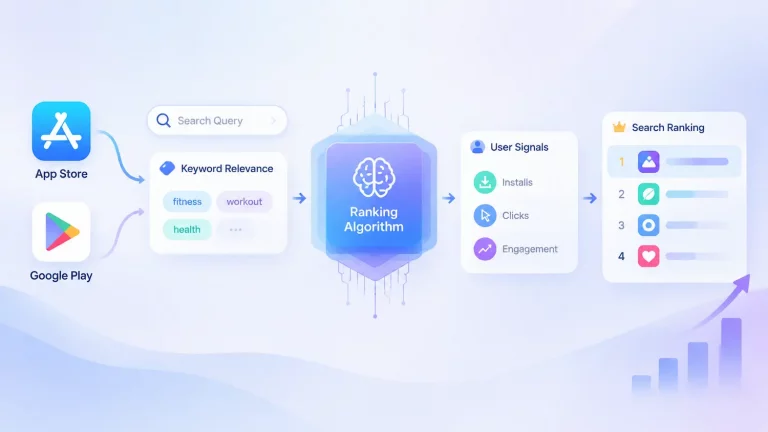
Your app name is one of the most visible parts of your store listing, but space is limited. (Google Play calls this field the title.) This guide explains how to choose app name keywords for App Store optimization: when descriptive terms help, how naming rules differ between the App Store and Google Play, and how to measure the impact of a name change.
Key Takeaways
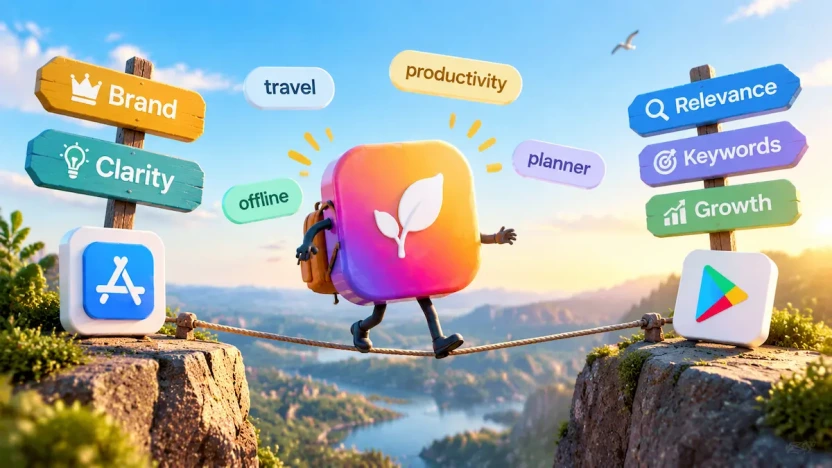
- Balance brand and app name keywords. Pair your brand with one clear term.
- Follow each store’s rules. Both cap names at 30 characters, but metadata policies differ.
- Adapt to each store. Apple has a keywords field; Google Play doesn’t.
- Prioritize relevance. Popular keywords won’t help if they don’t fit your app.
- Measure rename results. Set a baseline and compare performance after the change.
How Your App Name or Title Affects App Store Optimization
Your app name helps App Store search understand what your app is about. It also appears prominently in search results and on your product page, so it influences whether someone recognizes your brand and decides to tap through.
The name is not the only factor that matters. Apple says ratings and reviews also influence how an app ranks in App Store search. A well-chosen name can improve visibility for relevant queries, but it cannot compensate for a product page that does not convert or an app that does not satisfy user intent.
Google Play also uses app metadata to understand an app’s content and relevance. Google identifies the title, description, category, and other listing information as inputs to discovery and ranking, alongside app characteristics and user feedback such as ratings, reviews, and engagement. This means your title should describe the app accurately, while the rest of your listing provides supporting context. Google does not publish a simple formula that guarantees a specific ranking from adding a keyword to the title.
Where Your App Name Fits in Each Store Listing
Both the App Store and Google Play use listing metadata in discovery, but the name sits in different fields and is subject to different rules.
How Metadata Fields Work
On the App Store, the app name identifies the app, the subtitle adds context about its value, and the dedicated keywords field covers additional relevant search terms. Google Play has no separate keywords field, so the app title, short description, and full description work together to communicate the app’s functionality and relevant search terms.
| Field | Apple’s official limit | Google Play |
| App name | 30 characters | 30 characters |
| Subtitle / short description | Subtitle: 30 characters | Short description: 80 characters |
| Keywords field | Up to 100 bytes; separate terms with commas and avoid spaces. | No equivalent dedicated field |
| Full description | Up to 4,000 characters | Up to 4,000 characters |
Apple’s keywords limit is 100 bytes, not 100 characters. Characters in Chinese, Japanese, Korean, and many other scripts, as well as emoji, may use multiple bytes, and commas also count toward the limit.
What Guidelines Require
Apple’s App Review Guidelines set the boundaries for what can appear in your metadata. Section 2.3.7 prohibits trademarked terms, popular app names, and pricing information. Apple can also modify inappropriate keywords at any time, and it warns that improper keyword use is a common reason for App Store rejections.
Apple also says special characters such as # and @ do not carry extra search weight. In practice, they should not be added to an app name purely for ranking purposes. If they appear, they should serve branding or readability rather than an assumed search benefit.
Google Play also prohibits misleading or excessive metadata, including keyword stuffing and irrelevant repetition. Its specific title requirements are covered below.
Should You Add Keywords to Your App Name?
A strong app store optimization title uses descriptive keywords to clarify an app’s purpose, but adding more keywords does not automatically improve rankings. The right choice depends on brand recognition, search relevance, available space, and how accurately the name represents the app.
When App Name Keywords Help
Adding a relevant keyword can clarify your app’s purpose and help align its name with searches for a specific task, problem, or app category.
That does not mean every app name needs keywords. If your brand is already well known, a brand-only name may be clearer and easier to remember. If your app is new or competes in a crowded category, one or two relevant generic terms can explain its purpose without turning the name into a keyword list.
ASO vendors describe the app name as a high-weight metadata field, but none of them publishes a tested weighting ratio, and Apple has not published field weights. Treat any exact ranking weight as a vendor estimate rather than a confirmed rule. The practical goal is to choose words that accurately describe your app and match the language your target users already use, rather than words a keyword tool happens to rank highly.
How to Balance Brand and Search Terms
A practical naming strategy is to preserve enough space for users to recognize your brand while using the remaining characters to explain what the app does. Some ASO vendors suggest allocating roughly 10 to 15 characters to the brand name, leaving room for a descriptive keyword. Treat this as a starting point, not a universal rule; the right balance depends on brand recognition, category competition, and the clarity of the proposed name.
The same trade-off applies on Google Play: prioritize the single clearest descriptive term rather than trying to fit every candidate keyword into the 30-character title.
The table below is our own summary of four common approaches to balancing brand recognition and descriptive terms, using fictional apps.
| Naming approach | Best for | Example (fictional) | Trade-off |
| Brand only | Established brands with strong recognition | FocusFlow | May not explain a new app’s purpose |
| Brand plus generic term | Most growth-stage apps | FocusFlow: Focus Timer | Uses space for both branding and clarity |
| Keyword-first | New apps or independent developers | Focus Timer by FocusFlow | Can improve clarity but may weaken brand recall |
| Descriptive phrase | Apps whose value is not obvious from the brand | FocusFlow: Start Deep Work | Can become long if not kept concise |
What Makes a Name Feel Stuffed
A name starts to feel stuffed when it repeats similar ideas, uses words users would not search for, or sacrifices clarity to fit more terms. For example, Photo Editor Camera Filter Editor (a fictional example) repeats the same general idea and gives no clear sense of what makes the app different.
Each keyword should describe a genuine feature, benefit, or use case. If it does not make the app’s purpose clearer, it is unlikely to improve the name.
Example: Brand Plus One Clear Term
Consider a fictional focus-timer app called FocusFlow. Its core purpose is to help users start focused work sessions and avoid distractions. Relevant candidate terms might include focus timer, study timer, productivity, and work sessions. A structured ASO keyword research process can help you identify and evaluate additional candidates.
A name such as FocusFlow: Focus Timer keeps the brand recognizable while explaining what the app does. By contrast, FocusFlow Study Timer Productivity Work Sessions tries to cover too many ideas in one name and becomes difficult to read.

Should You Repeat App Name Keywords in Apple’s Keywords Field?
Apple and Google Play handle app keywords differently. Because Apple provides a dedicated keywords field, it is important to understand how that field works with your app name and subtitle. Google Play has no equivalent field, so its metadata requires a different keyword placement strategy.
Generally, avoid repeating words from your app name and subtitle in Apple’s keywords field, because doing so uses space that could cover additional relevant search terms. Follow Apple’s current guidance when deciding which terms to include.
How App Store Keywords and Your App Name Interact
Take FocusFlow: Focus Timer. The name already covers FocusFlow, focus, and timer. A subtitle such as Stay productive and build better habits can add context without repeating the name. The keywords field can then focus on terms that the name and subtitle do not already cover, such as: study, productivity, deep work, time management.
This is only a demonstration of the deduplication logic. Before using any term, validate that it reflects a real search habit, accurately describes your app, and does not create a misleading impression of its features.
What Not to Put in the Keywords Field
Do not use the keywords field for competing app names or trademarked terms; Apple prohibits both. Also avoid filler terms added merely to use up space. For a broader approach to app keyword optimization, including keyword selection and prioritization, see our dedicated guide.
How to Choose Keywords for Your App Name
Building an effective app store optimization title involves defining your app’s purpose, researching candidate terms, evaluating relevance and competition, allocating name space, and localizing where needed.
A Five-Step Process for Choosing App Name Keywords
- Define your app’s core purpose. Start with the user, task, and main benefit. A focus-timer app is not simply about “productivity”; it may help students study, remote workers concentrate, or anyone build a habit of focused work sessions.
- Build a candidate list. Collect terms from the language users use, competitor listings, app categories, and related search queries. Include category terms, feature-based terms, and problem-based terms, but do not treat every candidate as a name keyword. For a deeper workflow, see our guide to App Store keyword research.
- Evaluate each term. Ask whether the term is relevant to your app’s core purpose, whether people actually search for it, and whether your app can realistically compete for it. A term can be relevant but too broad, or popular but mismatched with what your app delivers. When assessing demand, app store optimization keyword volume can provide a useful estimate, but it should be considered alongside relevance and competition.
- Allocate the name’s space. Keep the brand recognizable and use any remaining characters for a highly relevant descriptive term.
- Localize the name where needed. Search behavior varies by market, so adapt the descriptive part of the name to local search language while preserving brand recognition.

Example: Evaluating Candidate Terms
For FocusFlow, “productivity” is too broad because it can refer to task management, habit tracking, and other tools. “Focus timer” or “study timer” better describes the app’s core purpose.
Terms such as meditation or sleep tracker may show up in adjacent searches, but they do not describe what FocusFlow does. Including them could attract the wrong users and make the name less clear. Related terms such as “study,” “deep work,” or “time management” may fit better in supporting metadata than in the app name.
Does Localizing the Name Help?
Localize an app name when users in different markets describe the same need differently, adapting the wording to local search behavior rather than translating it literally.
If your brand is already recognized in a market, keep it unchanged and localize the descriptive term. For example, adapt “Focus Timer” to the local equivalent of “concentration” if that better matches local search behavior.
Before changing a localized name, check that the new term accurately describes the app, matches local user expectations, and does not introduce trademark or compliance risks. On Google Play, apply the same approach to the title and descriptions.
App Store vs. Google Play: Naming Differences
Both stores limit the app name or title to 30 characters, but their metadata structures differ. Adapt your naming strategy to each store rather than copying the iOS version directly into Google Play.
What Google Play Requires
Google Play’s metadata policy says the title should not include emojis, repeated special characters, or all-caps text (unless it is part of the brand), and should not make promotional or performance claims such as “best,” “top,” or “free.”
Why an iOS Strategy Does Not Transfer
On the App Store, the subtitle and keywords field carry additional coverage. On Google Play, the title and descriptions must do that job together. That does not mean a Play title should become a keyword list. Use the title for the brand and the clearest description of the app’s purpose, then use the descriptions to add context in natural language.
For example, FocusFlow: Focus Timer can work on both stores as a brand-first title. On the App Store, study, deep work, and time management can go in the subtitle and keywords field. On Google Play, the short description might emphasize focused study sessions, while the full description explains session timing, distraction reduction, and other actual features.
Keep the brand consistent across stores, and adapt the supporting metadata to each store’s structure.
How to Evaluate an App Name Change
Changing an app name can affect search visibility, product page performance, and how users understand your app. But a rename also makes before-and-after comparisons harder if you do not record a baseline first.
The goal is not to declare a rename successful after a few days of higher downloads. It is to compare a clearly documented starting point with enough post-change data to see whether the change improved relevant discovery, conversion, or both.
Set a Baseline Before You Rename
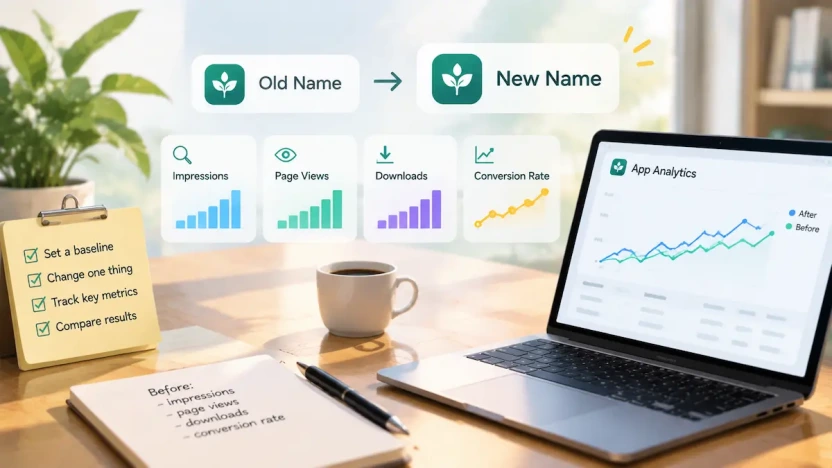
Before changing the name, record at least one complete observation period. Include the target keywords or search terms you care about, along with search-source impressions, product page views, downloads, and conversion rate.
Also separate brand-driven performance from non-brand performance where possible. A rename may affect generic search visibility differently from searches for your existing brand name, so treating all traffic as one number can hide what actually changed.
Document the app version, release date, markets affected, and any other listing elements that may change at the same time. This baseline becomes the reference point for interpreting results after the new name goes live.
Change One Meaningful Variable at a Time
If possible, change only the app name during the test period. Avoid simultaneously rewriting the subtitle, replacing screenshots, changing the keywords field, adjusting pricing, or launching a major paid campaign.
When several variables change together, you cannot cleanly attribute a performance shift to the name. That does not make the test useless, but it means you should describe the result as the effect of a broader listing update rather than the effect of the rename alone.
Which Metrics to Watch
| Metric | What to watch | Attribution limit |
| Unique impressions | Whether search exposure changes | The search source includes Search Ads, so it is not purely organic |
| Product page views | Whether impressions turn into page visits | Results can be affected by ranking, screenshots, ratings, and external traffic |
| Conversion rate | Whether impressions turn into downloads | Apple defines it as downloads (plus pre-orders) divided by unique device impressions; product page conversion rate uses page views instead. Check the official definitions before comparing with your own calculations |
| First-time downloads | Whether the change brings new users | Smaller apps can see large percentage swings from relatively small absolute changes |
App Store Connect reports unique impressions, product page views, and conversion rate by source type. Because search traffic and Search Ads share one source type, a name change can be difficult to attribute cleanly from search-source data alone. For more on reading these numbers, see our guide to App Store Connect conversion data.
How to Measure a Name Change on Google Play
Google Play developers can use Play Console’s store listing reports to assess performance before and after a name change. Review Google Play search traffic, store listing visitors, and install-related metrics where available. These reports help you understand whether discovery and listing performance changed, although they do not prove that the name alone caused the change. Use the same baseline documentation described above.
How Long to Wait
There is no universal waiting period for evaluating a name change. Choose an observation window based on download volume, seasonality, release cadence, and other marketing activity.
For a low-volume app, a few days may not produce enough data to distinguish a real change from normal variation. For a higher-volume app, a shorter period may be enough to see a directional change, but it still may not be enough to judge conversion effects.
As a practical starting point, allow around two weeks to observe initial changes after updating your app name. Use this period to monitor keyword visibility, impressions, and downloads against your baseline. If your app has low traffic or results fluctuate significantly, extend the observation window before deciding whether the change was effective.
When Not to Rename Again
Avoid another rename while results are unstable; without a documented baseline for each change, earlier results become difficult to interpret.
If search impressions decline after a rename, do not immediately assume the new name failed. Check whether the new name still accurately describes the app, whether important search terms were lost, whether the product page or external traffic changed, and whether the observation period includes unusual seasonality or a campaign.
Consider rolling back only after you have enough data to compare against the documented baseline.
FAQs
Does my app name affect ASO?
Yes. Your app name or title helps communicate relevance to search queries and appears prominently in search results. A clear, accurate name can also influence whether users tap through to your listing. However, the name alone does not guarantee rankings or installs.
Should my app name be in my keywords field?
Generally, no. Apple already indexes words in your name, subtitle, and category, so repeating them wastes space. Use the field for additional terms, separated by commas with no spaces. Singular and plural forms don’t need to be listed separately.
Will changing my app name affect my rankings?
It can. A name change may affect search relevance and listing conversion, but the outcome is not guaranteed. On the App Store, a name change takes effect with a new app version. Compare relevant discovery and conversion metrics before and after the change, and account for Search Ads and other factors that may affect the results.
Does Google Play have an equivalent keywords field?
No. Google Play has no dedicated keywords field, so use the title and descriptions to communicate your app’s content and relevance naturally. Avoid keyword stuffing or repetitive wording.
Make Every Character Count
Your app name or title is one of the smallest spaces in your listing, yet it shapes both search relevance and first impressions. Make its purpose clear, balance brand recognition with relevant app name keywords, and use each store’s supporting metadata to add context. Then measure what changes rather than assuming a new name will improve rankings. A strong name connects the right search with the right expectation.