

Most users don’t leave an app with a decision. They just open it a little less each week, until one day they don’t open it at all. By the time that shows up in a report, the habit is usually gone.
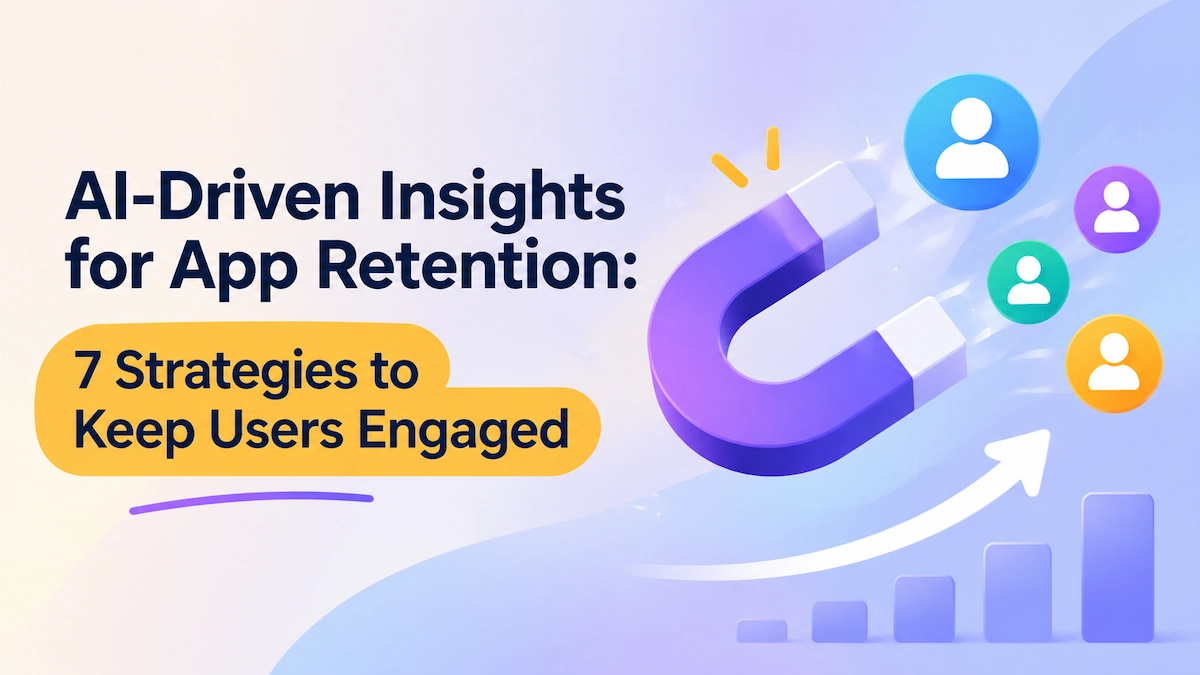
Catching that drift early is hard to do by hand. An app has to decide, for thousands of users at once, who needs a nudge, what to show them, and when to say nothing. Fixed rules and weekly campaigns can’t keep up with that. AI-driven insights for app retention can, because they update as each person’s behavior changes instead of waiting for a scheduled send.
That doesn’t mean AI can save any product. If an app isn’t giving people a reason to come back, smarter messaging only makes the interruptions more precise. So this guide shows how to use them well. It begins with what AI can and can’t do, looks at the data it needs, and then walks through seven strategies and the practices that keep them working together.
Key Takeaways
- AI improves retention decisions, but it can’t replace product value. It helps apps deliver existing value more effectively, but it cannot fix a weak product, structural churn, or poor app reliability.
- Build the data foundation first. Collect behavioral, message engagement, and business signals, combine them with what users tell you directly, and define the outcome AI should optimize, such as activation or renewal rather than message opens.
- Match each strategy to a lifecycle stage. Personalize onboarding, recommendations, and push timing to keep users engaged, then use conversational AI, tailored offers, churn prediction, and win-back flows to handle support, incentives, and at-risk or lapsed users.
- Know when to hold back, and prove it works. AI should decide when to skip a message or an incentive, and teams should use control groups and retention-based metrics to confirm that changes add incremental value rather than reward users who would have stayed anyway.
- Roll out in stages with guardrails. Start with onboarding and recommendations, set shared contact limits across strategies, and define when a human should step in.
The Role of AI in Mobile App Retention
AI is changing how mobile apps approach user retention, making it possible to personalize engagement and respond to changing user behavior. However, it is not a solution to every retention challenge. This section explores what AI can do to improve retention and where its limitations lie.
What AI Can Do for Retention
Most retention campaigns still treat users as one audience. Static discounts, mass re-engagement messages, and generic loyalty programs reach everyone and change nothing. Users notice. McKinsey’s 2021 research found that 71% of consumers expect personalized interactions. In the same research, 76% said they feel frustrated when they don’t get them.
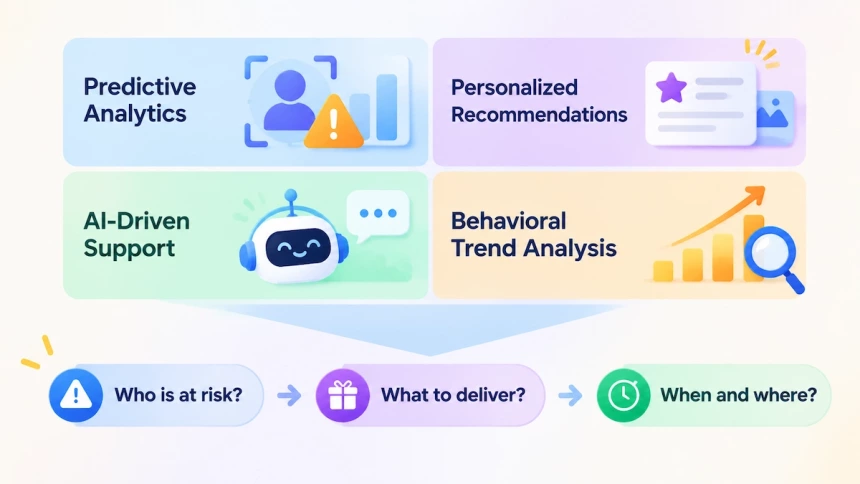
AI closes that gap by adapting engagement to individual behavior instead of segments. It does this in four ways:
- Predictive analytics. Estimates each user’s churn risk by watching for activity shifts. A fitness app that sees workout frequency drop can send a reminder before the habit breaks.
- Personalized recommendations. Surfaces content and features matched to past behavior. A streaming app can build its next recommendation from viewing history.
- AI-driven support. Answers questions and walks users through features inside the app. Issues get resolved before they turn into uninstalls.
- Behavioral trend analysis. Reads what users are interested in and how that is shifting. A shopping app can spot repeat browsers who never buy and change what it recommends.
The difference is adaptive, not static. Together, these capabilities keep answering three questions as behavior changes: Who is at risk (predictive analytics)? What should they receive (recommendations)? When and where should we reach out (behavioral trend analysis)? Answering them with data, not guesswork, turns personalization from a promise into a retention metric. AI-driven support covers the questions users bring themselves.
What AI Can’t Fix
AI can improve engagement, but it cannot solve every cause of app churn. Three limitations are worth keeping in mind:
- Lack of Product Value: Adobe’s 2026 survey of 1,000 US consumers found that “no longer needed for the original purpose” was the most common reason for uninstalling a retail app, cited by 64%. Separately, 72% said they had downloaded a retail app for a one-time purchase or discount and later deleted it. Discounts can attract installs, but lasting retention requires ongoing value.
- Structural Churn: AI-driven messaging cannot fix problems such as uncompetitive pricing, poor product fit, or limited product availability. These require changes to the product or business offering.
- Poor App Experience: Crashes, slow loading, and usability issues need to be fixed at the product level. AI cannot compensate for an app that fails to work reliably.
AI can help apps deliver existing product value more effectively, but it cannot create demand for a product users no longer need or fix fundamental product weaknesses. Mobile app retention strategies should therefore start with understanding why users stay or leave, then use AI to improve how the app meets their needs.
Build the Data Foundation Before Adding AI
AI-powered retention is only as good as the data underneath it. Before adding a model, teams must decide three things. They need to know which signals to collect, which data to ask for, and which outcome to improve. Skip that work, and AI will find patterns that track activity, not retention.
Read the Signals AI Needs
Churn rarely starts with an uninstall. It starts with small shifts in how often someone opens the app, interacts with a message, or makes a purchase. AI needs those signals before it can act on them, and mobile apps usually group them into three categories:
- In-app behavior. Session frequency, time between sessions, core feature usage, and changes in feature adoption.
- Message engagement. Push notification opens, email interactions, and declining responses to re-engagement campaigns.
- Business events. Failed payments, subscription status changes, renewal failures, and completed purchases.
Two additional signals help explain these patterns. Crash reports reveal technical problems that may interrupt sessions and discourage users from returning. Push permission status provides context about message reach. A user who declines notifications is not necessarily disengaged, just as a user who ignores them is not necessarily losing interest. Without this distinction, AI may mistake delivery limitations or technical issues for declining user intent.
Collect the Data AI Learns From
Two kinds of data matter here, and they differ in how you get them. First-party data comes from observing what users do inside your app. Sessions, searches, purchases, and support tickets all count. Zero-party data comes from asking users directly. It covers what they intentionally share about themselves, including goals, interests, content preferences, and stated intent. These are two ways of acquiring data, not mutually exclusive categories: zero-party data is collected by you too, so it is technically a subset of first-party data. The difference is that users hand it over on purpose rather than you inferring it.
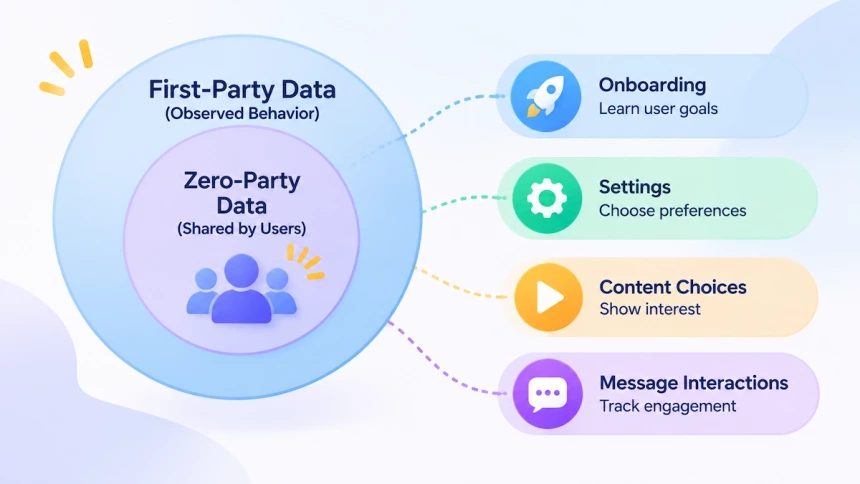
Both feed retention models, but they answer different questions. Watching shows what a user did last week. Asking shows what a user wants next. A model trained on behavior alone can only guess at intent.
That balance is shifting. Apple’s App Tracking Transparency (ATT) framework, introduced in 2021, requires permission before an app can access the identifier used to track users across other apps and websites. This limits access to cross-app tracking data, not an app’s own analytics. Declared data offers another way to understand user intent without relying on cross-app tracking identifiers. By asking users directly about their goals and preferences, apps can build a clearer picture of what users want from the product.
Asking carries one condition: users have to be willing to answer. Trust plays a major role, and concerns about data handling remain significant. Cisco’s 2022 Consumer Privacy Survey of 2,600 adults in 12 countries found that 76% would not buy from a company they did not trust with their data. An app that asks for goals and preferences is asking for that same trust.
Apps can make these requests at different points in the user journey. Four practical touchpoints include:
- Onboarding. Ask what the user wants from the app and what they have tried before.
- Settings. Let users choose content preferences, notification topics, and message frequency.
- Content choices. Read intent from saved items, followed topics, and selected categories.
- Message interactions. Note which topics get replies and which offers get opened.
Retention models need both. Once both are in place, the next question is what the model should optimize for.
Define the Outcome AI Optimizes
Data alone gives AI no direction. Teams also need a defined objective, or the system will optimize for whatever is easiest to measure.
The right metric depends on where a user sits in the journey. A new user may need to complete onboarding and reach a first value moment. An established user may need to return to a core feature, while a subscriber’s key milestone may be a successful renewal.
Start by naming the early behaviors that prove a user has reached the product’s first value moment. Those behaviors should reflect what makes the app useful, not generic activity like opening the app or viewing a notification.
Then tie optimization to the matching journey goal:
- Activation. Raise the share of new users who complete key onboarding actions and reach core value.
- Repeat engagement. Increase the share of users who return and complete meaningful actions over time.
- Subscription retention. Improve renewals by finding cancellation risk early.
This gives AI a sharper target than notification opens or message clicks. Those metrics explain how users respond, but they do not prove stronger retention.
Teams should also agree on what counts as an active user and how retention is measured across time windows. Shared definitions let them compare AI-driven changes against existing benchmarks.
7 AI-Driven Strategies for Better App Retention
AI can help apps retain users at every stage of the lifecycle, from personalized onboarding and ongoing engagement to churn prevention and reactivation. By turning behavioral data into AI-driven insights for app retention, AI helps teams decide what experience to deliver, when to engage, and which users need attention. The following seven strategies explore how AI can turn user data into more relevant experiences and timely retention actions. Strategy 1 fits new users, 2 to 4 fit active users, 5 fits users at a purchase or subscription decision, 6 fits users showing early churn signals, and 7 fits users who are leaving or have lapsed.
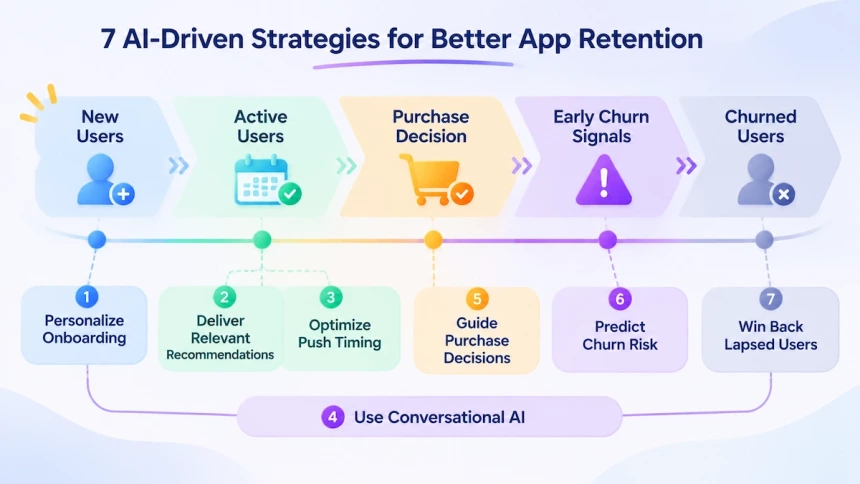
1. Personalize App Onboarding Based on User Intent
Users have different goals when they first open an app. AI can analyze first-session behavior, in-app events, and early actions to identify user intent and adapt the onboarding experience. Based on these signals, it can guide users toward relevant features, provide interactive tutorials, and offer help when needed.
For example, in a budgeting app, users who select expense tracking as their goal can see the expense-entry feature directly on the home screen. Those who skip onboarding can receive a contextual prompt when they return for their second session. Interactive tutorials can also help users learn essential functions and solve common problems independently. AI can also infer intent from behavior: a user who skips goal-setting but logs three expenses in the first session can be treated as an expense tracker and shown the entry shortcut, while one who opens savings-goal screens first can be routed to goal setup.
Measure time-to-value, activation completion rate, and D1 and D7 retention across onboarding paths. Keep the number of paths manageable so personalization does not create unnecessary maintenance or complexity.
2. Deliver Personalized Content and Feature Recommendations
After users experience an app’s core value, AI can help them discover more relevant content and features. It analyzes their behavior, recent interactions, and responses to previous recommendations to determine what may be useful next. Suggestions can include educational content, feature tips, exclusive offers, and other in-app resources.
For example, Equinox+, a fitness app, uses Amazon Personalize to recommend classes and content based on member preferences. In a test comparing machine learning recommendations with its existing rule-based system, the company reported a 92% increase in engagement with homepage carousel content.
Recommendations can also address features users have not explored. Someone who repeatedly browses running plans but has never used workout analytics could receive a suggestion to try that feature. AI should also consider negative feedback and recent support interactions before displaying promotional content. Users who have submitted complaints or requested refunds may need support rather than another sales message.
Track whether users engage with recommended content and adopt the suggested features. Also monitor how these interactions affect subsequent retention. Adjust recommendations based on user feedback, changing preferences, and recent support interactions. This helps keep suggestions useful instead of turning them into repetitive promotions.
3. Optimize Push Timing, Channel, and Frequency
Users may receive push notifications, emails, and in-app messages from the same app. Sending too many messages or reaching users at the wrong time can cause notification fatigue, reducing engagement and even prompting users to disable notifications. AI can analyze individual activity patterns, channel engagement, and responses to previous messages to decide when to send, which channel to use, and how often to reach each user. It can also hold back low-priority messages when users show signs of fatigue.
For example, a user often opens an app in the evening but has ignored the last three push notifications. However, they continue to engage with the app’s emails. AI can reduce push frequency and send suitable messages through email or in-app channels instead. Important status updates can still be delivered through push notifications. This approach helps maintain communication without repeatedly using channels that the user is less likely to engage with.
The impact of notification fatigue is reflected in consumer research. In a 2026 Adobe survey of 1,000 US consumers, 30% cited notification fatigue as a reason for uninstalling a retail app, compared with 64% who said the app was no longer needed.
Track engagement and key action completion across different channels, along with notification opt-out rates. Also monitor total message volume to ensure that improved targeting does not simply lead to more messages. Compare these results with the app’s previous messaging schedule to assess whether AI-driven delivery improves engagement while reducing unnecessary interruptions.
4. Use Conversational AI to Keep the App Useful
Users should not have to navigate multiple menus or switch between screens to complete simple tasks. Conversational AI allows them to describe what they need in natural language, while AI understands their intent and helps them take the next step.
It can support several in-app tasks:
- Product discovery: Help users find suitable products or features based on their descriptions.
- Information lookup: Retrieve order, delivery, account, or payment status.
- Problem solving: Provide step-by-step guidance for common issues.
- Human handoff: Pass complex cases to human agents with relevant conversation history and user context.
For example, a retail app user can ask, “Where is my order?” and receive an update based on the latest delivery status. In a fintech app, if a user asks about a refund after experiencing two recent payment failures, AI can pass the issue and relevant context to a human agent, so the user does not have to explain the situation again.
To measure its impact, track:
- Problem resolution time: from the user’s first message to the issue being marked resolved
- Time-to-recovery: from the user’s first failed action, such as a payment failure, to successfully completing that action
- Seven-day retention after contacting support
These metrics help determine whether conversational AI reduces friction and helps users continue using the app. Compare them with the previous support flow for the same issue types.
5. Personalize Offers and Rewards Without Over-Discounting
Not every user needs a discount to stay engaged or make a purchase. AI can analyze usage behavior, purchase intent, price sensitivity, and recent engagement. It then determines whether an incentive is necessary and which type fits best.
For example, a user who has completed three core actions but has not subscribed may benefit from a limited-time premium trial. Another user who repeatedly visits the pricing page but becomes less active may respond better to a targeted discount. Users with strong purchase intent may not need an incentive at all.
The same logic applies to the incentive type itself. Free trials, loyalty points, exclusive benefits, and better-fitting plans can all outperform a generic discount. The goal is to match the incentive to the behavior, not to treat price cuts as the default retention strategy.
One published example comes from DoorDash. Its data science team uses causal machine learning to predict how a promotion changes each customer’s ordering behavior, then adjusts discounts to match. In one cross-category promotion test (not a restaurant-promotion test), personalized promotions generated nearly the same incremental order volume as uniform ones. The cost per incremental order dropped by about 50%.
This case highlights why offer performance should not be measured by redemption rates alone. Teams should compare users who receive incentives with a control group that receives none. Key metrics include incentive cost per user, 30-day and 60-day retention after receiving an offer, and incremental conversion and retention lift. These measures show whether incentives create additional long-term value, rather than subsidize purchases that would have happened anyway.
6. Predict Churn Risk and Intervene Before Users Leave
AI can spot early signs of churn before a user stops opening the app. Longer gaps between sessions, declining use of key features, and fewer responses to notifications may all signal fading interest. By tracking these changes, the model can estimate churn risk and suggest likely causes. Teams can then act before inactivity becomes permanent.
The response should depend on what drives the risk, not default to one discount or reminder for every at-risk user. If feature usage drops after repeated crashes, fix the crashes first and acknowledge them in an in-app message. If a user has never tried a core feature, an educational nudge or guided walkthrough may work better. Each action should match the user’s likely problem. That is the shift from reactive win-back campaigns to predictive intervention.
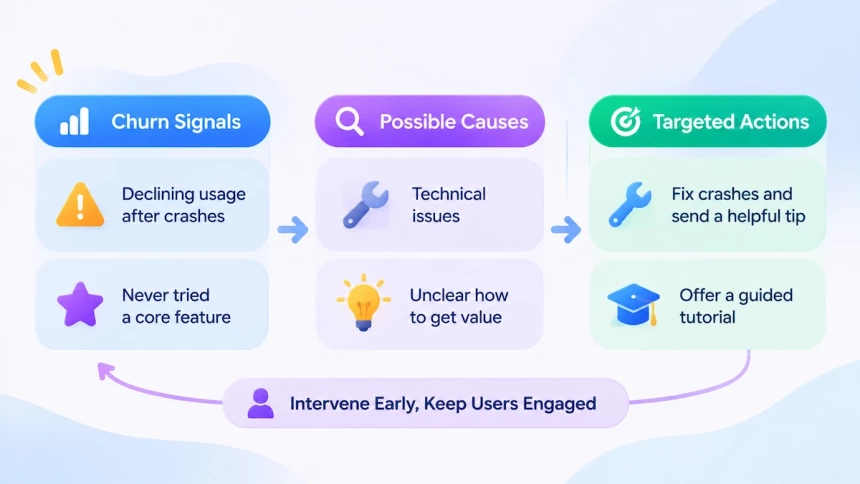
Teams can measure results through recovery rate (the share of flagged at-risk users who return to their earlier activity level within a set window) and retention lift against a control group. Comparing AI-driven interventions with existing rule-based campaigns shows whether predictive targeting adds measurable value. This strategy applies to users still showing early signals. Once inactivity becomes prolonged, they belong in a dedicated re-engagement flow. Where that line falls is set by the team, using the active-user definition agreed earlier.
7. Prioritize Win-Back and Save Flows by Propensity
Users who are considering leaving and those who have already stopped using an app require different retention approaches. AI helps teams identify which users to prioritize and select suitable interventions based on their behavior, engagement history, and likelihood of returning. This allows teams to build separate strategies for preventing churn and reactivating inactive users. A Save Flow applies to users who are still active but signal they may leave. Win-Back applies to users who have been inactive for a set period, which should follow the product’s usage cycle.
When a user takes an action that signals intent to leave, a Save Flow can address the reason behind it. AI can analyze feature usage, in-app behavior, and user feedback to pick an appropriate response. For example, users who rarely touch a particular feature may benefit from guidance that shows its value. Users who find the app hard to use may need a simpler workflow or human support. Others may need a plan that better fits how they use the app, or a relevant incentive.
For users who have already gone inactive, Win-Back campaigns focus on reactivation. AI can weigh past usage, time since last session, and likelihood of return to decide who to contact first. It can then match each user with content reminders, feature suggestions, or personalized offers. Win-back only works for users the app can still reach, such as those who still allow push notifications or have a usable email address. Users who can’t be reached through any channel are better left out of the outreach ranking.
Consider a fitness app user who used to log workouts every week but has not opened the app in six weeks. The app might start by reminding them of their previous training plan. If they do not respond, it could suggest a class that matches their interests or offer a short trial. If these attempts bring no response, the app should avoid sending more reminders that are unlikely to make a difference. Instead, it can pause outreach and wait for a new sign of interest.
Teams can evaluate these efforts with metrics specific to each flow. For Save Flows, track save rate, incremental saves against a control group, and post-save retention. Post-save retention shows whether users keep using the app after changing their mind. For Win-Back campaigns, measure reactivation rate, cost per reactivated user, and post-reactivation retention. Comparing segments also shows which thresholds to adjust.
Best Practices for Implementing AI in Mobile Apps
Deploying AI retention strategies requires more than choosing the right tools. Teams also need a clear rollout plan, shared engagement rules, and defined boundaries for automation. The following practices help ensure that different strategies work together without creating unnecessary complexity or disrupting the user experience.
1. Roll Out AI Retention Strategies in Stages
Launching all seven strategies at once makes it difficult to identify what works and where improvements are needed. A phased rollout gives teams time to evaluate each strategy, address implementation issues, and build on earlier results.
Start with personalized onboarding and content recommendations. These strategies improve the in-app experience and provide measurable signals through activation and feature adoption. Once enough behavioral data is available, introduce push optimization and churn prediction to make engagement more responsive to individual activity patterns.
Conversational AI can follow when the support team is ready to handle cases that require human intervention. Personalized offers, Save Flows, and Win-Back campaigns can come later. Save Flows depend on reliable detection of leave-intent signals, such as a cancellation attempt. Win-Back campaigns need enough behavioral history to judge which lapsed users are worth contacting. Since incentives involve additional costs, use holdout groups to determine whether they generate incremental retention rather than simply rewarding users who would have stayed anyway.
2. Set Guardrails Across AI-Driven Engagement
When multiple AI strategies operate simultaneously, each may make a reasonable decision on its own while creating an overwhelming experience for the user. Someone showing signs of disengagement, for example, could qualify for a churn-prevention message, a personalized offer, and a content recommendation on the same day. Without shared rules, these strategies may compete for the user’s attention.
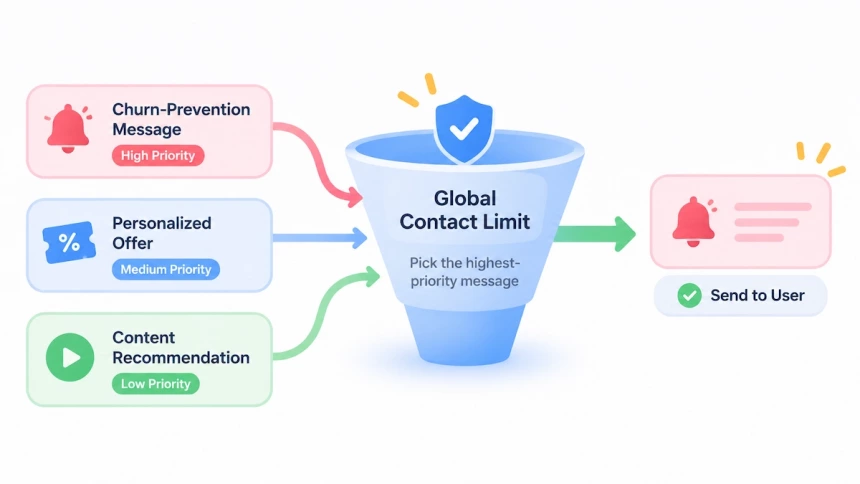
Set a global contact limit across strategies and channels, rather than allowing each campaign to manage frequency independently. When several messages qualify at once, prioritize the one most relevant to the user’s current needs and suppress lower-priority messages. Also define the role of each channel: push notifications can deliver timely updates, email can carry more detailed information, and in-app messages can provide guidance in context.
User preferences should remain part of these decisions. Allow users to control message frequency, channels, and content topics, and make sure AI-generated messages follow consistent brand guidelines. These controls help prevent personalization from turning into excessive or inconsistent communication.
3. Define When Human Intervention Is Needed
AI can handle routine questions and guide users through common tasks, but some situations require human judgment. Teams should define these boundaries before deploying automated support or retention workflows.
Set clear escalation rules for complaints, refund requests, account access problems, safety or regulatory concerns, and high-value users at risk of leaving. When a case meets one of these conditions, AI should transfer it to the appropriate team instead of continuing to generate automated responses.
Each escalation path needs an assigned owner and a defined response time. The handoff should also include relevant conversation history and user context, so customers do not have to repeat information when speaking with an agent. This makes human support a planned part of the retention process, rather than a fallback introduced only after automation fails.
Final Thoughts
AI-driven insights for app retention make decisions sharper, but they don’t make them optional. They can tell you who is drifting, what they are likely to need, and when and where to reach them. That only works when the data is sound, the goal is clearly defined, and the product gives people a reason to come back. Start with onboarding or recommendations: define the outcome, test against a control group, and set guardrails before you expand. Retention improves when AI helps an app deliver the value it already has, more reliably and at the right moment.
FAQ
Do I need a data science team to use AI for retention?
Not necessarily. Some analytics, messaging, and customer engagement platforms offer built-in churn prediction and send-time optimization, so check what your current tools support. Teams with limited resources can start with these tools, then consider custom models once they have clear goals and enough data.
How much user data do I need before AI can help?
It depends on the strategy. Onboarding personalization and content recommendations can start with first-session behavior and basic usage events. Churn prediction needs a longer history of active and lapsed users to learn from, so introduce it later.
How do I use behavioral data without hurting user trust?
Collect only the data a strategy actually needs, and tell users how it is used. Give them control over message frequency, channels, and topics, and follow the privacy and consent rules that apply in your markets. Users are more willing to share goals and preferences when they can see what they get in return.
How long does it take to see retention results?
It depends on your product’s usage cycle. A daily-use app may show a change within a few weeks (a rule of thumb, not a guarantee), while a monthly subscription needs longer. Compare results against a control group over a full retention window, rather than judging from short-term message opens or clicks.
Can AI win back users who no longer need my app?
Rarely. AI improves how an app delivers value it already has, but it cannot create demand that has disappeared. Fix the product reasons for churn first, then use AI to make engagement more relevant and timely.