Most apps lose the majority of their users before those users ever experience the app’s core value. By Day 30, more than 90% of installs are gone. The steepest drop happens much earlier: on a typical app, about three in four users never return the day after installing. To increase app retention, teams need to understand why users leave so early.
This pattern points to a different problem than many teams expect. Retention is often lost during the first session, not at Day 30. Users who fail to reach an app’s core value on their first visit rarely give it a second chance. That leaves fewer users for later re-engagement efforts to bring back.
Improving retention starts with identifying where users drop off and what drives them away. This guide explains how to measure retention and assess benchmarks by app category, then explores common causes of churn. It also covers 12 app retention strategies across the user lifecycle, with examples of how different app categories can improve retention and the key metrics to track.
Key Takeaways
- Retention is lost early. Across all apps, average retention is 25% on Day 1 and 6% on Day 30, so most users leave before a habit can form. The first session is the main point of leverage.
- A good rate depends on the category. Finance and lifestyle apps hold users better over 30 days than shopping, food and drink, and travel apps. Steady improvement across an app’s own cohorts is a more useful goal than matching a single industry figure.
- Retention numbers are only comparable when defined consistently. The definition of an active user, the way Day N is counted, and the cohort measured all need to stay fixed across periods. Classic and rolling retention should not be compared directly.
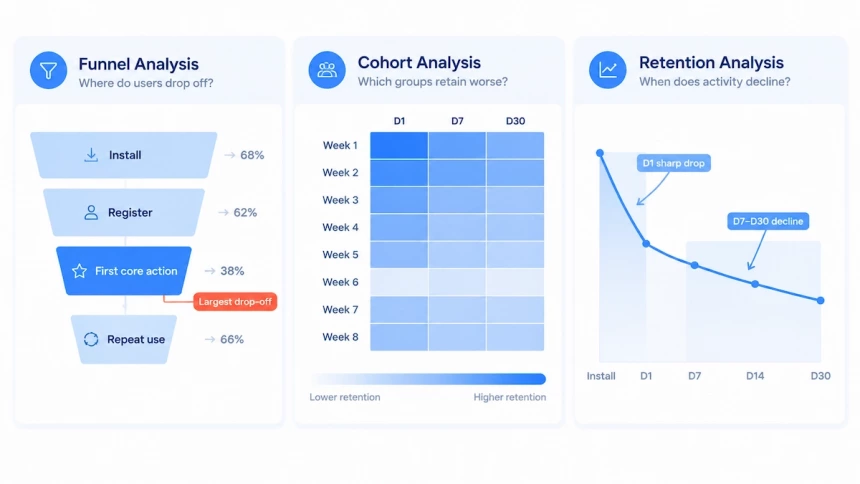
- Churn diagnosis rests on three questions. Funnel analysis shows where users drop off, cohort analysis shows which groups retain worse, and retention analysis shows when activity declines. These patterns are clues, not proof of cause.
- The 12 strategies follow the user lifecycle, from activation to continuous optimization. The weakest stage in D1, D7, and D30 retention decides where to start.
- Messaging works when it is relevant and coordinated. Behavior-triggered messages, shared user states, and frequency caps across channels keep outreach useful. Success is measured by completed actions and later retention, not by opens and clicks.
- Industry shapes how the numbers read. A low D30 in a travel app may reflect the trip cycle, media apps depend on the business model, and finance apps on trust and meaningful tasks. Retail apps rely on behavior-based reminders.
- Every change needs verification. Experiments with success criteria defined in advance, judged by task completion and later retention, separate real improvement from normal fluctuation.
What Is App Retention?
App retention measures how many users continue using an app after installing it. It is usually tracked on Day 1 (D1), Day 7 (D7), Day 30 (D30) to see how well an app keeps users coming back.
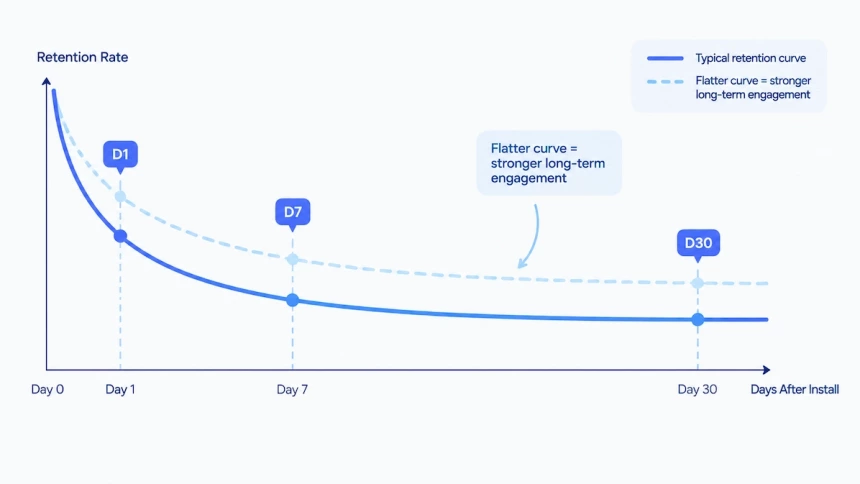
A typical retention curve drops quickly in the first few days, then gradually levels off. This means many users leave early, while a smaller group continues using the app. A flatter curve can signal stronger long-term engagement, but it doesn’t always mean users have formed a habit.
Downloads bring users in, but keeping them is what supports long-term growth. If most users leave after a few days, the money spent acquiring them may go to waste. An effective app retention strategy helps keep users engaged, increase their lifetime value (LTV), and give the app a better chance of recovering its acquisition costs.
How to Calculate App Retention Rate
App retention rate measures the percentage of users who return to an app after installing it. The most straightforward method is classic retention, calculated by dividing the number of users who return on a specific day by the total number of users in the original install cohort, then multiplying by 100.
Day-N Retention = (Users active on Day N / Total users in install cohort) × 100%
For example, if 1,000 users install an app and 150 return on Day 30, the Day-30 retention rate is 15%. The corresponding churn rate is 85%, calculated as 100% minus the retention rate.
Before calculating retention, define what counts as an active user. Simply opening the app is easy to measure, but it may overstate engagement. For some apps, completing a core action, such as booking a trip or finishing a workout, gives a clearer picture of whether users are getting value.
There are two common ways to measure retention:
- Classic retention counts users who return on the exact day being measured.
- Rolling retention counts users who return on that day or any day afterward. With the same cohort and the same denominator, its rate is never lower than classic retention.
Report both when useful, but do not compare them directly. Whichever method you use, state how you define an active user, how you count Day N, and which cohort you measure, and keep these definitions consistent across periods and reports.
What Do D1, D7, D30 Tell You?
| Period | What it reflects | What to examine |
| D1 | First experience | Onboarding and initial value |
| D7 | First-week engagement | Usage patterns and relevance of content or notifications |
| D30 | Sustained engagement | Core product value and user friction |
These checkpoints help teams identify when users drop off and where improvements may have the greatest impact. Their significance varies by app category and usage frequency, so interpret them in the context of your product.
What Is a Good App Retention Rate?
A good app retention rate depends on the app category and how often users need it. Retention rates also change over time after installation. The table below compares global retention rates across different app categories on Days 1, 7, and 30.
| Day After Install | All Apps | Gaming | Finance | Shopping | Lifestyle | Food & Drink | Travel |
| Day 1 | 25% | 27% | 21% | 17% | 21% | 13% | 15% |
| Day 7 | 12% | 13% | 13% | 9% | 13% | 8% | 8% |
| Day 30 | 6% | 6% | 9% | 5% | 8% | 5% | 4% |
Source: Adjust
Retention patterns vary by category. Finance and lifestyle apps retain users better over 30 days than shopping, food and drink, and travel apps in this dataset. Gaming apps start with relatively strong retention but lose users over time, highlighting the importance of keeping users engaged beyond the initial install.
Use these benchmarks to assess your app against similar categories, then track retention across your own user cohorts. Consistent improvement is a more useful goal than matching a single industry-wide figure.
Why Users Leave Your App
An app can attract thousands of downloads and still struggle to keep users active. The gap between acquisition and continued usage often reveals more than download numbers alone. Some users never experience the app’s core features, while others use it several times before losing interest.
Understanding app churn means looking beyond the final uninstall. Users may disengage long before they remove an app from their devices. Their actions, session patterns, and feature usage can help explain where the user experience falls short and which types of users are most likely to leave.
Common Reasons Users Leave Your App
User churn can result from problems with the product experience, technical reliability, or the way an app communicates with its audience. These issues often produce different behavioral patterns, although no single signal proves a specific cause.
| Potential reason | Behavioral signals | What to investigate |
| Poor first experience | High onboarding abandonment, incomplete registration, or failure to reach the first key action | Where users stop progressing during their initial visit |
| Unclear value proposition | Low usage of core features, few meaningful actions, or repeated visits without task completion | Whether users are reaching the outcomes the app is designed to deliver |
| Technical problems | Crash spikes, slow loading, repeated errors, or interrupted sessions | Whether problems cluster around specific devices, operating systems, app versions, or screens |
| Excessive advertising | Short sessions around ad exposure, repeated exits after impressions, or complaints about intrusive ads | Whether advertising coincides with interrupted user journeys |
| Irrelevant notifications | Low notification click-through rates and weak post-notification engagement | Whether notification responses differ by audience or message type |
| Notification fatigue | Declining engagement alongside rising opt-outs or increasing message frequency | Whether heavily notified users show different behavior from less frequently notified users |
| Storage constraints | Uninstall patterns around storage warnings or large updates, when supporting data is available | Whether device capacity could explain the departure |
| No initial engagement | Downloads without a recorded first open or meaningful in-app event | Whether users actually started using the product after installation |
The same behavior can have multiple explanations. A user who never reaches a core feature may be confused by the interface, have different expectations, or simply lack a relevant need. Likewise, low notification engagement does not automatically mean that notifications caused churn.
Uninstalls also require careful interpretation. App analytics may record the last session without revealing the user’s actual reason for removing the app. Distinguishing confirmed events from possible explanations is essential when evaluating churn.
Where Does the User Journey Break Down?
Rather than treating all churn as one event, examine the stages at which users disengage. Each stage provides a different perspective on the gap between downloading an app and continuing to use it.
Initial interaction
The first interaction shows whether users can begin using the product and reach a meaningful outcome. Examine onboarding completion, registration abandonment, and progression toward the first core action. A large drop-off at a particular step identifies a point of friction, although further evidence is needed to establish its cause.
Early repeat usage
The next question is whether users return and continue engaging after their initial experience. Missing second sessions, incomplete key actions, and rapidly declining activity can indicate that initial interest has not developed into repeat usage. These patterns should be interpreted in light of how frequently users would reasonably be expected to open the app.
Longer-term engagement
Over time, some users maintain regular activity while others gradually disengage. Comparing D1, D7, and D30 retention helps reveal when the decline becomes more pronounced. Session frequency and feature usage provide additional context about whether users are becoming less active before disappearing from the retained user base.
These stages are not fixed deadlines for every product. A social app, a financial app, and a travel app can have very different usage cycles. The meaningful question is whether actual behavior matches the pattern expected for the app’s category and purpose.
How to Diagnose App Churn with Behavioral Data
App churn becomes easier to diagnose when you examine three questions: where users drop off, which user groups have lower retention, and when user activity begins to decline. Funnel, cohort, and retention analysis reveal churn patterns from these three perspectives.
Funnel Analysis: Where Do Users Drop Off?
By tracking the steps users take toward a specific goal, funnel analysis reveals where they abandon key journeys, such as onboarding, account registration, or first-time use of a core feature. Comparing conversion rates between steps reveals where the largest drop-offs occur.
For example, if many users complete registration but few proceed to use the app’s core features, the gap between these steps warrants further investigation. Segmenting funnel data by acquisition source, device, or app version can also show whether the pattern affects most users or is concentrated in specific groups.
Cohort Analysis: Which User Groups Have Lower Retention?
Cohort analysis groups users by a shared characteristic, such as installation date or acquisition channel, and compares their behavior over time. It helps reveal differences that overall averages may conceal.
For example, users acquired during one period may consistently show lower D1, D7, or D30 retention than users acquired earlier. This difference may be associated with changes in acquisition quality, user expectations, or the app experience. Cohort analysis identifies which groups perform differently, but additional evidence is needed to establish the underlying cause.
Retention Analysis: When Does User Activity Begin to Decline?
Retention analysis measures the proportion of users who return to an app after a defined period. Comparing D1, D7, and D30 retention helps distinguish early churn from a decline that develops over the following weeks.
A sharp drop in D1 retention may indicate that many users do not return after their first experience. A more pronounced decline between D7 and D30 may suggest that fewer users continue using the app over time. These patterns provide useful diagnostic clues, but their significance depends on the app’s category and expected usage frequency.
Session frequency and the time between visits can provide additional context for retention trends. A gradual decline in activity may indicate weakening engagement. However, infrequent visits do not necessarily signal churn for apps designed for occasional use.
Together, these methods show where users abandon key actions, which user groups have weaker retention, and when user activity begins to decline. Combining these findings with crash reports, feature usage data, and user feedback helps narrow down potential causes without treating behavioral patterns as definitive proof.
12 Mobile App Retention Strategies to Increase Retention Rates
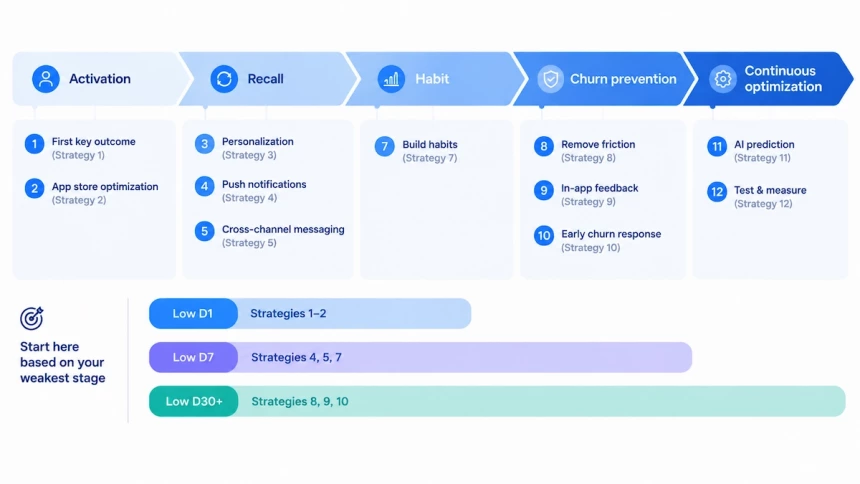
Retention problems rarely have a single fix. The strategies below follow the user lifecycle, from activation to recall, habit, churn prevention, and continuous optimization. You do not need to apply all 12 at once. Check your D1, D7, and D30 retention first, find the weakest stage, and start with the strategies that fit it. If your numbers fall below the benchmarks above, this is the best place to begin.
| Weakest stage | What it usually means | Start with |
| Low D1 | Users leave after the first session | Strategies 1–2: first value and the right audience |
| Low D7 | Users came back once but did not form a habit | Strategies 4, 5, 7: relevant messaging and habit building |
| Low D30+ | Established users drift away | Strategies 8, 9, 10: less friction, feedback, and early churn response |
The best mobile app retention strategy is the one that fixes your weakest stage first.
Strategy 1. Help Users Reach Their First Key Outcome
Users return when they see value early. Find the one action that best shows your app’s worth, such as finishing a workout or viewing spending insights. Then simplify onboarding so users can reach that action in fewer steps.
Track how many users complete this action. Compare their retention with users who don’t. The gap shows where onboarding loses people. Use it to improve the first-session experience.
Strategy 2. Optimize Your App Store Page to Attract the Right Users
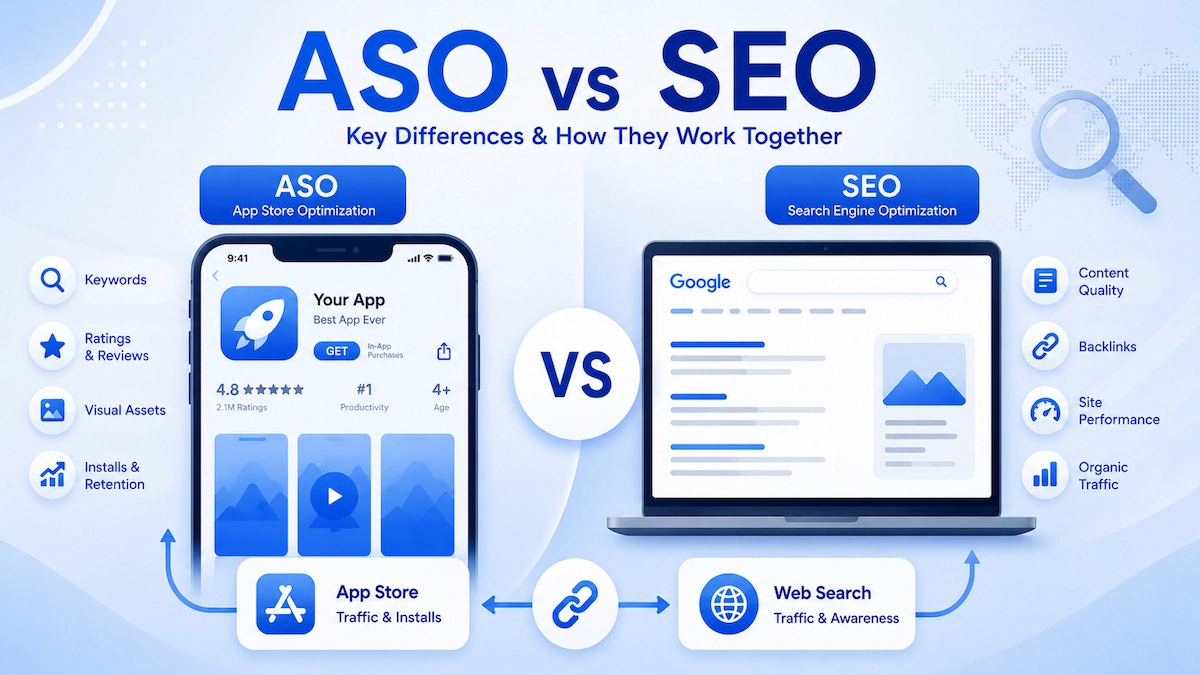
App Store Optimization (ASO) helps attract users who are more likely to stay. Start with your app name, since a clear app store optimization title tells users what the app does before they install. Then optimize your subtitle, keywords, description, and screenshots to communicate your app’s core value and match relevant search intent. Accurate metadata also sets clear expectations before installation, and Google Play’s metadata policy requires store listings to reflect an app’s actual functionality.
When users find the experience they expected, they are less likely to leave because of a mismatch. Localize your store listing for target markets and compare retention across acquisition sources to identify whether your metadata attracts the right audience.
Strategy 3. Personalize the Experience Based on User Behavior
Users have different needs, so a single experience rarely fits everyone. Start by segmenting users by lifecycle stage, activity patterns, and feature usage.
Each segment needs different support. New users may need onboarding guidance. Users with declining activity may need a reminder about features they haven’t tried lately.
Use these segments to tailor recommendations, welcome screens, and in-app messages. Also compare retention across acquisition channels and install cohorts. This shows which sources bring users who stay.
Keep personalization useful and respectful. Collect only the data you need. Give users control over what they see. Then measure the results instead of assuming they work.
Strategy 4. Send Relevant Push Notifications at the Right Time
Push notifications can bring users back to an app when they have a clear reason to return. Trigger them based on user behavior or meaningful updates. For example, a travel app can notify users when a saved hotel changes its price or an upcoming trip requires their attention.
Tailor notification content to the user’s needs and lifecycle stage. Test different triggers and send times to identify which ones lead to meaningful actions. Respect notification permissions and applicable consent requirements, and never make push access mandatory for core features. On Android 13 and higher, most notifications need the user’s runtime permission. Measure success by whether users complete the intended action and whether their subsequent retention improves, rather than relying on click-through rates alone.
Strategy 5. Coordinate Cross-Channel Messaging and Set Frequency Caps
Messages can bring users back, but too many can push them away. Push notifications, emails, SMS, and in-app messages should work as one system. Give each channel a clear role based on the message and the product context.
Share user states and message records across channels. This prevents users from getting several messages about the same event.
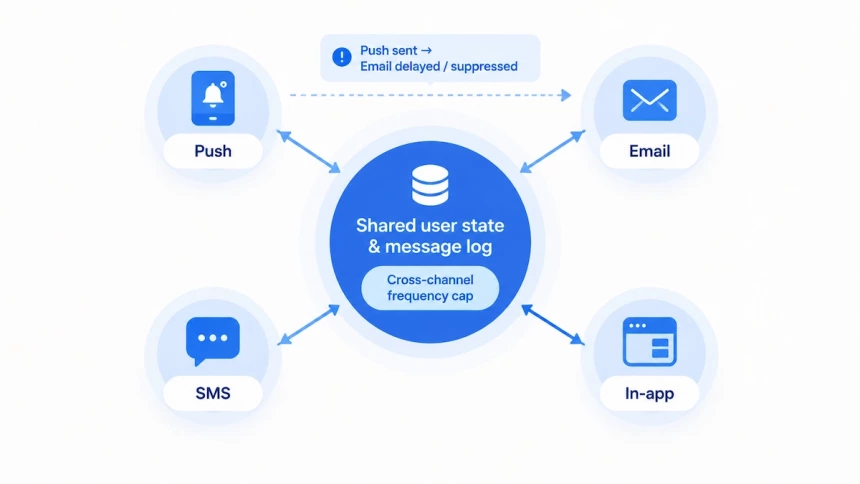
Set frequency caps across all channels, not just within each tool. For example, a user may already have received a push notification about a promotion. In that case, delay or suppress the related email.
Keep messaging flows up to date. When a user makes a purchase, cancels a subscription, or completes a target action, stop sending messages that no longer apply.
Always respect channel preferences and unsubscribe requests. Then monitor total message volume, duplicate contacts, and opt-out rates. Also compare retention between users who receive different message patterns. This shows whether your messaging helps users stay or drives them away.
Strategy 6. Use In-App Content and Deep Links to Guide Users
In-app content helps users discover useful features and get more value from an app. Use relevant content cards, recommendations, and feature tips to help users find what they need. Show guidance based on the user’s current page or actions instead of displaying the same pop-up every time they open the app. A more relevant experience can give users more reasons to return.
Make it easy for users to continue where they left off. Deep links from push notifications, emails, or other sources should take users directly to the relevant product, order, content, or feature. If login is required, preserve the intended destination and return users to it after authentication. Avoid unnecessary navigation and intrusive pop-ups that interrupt key tasks. When users can find relevant content and complete tasks with less effort, they have a clearer path to continued app use, which may support better retention.
Strategy 7. Build Habits Through Progress, Milestones, and Rewards
Users keep using an app when they can see their progress. They also need a clear reason to come back. Habit-building features turn good experiences into repeat usage and improve long-term retention.
- Build a habit loop. Link a prompt, a core action, feedback, and a reward. Repeat the loop to strengthen the behavior.
- Make progress visible. Show completed lessons, workout records, or task milestones. Users can see what they have achieved and want to continue.
- Reward meaningful actions. Use streaks, badges, or milestone rewards to encourage valuable behavior. Avoid rewarding daily opens alone.
- Keep the next step easy. Suggest small, achievable goals. This helps users keep their momentum and lowers the effort of returning.
- Fit the mechanism to the product. Learning and fitness apps benefit from regular practice. To improve edtech app retention rate, pair streaks with visible progress and small daily goals. Travel and insurance apps should focus on completing key tasks, not daily visits.
Compare retention between users who reach milestones and users who don’t. The results show which mechanisms truly help users stay.
Strategy 8. Remove Friction from Core User Journeys
Every extra step or error can push users away. Removing friction helps users finish key tasks with less effort. It also prevents avoidable drop-offs that hurt retention.
- Audit key user journeys. Review registration, first use of core features, purchases, payments, and subscription management. Look for steps where users get stuck.
- Fix performance and reliability. Address crashes, slow loading, and repeated errors before polishing the design, because these problems stop users from completing important tasks and no interface change can make up for them.
- Cut unnecessary steps. Use autofill, sensible defaults, and saved preferences to reduce repeated input. Make navigation clearer.
- Improve payment and support. Show pricing and subscription terms clearly. Make payment and cancellation simple. Help users find answers quickly when problems arise.
- Let data guide your fixes. Combine funnel data, session replays, error logs, and user feedback to find specific obstacles. Prioritize fixes by their impact on task completion and retention.
Friction also builds up as the product grows, so repeat the audit regularly rather than treating it as a one-time fix.
Strategy 9. Turn In-App Feedback into Product Improvements
Behavioral data shows what users do, but not why. In-app feedback fills that gap. Ask short, specific questions right after a key action, such as completing a task or contacting support, rather than interrupting users mid-journey.
Group responses by theme and match them against behavior data, such as where users drop off or which features they skip. Then assign each recurring issue an owner and a fix.
Close the loop. Tell users when their feedback led to a change, and check whether the fix improved task completion and later retention. Without visible change, users often have less reason to keep responding, unless other incentives sustain participation.
Strategy 10. Identify Churn Risk Early and Win Back Lapsed Users
Monitor declining session frequency, reduced use of core features, and lengthening gaps between visits. Judge these against each app’s normal usage rhythm, since a few quiet days mean little for a weekly-use app. Intervene early, while disengagement is still reversible, and time outreach to user behavior rather than a fixed schedule.
Users drift away for different reasons: a temporary need, waning interest in the content, product issues, or unwillingness to pay. Segment by cause and tailor your response instead of sending everyone the same reminder.
Give users a relevant reason to return, such as new content, an unused feature, or an important status update. For subscription apps, handle cancellations, trial endings, and failed renewals separately; a failed renewal, for example, often needs a payment fix rather than a discount. Test incentives such as discounts, extended trials, and paywall adjustments instead of assuming any one will work.
Opens and clicks don’t show improved retention. Track whether users resume key actions, return in later periods, or reactivate subscriptions, and weigh these results against the cost of the campaign.
Strategy 11. Use AI to Predict Churn and Personalize Retention at Scale
AI models can flag users likely to churn before they leave by analyzing recent activity, changes in feature usage, and historical behavior, helping teams prioritize interventions.
These predictions can also guide when to send messages, which channels to use, and what to offer, such as reminders about relevant features or fixes for friction points. AI can also analyze session data and user feedback to surface recurring problems.
Predictions should inform decisions, not replace them. Compare AI-assisted interventions with existing rule-based approaches on retention, user experience, and operating costs.
Strategy 12. Test, Measure, and Improve Retention Continuously
Improving app retention requires continuous testing rather than one-time changes. Start with a clear hypothesis, such as simplifying onboarding to help more users complete their first key task. Then prioritize experiments that affect important user journeys, including feature guidance, messaging, paywalls, and core interactions.
Before each test, define success criteria that go beyond clicks or immediate conversions. Measure whether the change improves task completion and subsequent retention. Use A/B tests where practical, allowing enough time and sample size to distinguish meaningful improvements from normal fluctuations. Once a test ends, document the results, roll out effective changes to relevant users, and investigate unsuccessful experiments for further insights. Also, compare retention across acquisition sources to understand which channels bring users who continue using the app. By repeating this process, teams can make evidence-based product decisions and improve retention over time.
Mobile App Retention: Examples, Industry Differences, and Key Metrics
Retention Examples by Lifecycle Stage
The table below shows how different types of apps apply retention tactics at each stage of the user lifecycle.
| Lifecycle Stage | App Type | Retention Approach |
| First session | Health | Ask about users’ goals during onboarding and use their answers to personalize the first plan |
| First session | Video creation | Let users create and preview a finished result quickly, backed by a free trial |
| Habit formation | Language learning | Pair streaks with daily reminders and visible progress |
| Habit formation | Fitness | Offer simple daily challenges that let users feel the app’s core value |
| Habit formation | Music | Recommend playlists drawn from each user’s listening history |
| Churn prevention | Finance | Send timely rate alerts and updates about useful new features |
| Feedback and optimization | Food delivery | Collect feedback after each delivery and use it to spot service issues |
How Retention Differs by Industry
Usage frequency, user motivation, and business model all differ by industry, so the same retention rate can tell very different stories. The sections below look at what shapes retention in each sector.
Retail and Ecommerce
Shopping is driven by repeat purchases and good timing, so to improve retail app retention rate, the key is giving shoppers a reason to come back. A free-delivery offer can prompt another visit, and messages based on browsing and purchase history can steer people back to products they are likely to want.
Push notifications work best when they respond to what a shopper has actually done, not when they go out in bulk. This is also where teams can improve ecommerce app retention rate most directly. Common triggers include:
- Cart reminders: nudge users about items they left behind.
- Price-drop alerts: let users know when something they viewed or saved gets cheaper.
- Back-in-stock alerts: tell users when an unavailable product returns.
- Browsing-based messages: share updates on categories or products users have explored.
Each of these gives users a concrete reason to open the app. Too many messages, or ones that miss the mark, push users to turn off notifications or uninstall. On iOS, App Review Guideline 4.5.4 allows promotional push notifications only after users explicitly opt in through consent language in the app’s UI. The app must also offer a way to opt out. Requesting opt-in at a moment when its value is obvious works best.
Media and Entertainment
Media and entertainment apps live on fresh content and good recommendations, so to improve media app retention rate or improve entertainment app retention rate, start there. How you read their retention, though, depends on the business model. Subscription streaming services are best judged by subscription retention and churn, while ad-supported apps care more about repeat sessions and viewing frequency.
Finance Apps: Retention Is Built on Trust
Fintech retention rests on trust, security, and the steady value users get from managing their money. Activation takes more than browsing: users may need to link an account, complete verification, or make a first transaction.
To keep users coming back, send timely transaction updates and rate alerts, and keep account information clear. Make everyday tasks such as checking a balance, transferring funds, or managing payments as frictionless as possible. And track whether users return to complete meaningful financial tasks, not just whether they open the app.
Telecom Apps: Retention Follows Everyday Tasks
Telecom apps are used less for browsing than for getting routine things done, such as checking data usage, paying a bill, or topping up a plan. To improve telecom app retention rate, make these tasks quick and reliable, and track whether users return to complete them, not just whether they open the app.
Travel and Hospitality Apps: Retention Follows the Trip Cycle
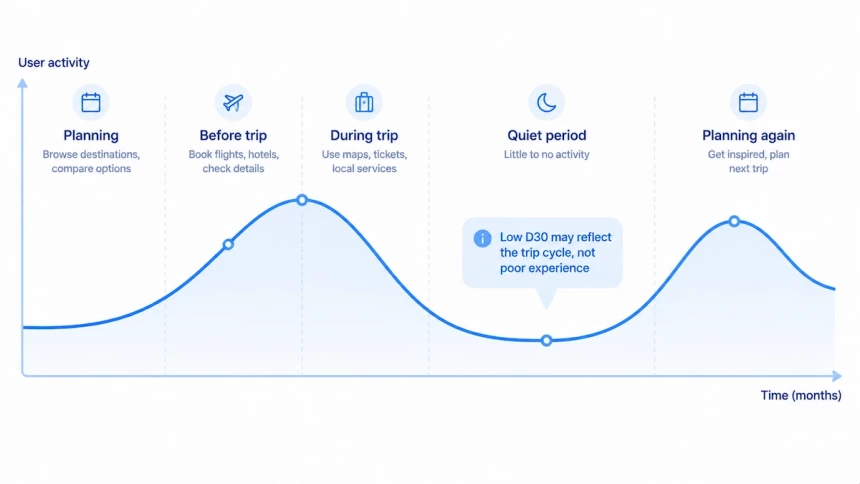
Travel app usage climbs sharply before and during a trip, then goes quiet for months. A low D30 rate may simply reflect that cycle rather than a poor experience, though it’s still worth checking against the app’s purpose and how users actually behave. A fuller picture comes from tracking repeat bookings, visits ahead of upcoming trips, and whether users return once they start planning again, read alongside D1, D7, and D30. These are also the most practical tips to improve travel app user retention: measure the trip cycle first, then time reminders and offers to the planning stage.
Hospitality apps follow a similar stay-based rhythm. To improve hospitality app retention rate, focus on the touchpoints around each stay: pre-arrival information, in-stay services, and easy rebooking afterward.
Key Metrics to Track
Retention rate tells you whether users return. The metrics below show where they drop off, how they behave, and whether your optimizations are working.
| Metric | The Question It Answers | How It’s Defined |
| Cohort Retention | Do different groups of users stick around equally well? | Percentage of users in a cohort who return after a defined period |
| Stickiness (DAU/MAU) | How often do monthly users show up day to day? | DAU ÷ MAU × 100% |
| Session Frequency and Interval | How often do users return, and how long do they stay away? | Average sessions per user and average time between sessions |
| Uninstall Rate and Timing | How many users leave, and when? | Uninstalls as a share of a defined user group over a set period |
| Time-to-Value | How quickly do users reach the app’s core value? | Time from a defined starting point to the first meaningful action |
| Churn Rate | How many users stop using the app? | Percentage of users who meet a predefined churn criterion in a given period |
| Lifetime Value (LTV) | What is a user worth over their lifecycle? | Estimated cumulative revenue or profit per user |
| Exit Rate | Where do sessions end? | Percentage of visits to a page that end a session |
Read these numbers in light of how your app is actually used. DAU/MAU is most revealing for frequently used apps, whereas a travel app will naturally have long gaps between visits. Pair behavioral metrics with D1, D7, and D30 retention to spot patterns, then use cohort comparisons or controlled experiments to confirm that a strategy really improves retention.
Retention looks different in every category, so start with your own app’s usage rhythm before measuring yourself against anyone else’s numbers.
Make Every Retention Effort Count
App retention isn’t won with a single tactic. It’s won by finding where users actually leave and fixing that stage first.
The starting point is data most teams already have. Calculating D1, D7, and D30 for recent install cohorts and comparing them with category benchmarks shows which stage is weakest. The two or three strategies that match that stage come next, with each change run as an experiment: success is defined up front and judged by task completion and later retention, not clicks alone.
The first session is the best place to look first. Which key action should a new user reach, and what share of users actually get there? That answer says more about retention than any benchmark.